

Take Control of Favicons in Safari's Favorites Bar - MacRumorsOpen MenuShow RoundupsShow Forums menuVisit ForumsOpen Sidebar
Skip to Content

Take Control of Favicons in Safari's Favorites Bar

by

Since Safari 17 and macOS Sonoma, Apple's browser has supported favicons in the Favorites bar. Keep reading to learn why favicons can be useful, how to make space for more, and how you can disable them if they aren't for you.

safari icon blue banner
A favicon is a small icon that serves as a kind of badge for a website. Its main purpose is to make it easier to locate the webpage when there are multiple tabs open in a browser.

Favicons can usually be found next to anything in a browser's interface that identifies a website. This can include bookmarks, tabs, history results, and search bars.
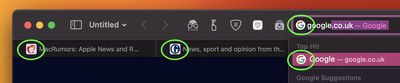
favicon examples
In Safari, if you have the Favorites Bar enabled (View ➝ Show Favorites Bar in Safari's menu bar) the favicon for each site will appear beside its title, allowing you to more easily spot it in the bar.
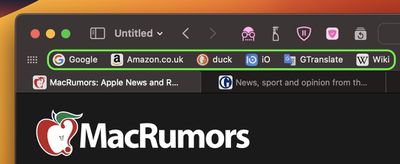
safari
Favicons can certainly be handy, but they can make your browser interface look too busy and cluttered. Another possible issue with the space they take up is that if you have a full row of websites in your Favorites Bar, some of them will be lopped off the viewable area, and you may have to click the double chevron icon at the far right to reveal them.

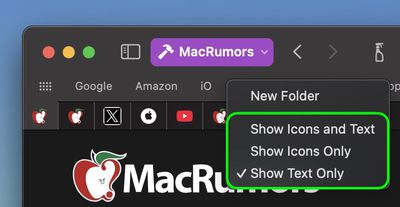
If this happens in your case, don't worry. It's not obvious, but you can easily prevent favicons from appearing in the Favorites Bar. Simply right-click a space on the bar and check Show Text Only in the pop-up menu.
safari
If you should miss them at all, you can easily turn them back on again by selecting Show Icons and Text. Alternatively, if you're a fan of favicons and can identify your favorites at a glance, simply select Show Icons Only. This last option also allows you to pack in more links along the bar.


Tag: Safari

Top Rated Comments

FightTheFuture Avatar
10 months ago
Surprised you guys are still using Separate Tab layout. Good to have options but I find the Compact Layout better for screen real estate.
Score: 2 Votes (Like | Disagree)
cicalinarrot Avatar
10 months ago
Every few years I check Safari and try to use it as my daily drive to see if it got good enough for me.
The text-only favorite bar it used to have until not very long ago has been the deal-breaker during one of those checks.
Score: 2 Votes (Like | Disagree)
10 months ago
Definitely useful if there are many websites saved as Favourites. Will try changing mine to icons only.
Score: 1 Votes (Like | Disagree)
TwoBytes Avatar
10 months ago
Shame there the safari favicons gets corrupt so much
Score: 1 Votes (Like | Disagree)
MedRed Avatar
10 months ago
I use favicons only for the favorite bookmarks bar. I'd been waiting for that for ages.
Score: 1 Votes (Like | Disagree)
AppleTO Avatar
10 months ago
Immediately disabled these.
Score: 1 Votes (Like | Disagree)

Popular Stories

iPhone 18 Pro Deep Red Feature

iPhone 18 Pro Launching Later This Year With These 12 New Features

Wednesday March 18, 2026 7:39 am PDT by
While the iPhone 18 Pro and iPhone 18 Pro Max are not expected to launch for another six months or so, there are already plenty of rumors about the devices. It was initially reported that the iPhone 18 Pro models would have fully under-screen Face ID, with only a front camera visible in the top-left corner of the screen. However, the latest rumors indicate that only one Face ID component...
imac video apple feature

Apple Released Yet Another New Product Today

Friday March 20, 2026 2:39 pm PDT by
Apple has unveiled a whopping nine new products so far this March, including an iPhone 17e, iPad Air models with the M4 chip, MacBook Air models with the M5 chip, MacBook Pro models with M5 Pro and M5 Max chips, the all-new MacBook Neo, an updated Studio Display, a higher-end Studio Display XDR, AirPods Max 2, and now the Nike Powerbeats Pro 2. iPhone 17e features the same overall design as...
ios 26 4 yellow

Here Are Apple's Release Notes for iOS 26.4

Wednesday March 18, 2026 11:56 am PDT by
Apple provided developers and public beta testers with the release candidate versions of iOS 26.4 and iPadOS 26.4, which means we're going to see a public launch as soon as next week. The RC versions of the software include Apple's official release notes, giving us final details on what's included in the update. Apple Music - Playlist Playground (beta) generates a playlist from your...
Related Apple News: Check Airtag Battery Life | Apple Events | Macbook Pro Air Deals | 2025 Volvo Ex90 Carplay | Apple Watch Live Activities Fix
















