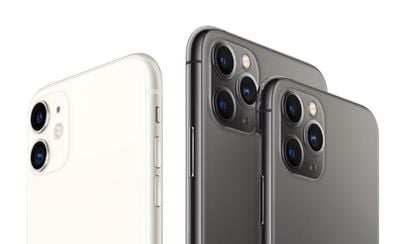
The headline feature of Apple's 2019 iPhones is undoubtedly the new camera system, with the more affordable iPhone 11 boasting the same high-quality lenses as the ‌iPhone‌ 11 Pro and iPhone 11 Pro Max, with the exception of the third telephoto lens that's exclusive to the Pro models.
iphone 11 and 11 pro no background
The standard wide camera on the ‌iPhone‌ 11 series offers the same 12 megapixels and f/1.8 aperture as on last year's ‌iPhone‌ XS devices, while the new 12 megapixel ultra-wide camera gets a f/2.4 lens. Apple has also widened the aperture of the telephoto lens on the Pro models to f/2.0 – an improvement over the f/2.4 lens found in the ‌iPhone‌ X and XS – which allows more light to hit the sensor and grab more detail.

Lens-Based Camera App Changes

Apple has also re-designed the camera system from the ground up to make the lenses work seamlessly in concert, and also radically improved the image processing technology. To accommodate these more advanced capabilities, Apple has given the stock Camera app a complete overhaul exclusively for its ‌iPhone‌ 11 series devices.

how to switch iphone 11 lenses1 e1569253109900
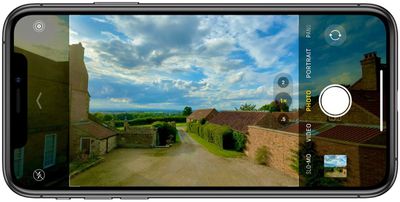
For example, when you shoot with the standard wide lens as shown above, the camera app interface becomes semi-transparent to reveal the ultra-wide camera's larger field of view, giving you a preview of what shooting with it would look like.

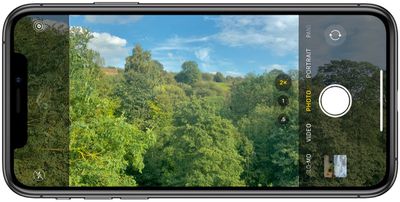
This immersive preview isn't limited to the wide and ultra-wide either: When using the telephoto lens on Pro devices, the Camera app will use the standard wide lens to fill in the additional area of the screen, as shown in the screenshot below. There's even an optional new camera feature that recruits the additional lenses and allows you to fix photo composition in post without having to resort to cropping.
how to switch iphone 11 lenses2

Switching Between Ultra-Wide, Wide, and Telephoto

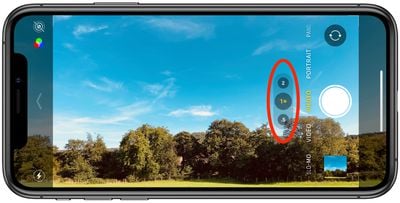
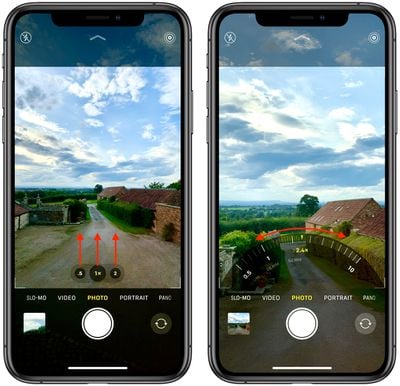
You can choose between the different lenses by tapping the numbered buttons at the bottom of the viewfinder: .5 is the new ultra-wide lens, 1x is the standard wide lens, and 2 is the telephoto lens (‌iPhone‌ 11 Pro and Pro Max only).

camera
At first glance, it looks as if these lens modes are fixed options. Far from it: If you swipe up on one of the buttons you'll see a radial zoom wheel enabling you to find a transition from camera to camera through a series of fine gradations.
how to switch iphone 11 lenses seamlessly
Along the wheel you'll also see the 35mm equivalent focal length of each lens-sensor combination (the focal length you would need for a 35 mm film camera to obtain the same angle of view). The wheel disappears once you've chosen a custom focal length, and if you decide you want to return to the standard focal length, you can simply tap the center lens button.


Related Forum: iPhone

Top Rated Comments

WilliamG Avatar
81 months ago
In addition to swipe up on the numbers to bring up the wheel, you can just put your finger on the 0.5, 1x 2 area and swipe left and right to adjust zoom quickly.
Score: 3 Votes (Like | Disagree)
BWhaler Avatar
81 months ago
Looks like Apple did a great job here. Very impressive.
Score: 3 Votes (Like | Disagree)
adrianlondon Avatar
81 months ago

Unpopular opinion but I think digital zoom is one of the features that Apple should just do away with.
I remember thinking that years ago with a point & shoot camera I had at the time. And to this day I very rarely digitally zoom in using my phone camera. I crop after the shot is taken, which also allows me to change my mind later if I decide not to crop out as much.

However, for fully automatic cameras, digitally zooming in does have one advantage: the sensors (which calculate shutter/aperture, whether to use HDR or flash etc etc) are working solely on the portion of the image you're going to keep.
Score: 2 Votes (Like | Disagree)
SirithX Avatar
81 months ago
Unpopular opinion but I think digital zoom is one of the features that Apple should just do away with. No point in using the digital zoom to crop the picture straight away and end up with something blurry, rather than simply taking a quality photo with the 1x or 2x telephoto lens and then using the iPhone's built in tools to crop it after the fact.

I think it would ultimately drive better iPhone photography in general as a result.
Score: 1 Votes (Like | Disagree)
Beards Avatar
81 months ago

Unpopular opinion but I think digital zoom is one of the features that Apple should just do away with. No point in using the digital zoom to crop the picture straight away and end up with something blurry, rather than simply taking a quality photo with the 1x or 2x telephoto lens and then using the iPhone's built in tools to crop it after the fact.

I think it would ultimately drive better iPhone photography in general as a result.
Sorry but I would have to disagree. Although I never shoot using digital zoom, I do though use it to reference something (as in just creep in closer to ensure what I will be shooting doesn’t contain anything I don’t want).
There’s also the use as binoculars. Sometimes it comes in handy when you want to check on something in the distance.
Score: 1 Votes (Like | Disagree)

Popular Stories

iOS 26

iOS 26.4 and iOS 27 Features Revealed in New Leak

Friday December 12, 2025 10:56 am PST by
Macworld's Filipe Espósito today revealed a handful of features that Apple is allegedly planning for iOS 26.4, iOS 27, and even iOS 28. The report said the features are referenced within the code for a leaked internal build of iOS 26 that is not meant to be seen by the public. However, it appears that Espósito and/or his sources managed to gain access to it, providing us with a sneak peek...
apple beta 26 lineup

Apple Leak Confirms Work on Foldable iPhone, AirTag 2, and Dozens More Devices

Monday December 15, 2025 2:05 pm PST by
Last week, details about unreleased Apple devices and future iOS features were shared by Macworld. This week, we learned where the information came from, plus we have more findings from the leak. As it turns out, an Apple prototype device running an early build of iOS 26 was sold, and the person who bought it shared the software. The OS has a version number of 23A5234w, and the first...
Apple Logo Top Half

Early iOS 26 Software Leak Uncovers Dozens of Upcoming Apple Features

Monday December 15, 2025 3:05 pm PST by
Software from an iPhone prototype running an early build of iOS 26 leaked last week, giving us a glimpse at future Apple devices and iOS features. We recapped device codenames in our prior article, and now we have a list of some of the most notable feature flags that were found in the software code. In some cases, it's obvious what the feature flags are referring to, while some are more...
Apple Foldable Thumb

Leak Reveals Foldable iPhone Details

Monday December 15, 2025 9:09 am PST by
The first foldable iPhone will feature a series of design and hardware firsts for Apple, according to details shared by the Weibo leaker known as Digital Chat Station. According to a new post, via machine translation, Apple is developing what the leaker describes as a "wide foldable" device, a term used to refer to a horizontally oriented, book-style foldable with a large internal display....
iOS 26

Apple Releases iOS 26.2 With Alarms for Reminders, Lock Screen Changes, Enhanced Safety Alerts and More

Friday December 12, 2025 10:10 am PST by
Apple today released iOS 26.2, the second major update to the iOS 26 operating system that came out in September, iOS 26.2 comes a little over a month after iOS 26.1 launched. ‌iOS 26‌.2 is compatible with the ‌iPhone‌ 11 series and later, as well as the second-generation ‌iPhone‌ SE. The new software can be downloaded on eligible iPhones over-the-air by going to Settings >...
iOS 26

iOS 26.2 Coming Soon With These 8 New Features on Your iPhone

Thursday December 11, 2025 8:49 am PST by
Apple seeded the second iOS 26.2 Release Candidate to developers earlier this week, meaning the update will be released to the general public very soon. Apple confirmed iOS 26.2 would be released in December, but it did not provide a specific date. We expect the update to be released by early next week. iOS 26.2 includes a handful of new features and changes on the iPhone, such as a new...
macOS Tahoe 26 Thumb

Apple Releases macOS Tahoe 26.2 With Edge Light

Friday December 12, 2025 10:08 am PST by
Apple today released macOS Tahoe 26.2, the second major update to the macOS Tahoe operating system that came out in September. macOS Tahoe 26.2 comes five weeks after Apple released macOS Tahoe 26.1. Mac users can download the macOS Tahoe update by using the Software Update section of System Settings. macOS Tahoe 26.2 includes Edge Light, a feature that illuminates your face with soft...
airpods max 2024 colors

AirPods Max 2 Likely to Offer These 10 New Features

Monday December 15, 2025 7:41 am PST by
Apple released the AirPods Max on December 15, 2020, meaning the over-ear headphones launched five years ago today. While the AirPods Max were updated with a USB-C port and new color options last year, followed by support for lossless audio and ultra-low latency audio this year, the headphones lack some of the features that have been introduced for newer generations of the regular AirPods and the ...