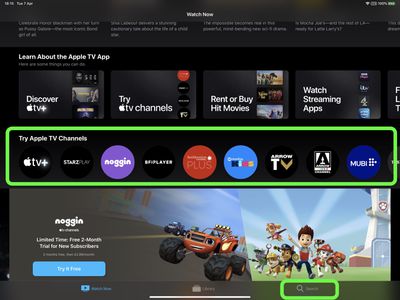
Apple's official TV app is designed to bring together all the ways to watch TV on your device in a single app. The idea behind it is that you can subscribe to just the channels you want, without downloading any apps, and then watch the content on demand and across all your devices.
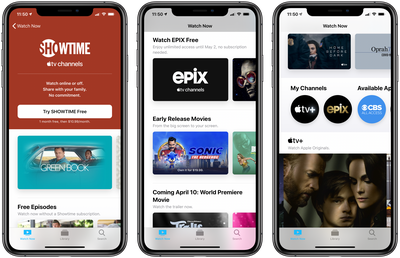
Free EPIX Access Apple TV Channels
In other words, you don't need a subscription to Apple TV+, Apple's streaming television service, to be able to use the ‌Apple TV‌ app. Rather, the app lists all the television shows and movies from any other streaming service apps on your device, and allows you to access them from the same interface.

Not only that, the ‌Apple TV‌ app is also host to "‌Apple TV‌ Channels," a section that lets you subscribe to and watch individual services like HBO, Starz, SHOWTIME, and EPIX, right from within the TV app interface.

It's important to note that a paid ‌Apple TV‌+ subscription doesn't give you access to content listed in the ‌Apple TV‌ Channels section of the TV app. Channels are completely separate from ‌‌Apple TV‌‌+, which refers only to Apple's own channel (also listed in the Channels section).

The following steps show you how to search for ‌Apple TV‌ Channels, subscribe to them, or start a free trial. Note that the availability of some trials may vary by country and region.

How to Subscribe to Apple TV Channels Using the TV app

  1. On your iPhone, iPad, ‌Apple TV‌ or Mac, launch the Apple TV app.
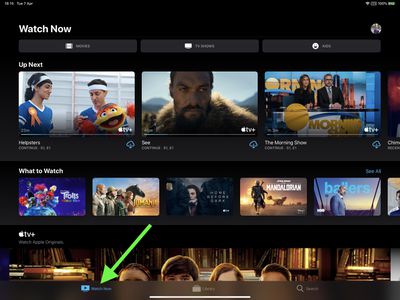
  2. Select the Watch Now section – on iOS devices it's at the bottom of the screen, on other devices it's at the top of the screen.
    how to subscribe to apple tv channels

  3. Scroll down to Try Apple TV Channels or go to Search to find a specific channel.
    tv app

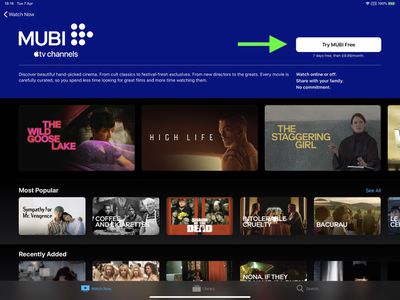
  4. Select the channel that you want to subscribe to, or start a free trial.
    tv app

  5. Enter your Apple ID and password if prompted.
  6. Confirm your billing information if required. You may also need to add a valid payment method.
  7. Agree to any terms and conditions if prompted.
Remember, you can stream content included in your channel subscription in the ‌Apple TV‌ app, without having to download an app. You can also access your subscription on any device that's signed in to the TV app with the same ‌Apple ID‌.

how to subscribe to apple tv channels mubi
To learn how you can cancel a subscription to an ‌Apple TV‌ Channel at any time, follow our simple guide.

Tag: TV

Popular Stories

Aston Martin CarPlay Ultra Screen

Apple's CarPlay Ultra to Expand to These Vehicle Brands Later This Year

Sunday February 1, 2026 10:08 am PST by
Last year, Apple launched CarPlay Ultra, the long-awaited next-generation version of its CarPlay software system for vehicles. Nearly nine months later, CarPlay Ultra is still limited to Aston Martin's latest luxury vehicles, but that should change fairly soon. In May 2025, Apple said many other vehicle brands planned to offer CarPlay Ultra, including Hyundai, Kia, and Genesis. In his Powe...
Apple Logo Black

Apple's Next Launch is 'Imminent'

Sunday February 1, 2026 12:31 pm PST by
The calendar has turned to February, and a new report indicates that Apple's next product launch is "imminent," in the form of new MacBook Pro models. "All signs point to an imminent launch of next-generation MacBook Pros that retain the current form factor but deliver faster chips," Bloomberg's Mark Gurman said on Sunday. "I'm told the new models — code-named J714 and J716 — are slated...
iOS 26

iOS 26.3 and iOS 26.4 Will Add These New Features to Your iPhone

Tuesday February 3, 2026 7:47 am PST by
We are still waiting for the iOS 26.3 Release Candidate to come out, so the first iOS 26.4 beta is likely still at least a week or two away. Following beta testing, iOS 26.4 will likely be released to the general public in March or April. Below, we have recapped known or rumored iOS 26.3 and iOS 26.4 features so far. iOS 26.3 iPhone to Android Transfer Tool iOS 26.3 makes it easier...
Apple MacBook Pro M4 hero

New MacBook Pros Reportedly Launching Alongside macOS 26.3

Sunday February 1, 2026 5:42 am PST by
Apple is planning to launch new MacBook Pro models with M5 Pro and M5 Max chips alongside macOS 26.3, according to Bloomberg's Mark Gurman. "Apple's faster MacBook Pros are planned for the macOS 26.3 release cycle," wrote Gurman, in his Power On newsletter today. "I'm told the new models — code-named J714 and J716 — are slated for the macOS 26.3 software cycle, which runs from...
iOS 26 Home Feature

Apple Gives Final Warning to Home App Users

Tuesday February 3, 2026 8:55 am PST by
In 2022, Apple introduced a new Apple Home architecture that is "more reliable and efficient," and the deadline to upgrade and avoid issues is fast approaching. In an email this week, Apple gave customers a final reminder to upgrade their Home app by February 10, 2026. Apple says users who do not upgrade may experience issues with accessories and automations, or lose access to their smart...