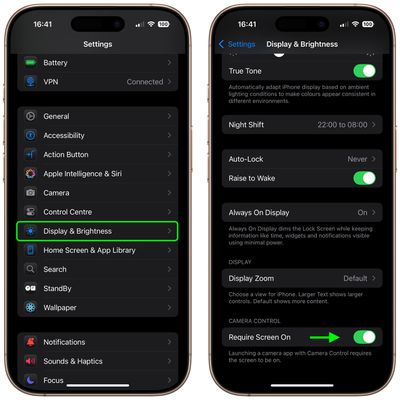
In iOS 18.2, Apple has introduced a thoughtful new feature for the Camera Control button on iPhone 16 models that helps prevent accidental camera launches by requiring the screen to be on before the button will register clicks. Keep reading to gain more control over when the Camera app opens.
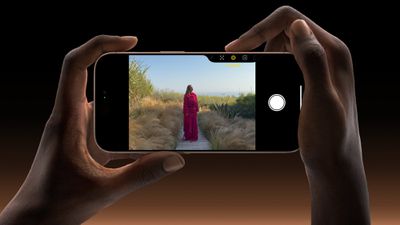
iphone 16 pro capture button
Apple located the Camera Control button to make it conveniently placed for quick access, but it can sometimes be too responsive – especially during those moments when you're not actually trying to take a photo.

Recognizing the potential for this, Apple in iOS 18.2 has added a new Require Screen On feature for Camera Control. It's particularly useful if you often find your iPhone accidentally opening the Camera app while it's in your pocket or bag. By requiring the screen to be on first, you can significantly reduce those unwanted camera launches while still maintaining quick access when you need it.

Require Screen On for Camera Control

Here's how to enable the new option to prevent accidental Camera Control presses:

  1. Open the Settings app on your ‌iPhone 16‌.
  2. Scroll down and tap Display & Brightness.
  3. Look for the Camera Control section.
  4. Toggle on Require Screen On.

settings

Once enabled, you'll need to wake your ‌iPhone‌'s screen before the Camera Control button will respond. This extra step adds just enough friction to prevent accidental activation while keeping the camera readily accessible when you need it.

Related Roundup: iPhone 16
Related Forum: iPhone

Top Rated Comments

Spock Avatar
15 months ago
What is the point of the button again?
Score: 17 Votes (Like | Disagree)
gordon1234 Avatar
15 months ago
The article is a bit misleading. This has been the way camera control has worked since it was launched. iOS 18.2 adds an option to turn it off for the first time.

I immediately turned it off, as I want the camera button to always do the same thing no matter what.

I think the default behavior is the worse behavior honestly, since it makes camera control inconsistent: sometimes it requires 2 presses, and sometimes just 1. Especially if you’re pulling the phone out of your pocket at the same time you’re opening the camera, it’s pretty much a crapshoot: will the motion of the phone wake up the screen before I press the button or not?

If you’re like me and don’t have an issue with accidentally opening the camera, I recommend turning the Require Screen option off. Otherwise, I would actually recommend the option in camera control settings to always require two button presses. This reduces the chance of accidental activation while allowing you to still have an action that does the same thing every time.
Score: 13 Votes (Like | Disagree)
patriotsfan82 Avatar
15 months ago
Surely this is backwards and Apple has added the ability to launch the camera with the screen off instead?

I'm rocking 18.1 and since day 1 my camera button will only launch the camera if the screen is on. If the screen is off it wakes the device only and requires a second click to launch the camera. That it doesn't reliably take me to the camera in all cases has been extremely annoying.
Score: 10 Votes (Like | Disagree)
Lyrics23 Avatar
15 months ago
I prefer to change it to double-press to activate, this way it works with the screen on or off, reliably and without messing around with getting the screen turned on first.
Score: 10 Votes (Like | Disagree)
LoveToMacRumors Avatar
15 months ago
feature will be defunct in less than 2 years
Score: 7 Votes (Like | Disagree)
Kylo83 Avatar
15 months ago
This was always on by default before and how it worked the option now lets you cancel it so it will open any time, so the story is wrong
Score: 6 Votes (Like | Disagree)

Popular Stories

Aston Martin CarPlay Ultra Screen

Apple's CarPlay Ultra to Expand to These Vehicle Brands Later This Year

Sunday February 1, 2026 10:08 am PST by
Last year, Apple launched CarPlay Ultra, the long-awaited next-generation version of its CarPlay software system for vehicles. Nearly nine months later, CarPlay Ultra is still limited to Aston Martin's latest luxury vehicles, but that should change fairly soon. In May 2025, Apple said many other vehicle brands planned to offer CarPlay Ultra, including Hyundai, Kia, and Genesis. In his Powe...
Apple Logo Black

Apple's Next Launch is 'Imminent'

Sunday February 1, 2026 12:31 pm PST by
The calendar has turned to February, and a new report indicates that Apple's next product launch is "imminent," in the form of new MacBook Pro models. "All signs point to an imminent launch of next-generation MacBook Pros that retain the current form factor but deliver faster chips," Bloomberg's Mark Gurman said on Sunday. "I'm told the new models — code-named J714 and J716 — are slated...
Apple MacBook Pro M4 hero

New MacBook Pros Reportedly Launching Alongside macOS 26.3

Sunday February 1, 2026 5:42 am PST by
Apple is planning to launch new MacBook Pro models with M5 Pro and M5 Max chips alongside macOS 26.3, according to Bloomberg's Mark Gurman. "Apple's faster MacBook Pros are planned for the macOS 26.3 release cycle," wrote Gurman, in his Power On newsletter today. "I'm told the new models — code-named J714 and J716 — are slated for the macOS 26.3 software cycle, which runs from...
iOS 26

iOS 26.3 and iOS 26.4 Will Add These New Features to Your iPhone

Tuesday February 3, 2026 7:47 am PST by
We are still waiting for the iOS 26.3 Release Candidate to come out, so the first iOS 26.4 beta is likely still at least a week or two away. Following beta testing, iOS 26.4 will likely be released to the general public in March or April. Below, we have recapped known or rumored iOS 26.3 and iOS 26.4 features so far. iOS 26.3 iPhone to Android Transfer Tool iOS 26.3 makes it easier...
iOS 26 Home Feature

Apple Gives Final Warning to Home App Users

Tuesday February 3, 2026 8:55 am PST by
In 2022, Apple introduced a new Apple Home architecture that is "more reliable and efficient," and the deadline to upgrade and avoid issues is fast approaching. In an email this week, Apple gave customers a final reminder to upgrade their Home app by February 10, 2026. Apple says users who do not upgrade may experience issues with accessories and automations, or lose access to their smart...