How to Silence Unknown Callers on Your iPhone - MacRumorsOpen MenuShow RoundupsShow Forums menuVisit ForumsOpen Sidebar
Skip to Content

How to Silence Unknown Callers on Your iPhone

by

Unsolicited phone calls can become a regular annoyance and even a cause of stress for many smartphone users these days. Thankfully, Apple provides a feature in iOS that can automatically silence calls to your phone from unknown numbers, which should help cut down on the number of spam calls that you receive.
silenceunknowncallers
Whether it's messages from a debt collector looking for the wrong person, or a random number that keeps calling in the middle of the night, following the steps below will help to stop them from bothering you.

How to Silence Unknown Callers on iPhone

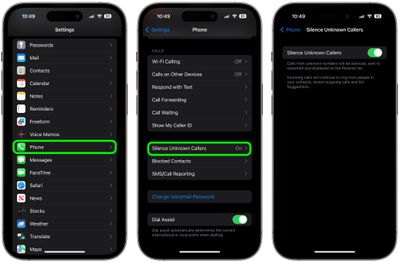
  1. Launch the Settings app on your device
  2. Scroll down and tap Phone.
  3. Scroll down to the section titled Call Silencing and Blocked Contacts.
  4. Tap the Silence Unknown Callers switch to toggle it to the green ON position.
silence unknown callers

With Silence Unknown Callers toggled on, people who call you that aren't listed in your contacts will have their calls sent straight to voice mail and your phone won't ring.

Did you know that you can block nuisance messages as well as calls on your iPhone? Click here to learn how it's done.


Top Rated Comments

JM Avatar
88 months ago
FINALLY!

Now the FTC and carriers and drag their butts all they want. Now anyone who calls (who I haven’t added to my contacts) will go straight to voicemail. If it’s important they’ll leave a VM.

This will cut down on spam calls since no one with an iPhone will pick up. They’ll get idea soon enough, and leave us alone.

So so happy.
Score: 10 Votes (Like | Disagree)
EdT Avatar
88 months ago
Once again, Apple only goes part way. I don’t want the call to go to my voicemail I want the spammers phone to instantly turn into a molten slag.
Score: 9 Votes (Like | Disagree)
88 months ago
I just guess that 90% are legitimate calls and wonder who actually activates this feature. That counts even more in the business environment. Sending the calls to the mailbox won’t stop the caller to try again till his goal is reached. But well, I guess to have the option is a good thing.
Obviously, you wouldn't want to do this with a business phone number. But, most people just have a personal number. I think a lot of people, including myself, will use this feature. If it is someone you don't know, calling you for a legitimate reason, they'll leave a message. I can't wait for this!
Also, I can tell you that at least 90% of unknown numbers that ring my phone...are not legitimate calls.
Score: 8 Votes (Like | Disagree)
NoBoMac Avatar
88 months ago
Did I miss something? You've been able to do this for quite a while by getting/setting the default ringtone to silence, with the custom ringtone for contacts set as usual.
True, and I do this. Along with blocking apps. All been mostly effective.

However, still a nuisance where you are listening to music and suddenly, nothing. Yes, I know then that it's a spam call, but, still intruding. With this new feature, no intrusions. And won't have to make sure "important" contacts get a real ringtone.
Score: 6 Votes (Like | Disagree)
rodpascoe Avatar
88 months ago
Love this feature but have found a small bug.

Had a marketing company call me and it did the job, no ring, straight to voicemail.

Only problem was they didn’t leave a voicemail so my carrier in the UK (O2) sent a text saying I’d missed a call from them.

They called again the next day and because I’d had a text message containing their number the feature let them through as is documented (intelligent Siri I think they called it - looks through mails and SMS for numbers and whitelists any it finds)
Score: 5 Votes (Like | Disagree)
88 months ago
Did I miss something? You've been able to do this for quite a while by getting/setting the default ringtone to silence, with the custom ringtone for contacts set as usual.
This feature is amazing. What you're describing feels like a tedious work around to a problem that shouldn't exist in the first place. To have to manually set a custom ringtone for every contact?? It seems like you would welcome the chance to just press a toggle to ignore unwanted calls.
[doublepost=1560458482][/doublepost]
I just guess that 90% are legitimate calls and wonder who actually activates this feature. That counts even more in the business environment. Sending the calls to the mailbox won’t stop the caller to try again till his goal is reached. But well, I guess to have the option is a good thing.
I get between 10-15 calls a day from numbers I don't know who don't leave messages. Blocking doesn't work because they spoof their numbers. This has been an amazing week with this feature. I'd guess over 90% of my calls are spam callers.
Score: 5 Votes (Like | Disagree)

Popular Stories

iPhone 18 Pro Deep Red Feature

iPhone 18 Pro Launching Later This Year With These 12 New Features

Wednesday March 18, 2026 7:39 am PDT by
While the iPhone 18 Pro and iPhone 18 Pro Max are not expected to launch for another six months or so, there are already plenty of rumors about the devices. It was initially reported that the iPhone 18 Pro models would have fully under-screen Face ID, with only a front camera visible in the top-left corner of the screen. However, the latest rumors indicate that only one Face ID component...
imac video apple feature

Apple Released Yet Another New Product Today

Friday March 20, 2026 2:39 pm PDT by
Apple has unveiled a whopping nine new products so far this March, including an iPhone 17e, iPad Air models with the M4 chip, MacBook Air models with the M5 chip, MacBook Pro models with M5 Pro and M5 Max chips, the all-new MacBook Neo, an updated Studio Display, a higher-end Studio Display XDR, AirPods Max 2, and now the Nike Powerbeats Pro 2. iPhone 17e features the same overall design as...
ios 26 4 pastel

iOS 26.4: Top 10 New Features Coming to Your iPhone

Friday March 20, 2026 2:44 pm PDT by
iOS 26.4 isn't the major update with new Siri features that we hoped for, but there are some useful quality of life improvements, and a little bit of fun with an AI playlist generator and new emoji characters. Playlist Playground - Apple Music has a Playlist Playground option that lets you generate playlists from text-based descriptions. You can include moods, feelings, activities, or...
Related Apple News: Lifestyle | South Africa | Reviews | Mac | Culture