How to Shuffle Your iPhone's Lock Screen Wallpaper - MacRumorsOpen MenuShow RoundupsShow Forums menuVisit ForumsOpen Sidebar
Skip to Content

How to Shuffle Your iPhone's Lock Screen Wallpaper

by

In iOS 16 and later, Apple includes several Lock Screen personalization features for iPhone. Keep reading to learn how to make your Lock Screen wallpaper shuffle through photos at custom intervals.
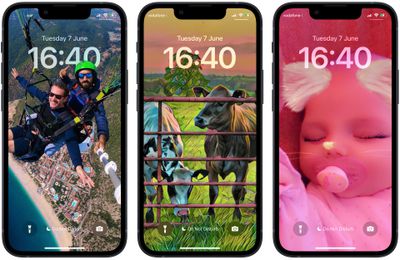
shuffle photos lock screen
Apple has made it possible for users to customize the Lock Screen in ways that were simply not possible in earlier versions of its mobile software. In iOS 16 and later, there are options to apply unique fonts, colors, and filters, and even add widgets to your Lock Screen.

One feature in particular that is sure to prove popular is the ability to shuffle your Lock Screen wallpaper. You can either select multiple pictures from your photo library or a specific album, and using the Shuffle option, you can opt to have the wallpaper shuffle between them on a set hourly or daily schedule, or every time you wake or tap your iPhone screen.

The following steps show you how it's done.

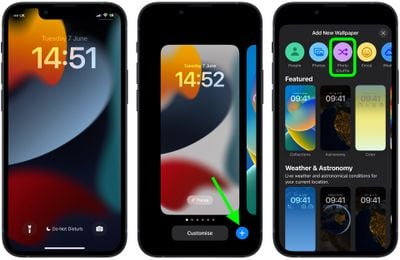
  1. Wake your iPhone and use Face ID or Touch ID to unlock it.
  2. Press and hold on the Lock Screen until the wallpaper gallery appears.
  3. Tap the blue + button in the bottom-right corner of the screen.
  4. Select Photo Shuffle from the wallpaper menu.
    Lock Screen

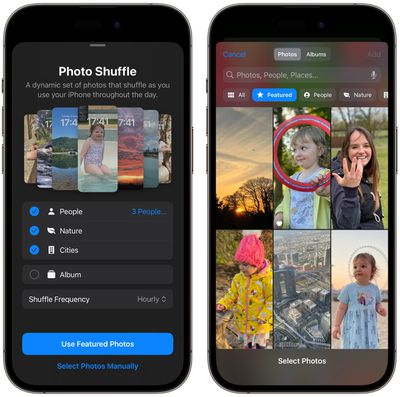
  5. Using the options (People, Nature, Cities) choose the kind of photos from your library that you'd like to include in the shuffle. Alternatively, choose an album of photos that you want to use.
  6. Tap Add.
    photo shuffle

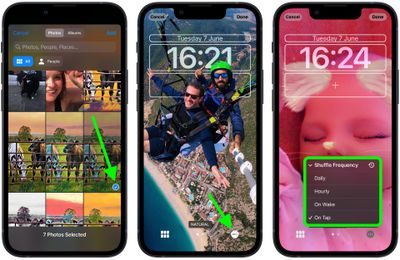
  7. Tap the ellipsis button (the three encircled dots) in the bottom-right corner of the screen.
  8. Tap Shuffle Frequency, then choose from Daily, Hourly, On Lock, and On Tap.
    Lock Screen

  9. Tap Done in the top-right corner to finish, then tap your new Photo Shuffle wallpaper to select it from the gallery.
Your new shuffle wallpaper will now be live. Tap or wake your iPhone's screen to change the photo, or wait for it to change automatically, depending on your chosen option.


Related Forum: iOS 16

Popular Stories

iPhone 18 Pro Deep Red Feature

iPhone 18 Pro Launching Later This Year With These 12 New Features

Wednesday March 18, 2026 7:39 am PDT by
While the iPhone 18 Pro and iPhone 18 Pro Max are not expected to launch for another six months or so, there are already plenty of rumors about the devices. It was initially reported that the iPhone 18 Pro models would have fully under-screen Face ID, with only a front camera visible in the top-left corner of the screen. However, the latest rumors indicate that only one Face ID component...
ios 26 4 yellow

Here Are Apple's Release Notes for iOS 26.4

Wednesday March 18, 2026 11:56 am PDT by
Apple provided developers and public beta testers with the release candidate versions of iOS 26.4 and iPadOS 26.4, which means we're going to see a public launch as soon as next week. The RC versions of the software include Apple's official release notes, giving us final details on what's included in the update. Apple Music - Playlist Playground (beta) generates a playlist from your...
Apple Logo Sketch Feature

Apple Has Now Unveiled Eight New Products This Month

Tuesday March 17, 2026 9:25 am PDT by
Apple has unveiled a whopping eight new products so far this March, including an iPhone 17e, iPad Air models with the M4 chip, MacBook Air models with the M5 chip, MacBook Pro models with M5 Pro and M5 Max chips, the all-new MacBook Neo, an updated Studio Display, a higher-end Studio Display XDR, and now the AirPods Max 2 this week. iPhone 17e features the same overall design as the iPhone...
Related Apple News: Chatgpt | Travel | Get Iphone Ask Callers Before Answer | M4 Ipad Air Vs M5 Ipad Pro | Ecovacs Deebot X11 Omnicyclone