Get Upcoming Calendar Events on Your iPhone Lock Screen - MacRumorsOpen MenuShow RoundupsShow Forums menuVisit ForumsOpen Sidebar
Skip to Content

Get Upcoming Calendar Events on Your iPhone Lock Screen

by

On iPhones running iOS 16 or later, you can display upcoming calendar events directly on the Lock Screen. Keep reading to learn how it's done.
calendar widget
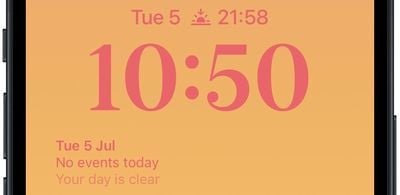
Thanks to watch face complications, many Apple Watch owners are used to being able to glance at their wrist to check their next upcoming calendar event. With the advent of iOS 16 and Lock Screen widgets, you can view the same calendar event information right on your iPhone without even having to unlock the device.

The calendar Lock Screen widget comes in two flavors, allowing you to track the time of the next upcoming event or use a larger widget to show both the event name and its time.

2lock screen widgets
To get started adding widgets, unlock your ‌‌iPhone‌‌ with Face ID or Touch ID, long press on the Lock Screen to enter the Lock Screen gallery, then tap the Customize button. The following steps guide you through the rest of the process.

Add Calendar Event Widget to Lock Screen

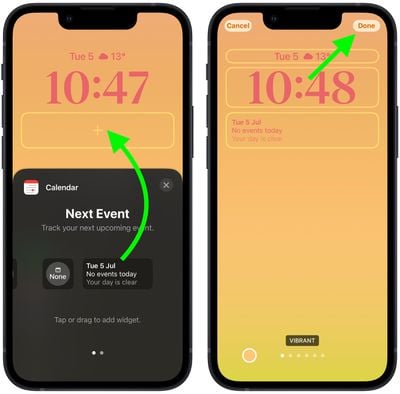
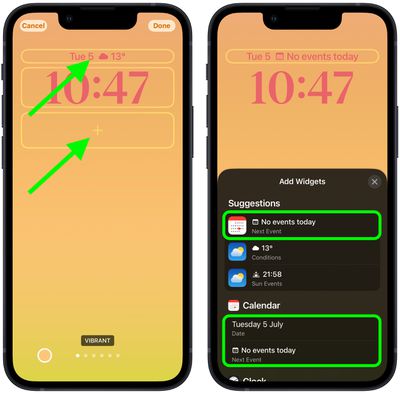
  1. Tap the frame either above or below the time to bring up the widgets selector.
  2. Tap the suggested calendar events widget at the top of the widgets selector to add it to the selected frame.
    Lock Screen

  3. You can also tap Calendar in the column list of apps to choose from a couple of widget variants. Swipe to the one you want, then tap it or drag it to the frame to place it.
  4. When you're finished arranging your widgets, tap Done in the top-right corner of the screen.
  5. Tap the current Lock Screen in the wallpaper gallery to activate it.
    Lock Screen

iOS developers often create widgets for third-party apps using Apple's WidgetKit API, so look out for them whenever you install a new app.


Popular Stories

iOS 27 on iPhone 17 1

iOS 27 Will Add These New Features to Your iPhone

Saturday May 2, 2026 8:43 am PDT by
Apple is expected to unveil iOS 27 during its WWDC 2026 keynote on June 8, and there are already many rumored features and changes for iPhones. The first developer beta of iOS 27 will likely be available immediately following the keynote, and a public beta typically follows in July. Following beta testing, the software update should be released to all users with a compatible iPhone in...
Apple Event Logo

Apple Just Released a New Accessory

Monday May 4, 2026 8:13 am PDT by
Apple today released a new Pride Edition Sport Loop for the Apple Watch. The band features a rainbow design with 11 colors of woven nylon yarns. The new Pride Edition Sport Loop is available to order now on Apple.com and in the Apple Store app in 40mm, 42mm, and 46mm sizes, and it will be available at Apple Store locations starting later this week. In the U.S., the band costs $49. There...
Apple MacBook Pro M4 hero

Why You Might Want to Wait to Buy a MacBook Pro

Friday May 1, 2026 3:43 pm PDT by
Apple refreshed the 14-inch and 16-inch MacBook Pro with M5 Pro and M5 Max models in March 2026, but depending on your needs and interests, you might want to skip this generation because there's something better in the works. The M5 Pro and M5 Max MacBook Pro models have faster chips, but the same design that Apple has used since 2021. An updated design with new display technology and faster ...
Related Apple News: Education | Entertainment | Iphone | Technology | Buyers Guide