How to Share One Pair of Powerbeats Pro Earphones With a Friend - MacRumorsOpen MenuShow RoundupsShow Forums menuVisit ForumsOpen Sidebar
Skip to Content

How to Share One Pair of Powerbeats Pro Earphones With a Friend

by

Splitting a pair of Powerbreats Pro earphones between two people is perfectly possible thanks to their integrated H1 Apple chip, and it's a neat way of using the wireless features of the earpieces to share your listening experience.

Listen Together With One Pair of Powerbeats Pro Earphones

There's nothing stopping you and a friend from each wearing a Powerbeats Pro earpiece to enjoy music or watch a movie together on your iPhone or iPad. Thanks to Automatic Ear Detection, both earphones sense when they're placed in an ear, regardless of whether they're attached to the same head.
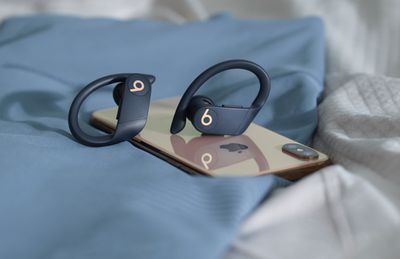
powerbeatsproiphone
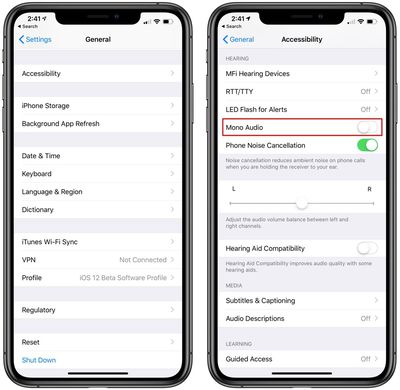
The only caveat to sharing ‌Powerbeats Pro‌ between two people is that you're effectively splitting stereo channels, so you'll want to convert to mono audio. You can do that by following these steps:

  1. Open up the Settings app.
  2. Tap General and then tap Accessibility. Powerbeats pro mono audio settings for sharing earbuds
  3. Scroll down to where it says "Mono Audio" and toggle it on.
When you're done sharing your AirPods with a friend, make sure to turn the Mono Audio setting back off so you get regular stereo sound when you're using both of your AirPods.

Share a Call With a Friend Using One Pair of Powerbeats Pro

Splitting a pair of ‌Powerbeats Pro‌ earphones between two people to take a phone call is a different situation that has one important drawback.

Although both earphones have built-in microphones, only a single mic can be active at any one time, so if you're sharing a pair with a friend, both of you can listen in on the call but only one of you will be able to talk back to the caller.

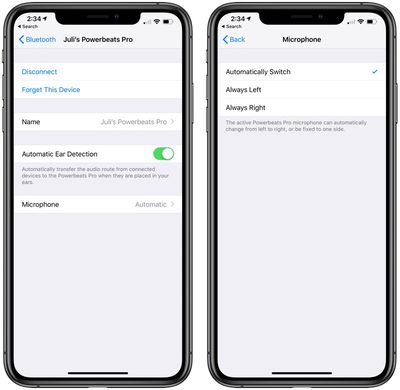
If you want to get to decide who take part in the conversation during a shared call, you can select which ‌Powerbeats Pro‌ earbud has the active mic.

Powerbeats Pro microphone settings
To do so, open the Settings app on your connected iOS device and tap Bluetooth, then tap the circled 'i' icon alongside ‌Powerbeats Pro‌ in the Devices List. Then tap Microphone and choose either the left or right earpiece.

Popular Stories

iPhone 18 Pro Deep Red Feature

iPhone 18 Pro Launching Later This Year With These 12 New Features

Wednesday March 18, 2026 7:39 am PDT by
While the iPhone 18 Pro and iPhone 18 Pro Max are not expected to launch for another six months or so, there are already plenty of rumors about the devices. It was initially reported that the iPhone 18 Pro models would have fully under-screen Face ID, with only a front camera visible in the top-left corner of the screen. However, the latest rumors indicate that only one Face ID component...
ios 26 4 yellow

Here Are Apple's Release Notes for iOS 26.4

Wednesday March 18, 2026 11:56 am PDT by
Apple provided developers and public beta testers with the release candidate versions of iOS 26.4 and iPadOS 26.4, which means we're going to see a public launch as soon as next week. The RC versions of the software include Apple's official release notes, giving us final details on what's included in the update. Apple Music - Playlist Playground (beta) generates a playlist from your...
Apple Logo Sketch Feature

Apple Has Now Unveiled Eight New Products This Month

Tuesday March 17, 2026 9:25 am PDT by
Apple has unveiled a whopping eight new products so far this March, including an iPhone 17e, iPad Air models with the M4 chip, MacBook Air models with the M5 chip, MacBook Pro models with M5 Pro and M5 Max chips, the all-new MacBook Neo, an updated Studio Display, a higher-end Studio Display XDR, and now the AirPods Max 2 this week. iPhone 17e features the same overall design as the iPhone...
Related Apple News: South Africa | Local News | Ipad | Buyers Guide | Mac