How to Send Funny Exploding Images Over iMessage - MacRumorsOpen MenuShow RoundupsShow Forums menuVisit ForumsOpen Sidebar
Skip to Content

How to Send Funny Exploding Images Over iMessage

by

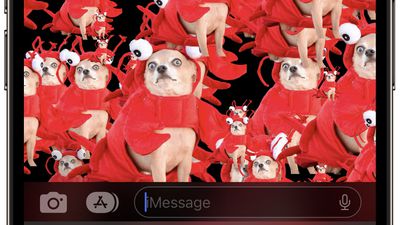
In the Messages app on iPhone and iPad, Apple includes a bunch of screen effects that add fireworks, confetti, and more to the whole screen when you send an iMessage to someone.
messages
Because it's not obvious how to access these iMessage screen effects, they're often overlooked, which is a shame because they can surprise recipients, make them smile, or even laugh out loud – if you use the right approach.

Here we're going to highlight one screen effect in particular that – when combined with an isolated subject from an image – can easily produce amusing results. Keep reading to learn how it's done.

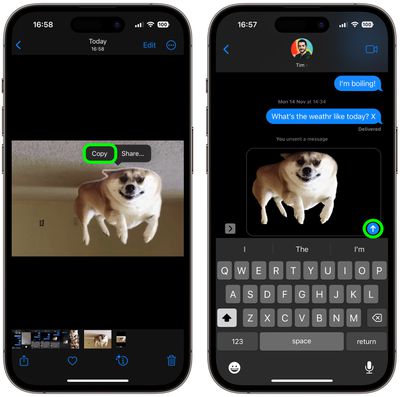
  1. First, open the Photos app and select an image from your library containing a well-defined subject – the funnier the better.
  2. Press and hold on the subject until it ripples and a white glow flows around its outline, then tap Copy in the popup menu that appears.
    iMessages

  3. Now open the Messages app, and in new or existing conversation, press and hold your finger in the input field, then tap the Paste option that pops up.
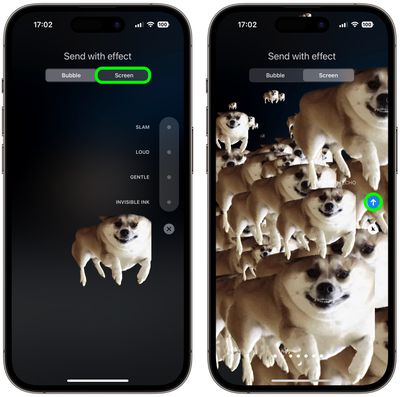
  4. Next, press and hold down the Send button until the "Send with effect" screen appears.
  5. Tap the Screen tab at the top, and the first effect that's selected is called Echo – this is what you want. Enjoy the preview, then hit the Send button.
    messages

Congratulations, you've just sent an exploding iMessage that should hopefully amuse your friends. Here's another tip: If you're short of funny pictures, you can also easily lift subjects from images on the web instead. Click the link to see how it's done.


Popular Stories

iOS 27 on iPhone 17 1

iOS 27 Will Add These New Features to Your iPhone

Saturday May 2, 2026 8:43 am PDT by
Apple is expected to unveil iOS 27 during its WWDC 2026 keynote on June 8, and there are already many rumored features and changes for iPhones. The first developer beta of iOS 27 will likely be available immediately following the keynote, and a public beta typically follows in July. Following beta testing, the software update should be released to all users with a compatible iPhone in...
Apple Event Logo

Apple Just Released a New Accessory

Monday May 4, 2026 8:13 am PDT by
Apple today released a new Pride Edition Sport Loop for the Apple Watch. The band features a rainbow design with 11 colors of woven nylon yarns. The new Pride Edition Sport Loop is available to order now on Apple.com and in the Apple Store app in 40mm, 42mm, and 46mm sizes, and it will be available at Apple Store locations starting later this week. In the U.S., the band costs $49. There...
Apple MacBook Pro M4 hero

Why You Might Want to Wait to Buy a MacBook Pro

Friday May 1, 2026 3:43 pm PDT by
Apple refreshed the 14-inch and 16-inch MacBook Pro with M5 Pro and M5 Max models in March 2026, but depending on your needs and interests, you might want to skip this generation because there's something better in the works. The M5 Pro and M5 Max MacBook Pro models have faster chips, but the same design that Apple has used since 2021. An updated design with new display technology and faster ...
Related Apple News: Mac | Mac | Sport | Business | Ipad