How to Screenshot An Entire Webpage on Mac - MacRumorsOpen MenuShow RoundupsShow Forums menuVisit ForumsOpen Sidebar
Skip to Content

How to Screenshot An Entire Webpage on Mac

by

In iOS, Apple's Safari browser includes a built-in screenshot feature that lets you capture entire webpages on your iPhone or iPad for sharing elsewhere.

mozilla firefox banner fixed
While Safari for Mac doesn't include an equivalent feature, fortunately Firefox does, so if you want to capture full webpages in macOS, you can do so easily by following these steps.

  1. Download and install Firefox from the Mozilla website (it's free).
    screenshot webpage mac1

  2. Launch Firefox on your Mac and visit the website from which you want to capture a full webpage as a screenshot.
    firefox

  3. Scroll down to the bottom of the webpage in question so that any images set to lazy-load are displayed in full.
    firefox

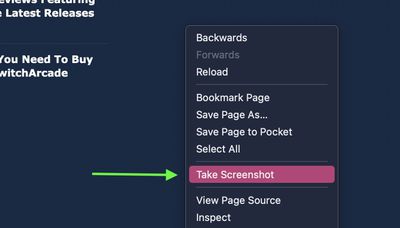
  4. Now right-click (Ctrl-click) anywhere on the webpage and select Take Screenshot from the contextual menu.
    firefox

  5. To capture the entire webpage, click Save full page in the top-right corner of the browser window.
    firefox

  6. In the framed capture that appears, click either Copy to copy the image to your clipboard, or click Download to save the image PNG file to your hard drive. The file will be saved to the same folder you use as Firefox's default download location. firefox

Note that in step 4, you can drag or click on the page to select a region and then save just that region by clicking Download, or you can save just the visible area of the page by clicking Save visible in the top-right corner.

Tip: You can also customize the Firefox toolbar to add a Screenshot button. Click the Menu button (three lines) in the top-right corner of the browser window. A special tab will open, where you can drag and drop items in or out of the overflow menu and the toolbar. Simply drag the Screenshot item (the cutting scissors icon) to the toolbar, then click Done.


Tag: Firefox

Popular Stories

iPhone 18 Pro Deep Red Feature

iPhone 18 Pro Launching Later This Year With These 12 New Features

Wednesday March 18, 2026 7:39 am PDT by
While the iPhone 18 Pro and iPhone 18 Pro Max are not expected to launch for another six months or so, there are already plenty of rumors about the devices. It was initially reported that the iPhone 18 Pro models would have fully under-screen Face ID, with only a front camera visible in the top-left corner of the screen. However, the latest rumors indicate that only one Face ID component...
Apple Logo Sketch Feature

Apple Has Now Unveiled Eight New Products This Month

Tuesday March 17, 2026 9:25 am PDT by
Apple has unveiled a whopping eight new products so far this March, including an iPhone 17e, iPad Air models with the M4 chip, MacBook Air models with the M5 chip, MacBook Pro models with M5 Pro and M5 Max chips, an updated Studio Display, a higher-end Studio Display XDR, and now the AirPods Max 2 this week. iPhone 17e features the same overall design as the iPhone 16e, but it gains Apple's...
ios 26 4 yellow

Here Are Apple's Release Notes for iOS 26.4

Wednesday March 18, 2026 11:56 am PDT by
Apple provided developers and public beta testers with the release candidate versions of iOS 26.4 and iPadOS 26.4, which means we're going to see a public launch as soon as next week. The RC versions of the software include Apple's official release notes, giving us final details on what's included in the update. Apple Music - Playlist Playground (beta) generates a playlist from your...
Related Apple News: Local News | Lifestyle | Entertainment | Culture | Iphone