How to Make an App's Menu Bar Fit Below a MacBook Pro's Display Notch - MacRumorsOpen MenuShow RoundupsShow Forums menuVisit ForumsOpen Sidebar
Skip to Content

How to Make an App's Menu Bar Fit Below a MacBook Pro's Display Notch

by

When Apple unveiled its new MacBook Pro models with a notch to house the camera in the thinner display bezel, many users saw it as a potential problem for third-party apps that place additional content across the menu bar, such as menus that extend from the left or menu items that extend from the right.
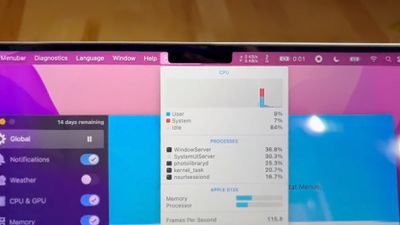
notch behavior feature
However, it turns out Apple was wise to the potential issue of having menus or menu items in the menu bar inadvertently being hidden behind the notch. In macOS Monterey, it includes a compatibility setting called "Scale to fit below built-in camera," which adjusts an app's settings so that it either uses the whole display or uses only the area below the camera housing.

"Scale to fit" ensures the menu bar and app windows appear below the built-in camera on your Mac and are always visible. Moreover, if the app has menu bar items or windows that would appear behind the camera housing, all open apps or apps that share the same space appear below the camera until you quit the app using the scaled setting.

Here's how to turn it on for an individual Mac app.

  1. Close the app that you want to adjust for the notch.
  2. Launch Finder and select the Applications folder.
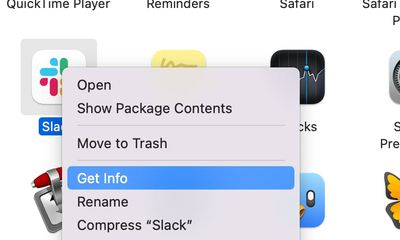
  3. Right-click (Ctrl-click) the icon for the app in question and choose Get Info.
    mac app notch get info

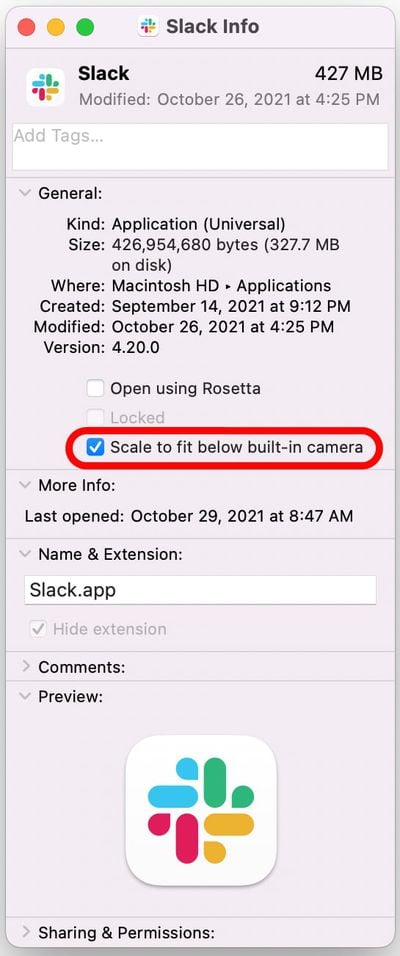
  4. Check the box next to Scale to fit below built-in camera.mac app scale below camera

Now restart the app, and as it launches you should see the screen automatically scale to fit its entire menu bar below the notch area, ensuring all of the app's menu bar items stay visible.


Related Roundup: MacBook Pro
Buyer's Guide: MacBook Pro (Buy Now)
Related Forums: MacBook Pro, macOS Monterey

Popular Stories

iPhone 18 Pro Deep Red Feature

iPhone 18 Pro Launching Later This Year With These 12 New Features

Wednesday March 18, 2026 7:39 am PDT by
While the iPhone 18 Pro and iPhone 18 Pro Max are not expected to launch for another six months or so, there are already plenty of rumors about the devices. It was initially reported that the iPhone 18 Pro models would have fully under-screen Face ID, with only a front camera visible in the top-left corner of the screen. However, the latest rumors indicate that only one Face ID component...
imac video apple feature

Apple Released Yet Another New Product Today

Friday March 20, 2026 2:39 pm PDT by
Apple has unveiled a whopping nine new products so far this March, including an iPhone 17e, iPad Air models with the M4 chip, MacBook Air models with the M5 chip, MacBook Pro models with M5 Pro and M5 Max chips, the all-new MacBook Neo, an updated Studio Display, a higher-end Studio Display XDR, AirPods Max 2, and now the Nike Powerbeats Pro 2. iPhone 17e features the same overall design as...
ios 26 4 yellow

Here Are Apple's Release Notes for iOS 26.4

Wednesday March 18, 2026 11:56 am PDT by
Apple provided developers and public beta testers with the release candidate versions of iOS 26.4 and iPadOS 26.4, which means we're going to see a public launch as soon as next week. The RC versions of the software include Apple's official release notes, giving us final details on what's included in the update. Apple Music - Playlist Playground (beta) generates a playlist from your...
Related Apple News: Culture | South Africa | Buyers Guide | Local News | Politics