Videos Show Menu Bar Behavior in Apps Not Updated for MacBook Pro Notch

When Apple unveiled the new MacBook Pro models with a notch to house the camera in the thinner display bezel, many observers pointed out potential problems for third-party apps that place additional content across the menu bar, in the form of dropdown menus that extend from the left or menu items that extend from the right.
notch behavior feature
The concern was that extended menus or menu items in the menu bar would be inadvertently hidden behind the notch. Based on new video evidence, that at least appears to be the case for non-updated apps that make extensive use of menu items, but not the case for apps that have extended dropdown menus.

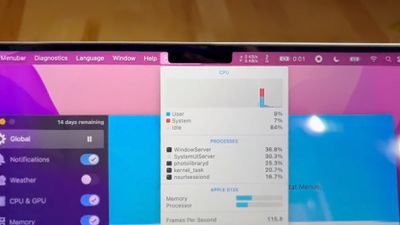
Snazzy Labs YouTuber Quinn Nelson shared two videos on Twitter bemoaning the impact that the notch has on versions of two third-party apps that have not been updated to make way for the notch. In the first video, menu bar items for popular app iStat Menus are shown as being partially concealed behind the notch but still accessible using the mouse pointer.

By contrast, in the second video, when Nelson launches an old version of DaVinci Resolve, he discovers that the video editing app's extended dropdown menus avoid the area of the menu bar concealed by the notch, and that the mouse pointer is blocked from entering the concealed space.


The latter behavior is an intentional move by Apple. By disabling the active space under the notch area and blocking off the mouse pointer, this ensures that older versions of apps can't display menus in that space. At a system level, on the other hand, the mouse pointer can enter the notch area, where it can be hidden. This behavior also applies in fullscreen mode.

In the second video, Nelson goes on to complain that the notch is causing DaVinci Resolve's extended menus to take over the menu items of iStat Menus on the right-hand side of the menu bar. This is actually normal behavior in macOS running on any Mac, but the notch does reduce the amount of menu bar space available for both sets of content.

Monterey ensures that app menus are shown on either side of the notch by using a new "compatibility mode" that disables the active display area taken up by the camera housing. For what it's worth, Bjango, the developer of iStat Menus, doesn't believe that adding compatibility mode support to their app would change the behavior of the app's status items when other apps are in the foreground and isn't likely to solve the issue presented in the video.


Related Roundup: MacBook Pro
Buyer's Guide: MacBook Pro (Caution)
Related Forums: MacBook Pro, macOS Monterey

Popular Stories

iOS 26

iOS 26.3 and iOS 26.4 Will Add These New Features to Your iPhone

Tuesday February 3, 2026 7:47 am PST by
We are still waiting for the iOS 26.3 Release Candidate to come out, so the first iOS 26.4 beta is likely still at least a week or two away. Following beta testing, iOS 26.4 will likely be released to the general public in March or April. Below, we have recapped known or rumored iOS 26.3 and iOS 26.4 features so far. iOS 26.3 iPhone to Android Transfer Tool iOS 26.3 makes it easier...
Apple Logo Black

Apple's Next Launch is 'Imminent'

Sunday February 1, 2026 12:31 pm PST by
The calendar has turned to February, and a new report indicates that Apple's next product launch is "imminent," in the form of new MacBook Pro models. "All signs point to an imminent launch of next-generation MacBook Pros that retain the current form factor but deliver faster chips," Bloomberg's Mark Gurman said on Sunday. "I'm told the new models — code-named J714 and J716 — are slated...
iOS 26 Home Feature

Apple Gives Final Warning to Home App Users

Tuesday February 3, 2026 8:55 am PST by
In 2022, Apple introduced a new Apple Home architecture that is "more reliable and efficient," and the deadline to upgrade and avoid issues is fast approaching. In an email this week, Apple gave customers a final reminder to upgrade their Home app by February 10, 2026. Apple says users who do not upgrade may experience issues with accessories and automations, or lose access to their smart...
Aston Martin CarPlay Ultra Screen

Apple's CarPlay Ultra to Expand to These Vehicle Brands Later This Year

Sunday February 1, 2026 10:08 am PST by
Last year, Apple launched CarPlay Ultra, the long-awaited next-generation version of its CarPlay software system for vehicles. Nearly nine months later, CarPlay Ultra is still limited to Aston Martin's latest luxury vehicles, but that should change fairly soon. In May 2025, Apple said many other vehicle brands planned to offer CarPlay Ultra, including Hyundai, Kia, and Genesis. In his Powe...
Apple Foldable Thumb

First Foldable iPhone Design Details Revealed

Monday February 2, 2026 7:19 am PST by
Apple's first foldable iPhone will feature relocated volume buttons, an all-black camera plateau, a smaller Dynamic Island, and more, according to design leaks from a known Weibo leaker. The user known as "Instant Digital" today claimed to share several key details about the design of the foldable iPhone: The volume buttons will be located on the top edge of the device, aligned to the...

Top Rated Comments

mystery hill Avatar
56 months ago
Don't blame the developers. It's notch their fault.
Score: 61 Votes (Like | Disagree)
robertts Avatar
56 months ago
I don't understand why this isn't handled at the system level. So, every Mac app needs to engineer a solution for the notch?
Score: 44 Votes (Like | Disagree)
Your Royal Highness Avatar
56 months ago
OK it’s a legitimate concern but that guy and his annoying crackle is ??
Score: 44 Votes (Like | Disagree)
macpot Avatar
56 months ago
The guy is sooo excited like he discovered a new kind of atom or something... ?

This can be fixed in the next "Minor" update!
Score: 32 Votes (Like | Disagree)
Wiesenlooser Avatar
56 months ago
It's valid criticism that needs to be fixed but the guy is super obnoxious.
Score: 31 Votes (Like | Disagree)
Max Webb Avatar
56 months ago
I get the issue, but it's not the end of the world, it will just take a small software fix to change how it works.
Score: 30 Votes (Like | Disagree)