


How to Restrict an App's Location Access in iOS 13 - MacRumorsOpen MenuShow RoundupsShow Forums menuVisit ForumsOpen Sidebar
Skip to Content

How to Restrict an App's Location Access in iOS 13

by

ios location servicesApple has doubled down on its privacy features in iOS 13, giving iPhone and iPad users a more granular view of how apps access their location information.

On Apple devices, the location services that apps can tap into use GPS, Bluetooth, and crowd-sourced Wi-Fi hotspot and cellular mast locations to determine your approximate location. The good news is that iOS 13 makes you more aware of how often apps are tracking you, as well as their motivation for doing so, and importantly it makes sure you're in control of your data.

If an app grabs your location data, iOS may display a popup notification showing you a map with the data that the app has tracked, as well as the specific reason why the app is tracking you, along with the question "Do you want to continue allowing this?"

Armed with this information, you'll usually be given three options: Allow While Using App, Allow Once, and Don't Allow. The first option limits the app's access to your location data to when the app is actively being used, the second allows it to track your location just this once, while the third disables location tracking completely.
how to set location service ios 13 1
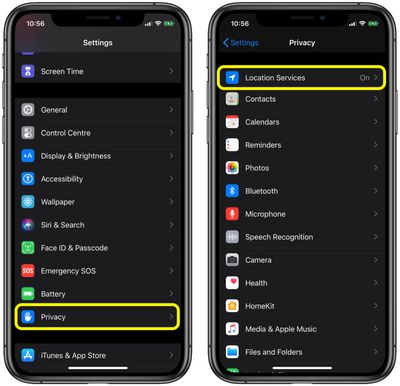
You can expect to see the "Just Once" option appear when you first launch a just-installed app. Otherwise, you can check out how apps on your device are using location services anytime you like by opening the Settings app and tapping through to Privacy -> Location Services.
how to set location service ios 13 2
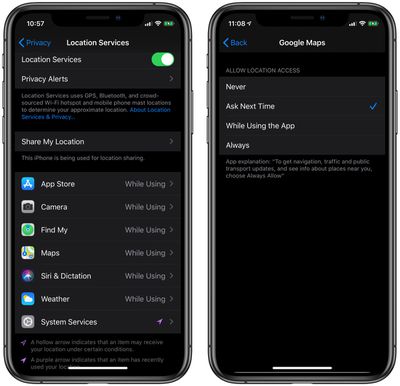
From here, you can change each app's permissions (Never / Ask Next Time /While Using the App / Always) and you'll also learn the reason why an app wants to access your location, allowing you to enable or disable location services on an ad-hoc basis.

The options you choose will depend on the app in question – some apps may have just cause to track your whereabouts in the background, while others may not. The point is Apple wants you to be in control of this behavior, so you can expect similar periodic notifications about what an app is up to with your location information.


Related Forum: iOS 13

Top Rated Comments

JosephAW Avatar
89 months ago
I'd like to see the "ask" option for all sensors. Mic, Camera, Data, etc.
Score: 6 Votes (Like | Disagree)
nutmac Avatar
89 months ago
While this is a good move, it doesn't solve the "home/away" tracking many home automation apps rely on (e.g., August, Nest). And many health tracking apps likewise rely on location service. To this end, I would like one additional option:

* Allow app to track you within certain distance where the app requests location access
Score: 2 Votes (Like | Disagree)
TheWatchfulOne Avatar
89 months ago
...A notes app... !?!? :confused:

Sure why not? For some people, it might be useful to look on a map and see where they were when they wrote the note. Especially in the case where a specific location inspired a great idea. If it's not useful, turn off Location Services for that app.
Score: 1 Votes (Like | Disagree)
89 months ago
Nice! My boss wants us to install an app in which we see our schedules, report our findings and all kinds of stuff.

When we start a shift, the app records our location, once. But I don’t trust ‘em. I’m afraid they can always track us with that app. So I set it to While Using at first. Now I have it turned off completely. I only switch it on when I start my shift and then turn it off again.

Hope that prevents them from spying
If it’s your personal phone can’t really make you install anything. If a company phone then can do and ask what ever wants.
Score: 1 Votes (Like | Disagree)
69Mustang Avatar
89 months ago
This is bad news for Google and Facebook as their apps tracks your location for no reason at all times unless explicitly changed by the user.
Not sure who you're getting your info from, but you seriously need to give it back to them.:D To be fair, I can't speak for Facebook apps because I have none. But if the source is the same one you use for your Google apps info, it's pretty suspect to say the least.

Just a guess, but I'd bet you have no idea how location tracking works on iOS or Android.
Score: 1 Votes (Like | Disagree)
Crowbot Avatar
89 months ago
Isn't this how it worked in past iOS verions? Nothing new
They're adding the option to have the app ask every time. Before you had to turn it on or off or "while in use".
Score: 1 Votes (Like | Disagree)

Popular Stories

iOS 27 on iPhone 17 1

iOS 27 Will Add These New Features to Your iPhone

Saturday May 2, 2026 8:43 am PDT by
Apple is expected to unveil iOS 27 during its WWDC 2026 keynote on June 8, and there are already many rumored features and changes for iPhones. The first developer beta of iOS 27 will likely be available immediately following the keynote, and a public beta typically follows in July. Following beta testing, the software update should be released to all users with a compatible iPhone in...
Apple Event Logo

Apple Just Released a New Accessory

Monday May 4, 2026 8:13 am PDT by
Apple today released a new Pride Edition Sport Loop for the Apple Watch. The band features a rainbow design with 11 colors of woven nylon yarns. The new Pride Edition Sport Loop is available to order now on Apple.com and in the Apple Store app in 40mm, 42mm, and 46mm sizes, and it will be available at Apple Store locations starting later this week. In the U.S., the band costs $49. There...
Apple Announces 2026 Pride Band Watch Face and iPhone Wallpaper Article 2

iOS 26.5 Coming Soon With These New Features

Monday May 4, 2026 8:40 am PDT by
iOS 26.5 is expected to be released next week, following more than a month of beta testing. The update is relatively minor, but there are a couple of new features and changes across the operating system that we have recapped below. iOS 26.5 lays the groundwork for end-to-end encryption for RCS in the Messages app and ads in the Apple Maps app, and it will include a new Pride wallpaper and a...
Related Apple News: Govee Star Light Projector | Switchbot S20 And K11 Plus | App Store | Ipad | Macbook Pro M5 Pro M5 Max
















