How to Reset Your Mac's Bluetooth Module to Fix Connection Issues - MacRumorsOpen MenuShow RoundupsShow Forums menuVisit ForumsOpen Sidebar
Skip to Content

How to Reset Your Mac's Bluetooth Module to Fix Connection Issues

by

BluetoothIconXBluetooth is what your Mac uses to connect to wireless devices like keyboards, mice, trackpads, speakers, and other peripherals. Generally, it's a reliable technology. At some point however, the chances are you'll run into difficulty establishing a Bluetooth connection with one or more of your devices.

Most problems can be fixed by unpairing and repairing the Bluetooth device, changing its batteries, rebooting your Mac, or performing an SMC reset. But if none of these methods work, you can always try resetting your Mac's Bluetooth module. Here's how to do it in macOS using the hidden Bluetooth Debug menu.

How to Reset Your Mac's Bluetooth Module

Before proceeding, bear in mind that if your setup relies exclusively on Bluetooth for communicating with your keyboard and mouse, then you're going to temporarily lose connection to them using the following methods, so you might want to have a backup wired input device option just in case.

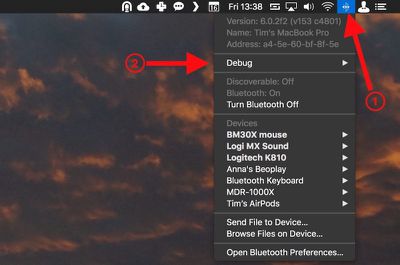
  1. Holding the Shift + Option (Alt) keys on your Mac's keyboard, click the Bluetooth symbol in the top-right corner of the macOS menu bar. (If you don't see it there, you need to check Show Bluetooth in menu bar in System Preferences -> Bluetooth.)
    macos bluetooth debug menu bar

  2. Locate the revealed Debug submenu and hover your mouse cursor over it.

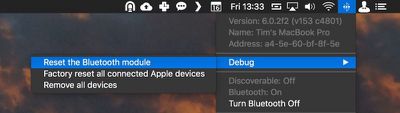
  3. Click Reset the Bluetooth module.
    macos reset Bluetooth module

  4. Now, restart your Mac.

You'll notice a couple of other potentially useful options in the Debug submenu. Factory reset all connected Apple devices does exactly what it says – forces any Apple-branded Bluetooth accessories back to the default settings they came with out of the box. It's a reliable fallback option if you've tried everything else to fix a connection issue, including resetting the Bluetooth module.

Lastly, the Remove all devices option might prove useful if you're moving your Bluetooth mouse and keyboard to another Mac, for example. However, you can also remove devices on an individual basis from the macOS menu bar, as long as you hold down Shift + Option (Alt) before you click the Bluetooth symbol.
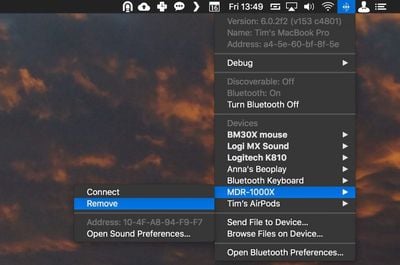
remove Bluetooth device macOS
Removing devices in this manner means you're not also banishing a whole bunch of other established Bluetooth connections like speakers and so on that you might want to keep.


Top Rated Comments

105 months ago
Enjoying all these hints lately a lot more than "news" about iOS games or rumored emoji changes.

Kind of reminds me of that great OS X Hints site (now defunct), if anybody remembers that. http://hints.macworld.com
Score: 7 Votes (Like | Disagree)
105 months ago
get some AirPods. They work great
Not sure how that’d help with my car system, Bluetooth speaker from Bose, etc.
Score: 3 Votes (Like | Disagree)
Rychiar Avatar
105 months ago
I find Bluetooth frustrating with my iPhone. My headset never auto-connects and I have to manually do it in settings. We should've come further than this.
get some AirPods. They work great
Score: 2 Votes (Like | Disagree)
Traverse Avatar
105 months ago
This is actually very useful. I’ve had problems with BT every so often
Score: 2 Votes (Like | Disagree)
Benz63amg Avatar
73 months ago

Thanks for this article; resetting the bluetooth module solved my year-old problem!
What problem was it?
Score: 1 Votes (Like | Disagree)
105 months ago
I find Bluetooth frustrating with my iPhone. My headset never auto-connects and I have to manually do it in settings. We should've come further than this.
No kidding. I was going to ask how to do this in iOS. Ever since iOS 11 (or maybe my iPhone X) Bluetooth has been amazingly buggy. I’ve had conversations with Apple which usually end in reloading the iPhone or the need for a new iPhone, but the problems persist.
Score: 1 Votes (Like | Disagree)

Popular Stories

imac video apple feature

Apple Released Yet Another New Product Today

Friday March 20, 2026 2:39 pm PDT by
Apple has unveiled a whopping nine new products so far this March, including an iPhone 17e, iPad Air models with the M4 chip, MacBook Air models with the M5 chip, MacBook Pro models with M5 Pro and M5 Max chips, the all-new MacBook Neo, an updated Studio Display, a higher-end Studio Display XDR, AirPods Max 2, and now the Nike Powerbeats Pro 2. iPhone 17e features the same overall design as...
iPhone 18 Pro Deep Red Feature

iPhone 18 Pro Launching Later This Year With These 12 New Features

Wednesday March 18, 2026 7:39 am PDT by
While the iPhone 18 Pro and iPhone 18 Pro Max are not expected to launch for another six months or so, there are already plenty of rumors about the devices. It was initially reported that the iPhone 18 Pro models would have fully under-screen Face ID, with only a front camera visible in the top-left corner of the screen. However, the latest rumors indicate that only one Face ID component...
ios 26 4 pastel

iOS 26.4: Top 10 New Features Coming to Your iPhone

Friday March 20, 2026 2:44 pm PDT by
iOS 26.4 isn't the major update with new Siri features that we hoped for, but there are some useful quality of life improvements, and a little bit of fun with an AI playlist generator and new emoji characters. Playlist Playground - Apple Music has a Playlist Playground option that lets you generate playlists from text-based descriptions. You can include moods, feelings, activities, or...
Related Apple News: Ipad | Buyers Guide | South Africa | Mac | Politics