

 The Apple News app for iPhone, iPad, and Mac automatically recommends stories for you based on your reading habits within the app. You can find these stories in the Today tab under the For You section, divided into topics and channels you've selected.
The recommendations feature isn't infallible, and it can become confused if a friend or family member uses the Apple News app on your device or another device linked to the same iCloud account.
If the suggested stories in the Apple News app seem increasingly random or unrelated to your interests, you can try resetting the information Apple uses to suggest them to you. Here's how.
How to Clear Apple News Recommendations on iOS
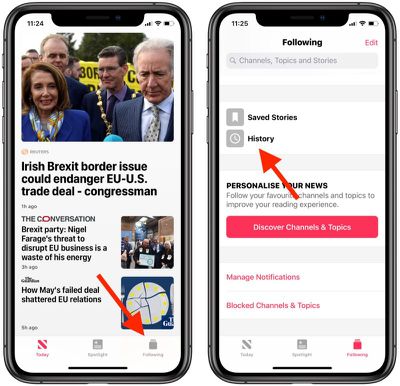
- Launch the Apple News app on your iPhone or iPad.

- Tap the Following tab in the lower right corner of the screen.
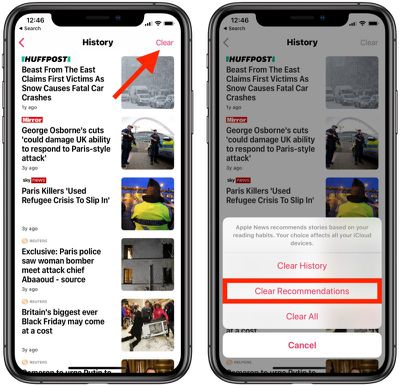
- Scroll down and tap History.
- Tap Clear in the upper right corner of the screen and then tap Clear Recommendations.
How to Clear Apple News Recommendations on Mac
You can perform a similar action on your Mac by following the steps below.
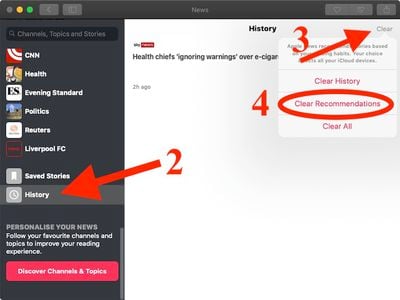
- Launch the Apple News app.
- Scroll down to the bottom of the sidebar and click History.
- Click Clear in the upper right corner of the window.
- Click Clear Recommendations.
Note that clearing your recommendations on one device affects all devices linked to the same iCloud account. Once you've done so, Apple News will attempt to re-learn your interests based on what you read going forward.





















