With the release of iOS 11, Apple nixed its built-in integration with Twitter, Facebook, Flickr, and Vimeo, a feature that allowed iPhone and iPad users to store their third-party account information and access it within apps that needed to use those services.

facebook mac
The equivalent feature remains in macOS High Sierra, although Apple has removed it completely from macOS 10.14 Mojave, which many users are likely to welcome in light of the recent data scandal.. While we wait for macOS Mojave to be released in the fall, this article shows you how to manually remove third-party accounts like Facebook from Macs running macOS 10.13.

Note that the following guide only deletes associated third-party accounts at the system level of your Mac – you'll still be able to access your Facebook account and related data by logging into Facebook.com (where you can delete your account permanently) or via the official iOS app, for example.

How to Remove Third-Party Accounts From macOS

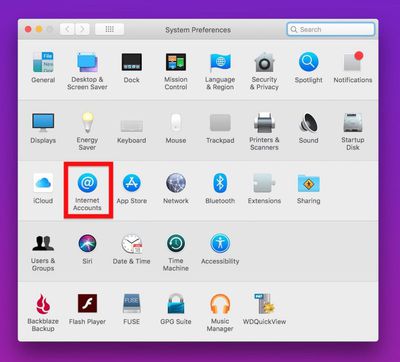
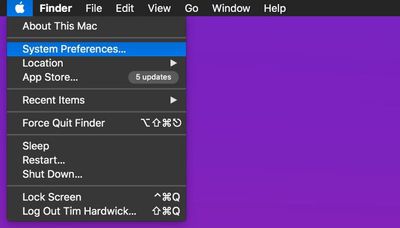
  1. Click the Apple symbol () in the menu bar on your Mac's desktop and select System Preferences....
    delete facebook from your mac

  2. Click the Internet Accounts preference pane.
    delete facebook from your mac1

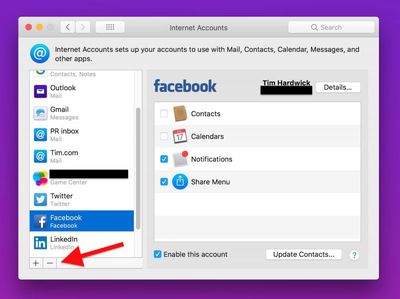
  3. Click an account in the left column that you want to remove.
    delete facebook from your mac2

  4. Click the minus (–) button at the bottom of the column.

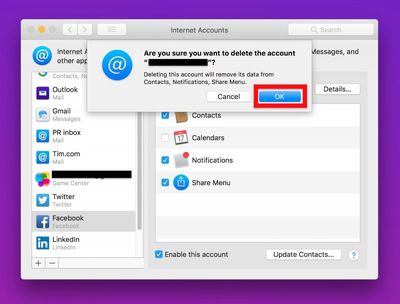
  5. Click OK in the "Are you sure..?" dialog.
    delete facebook from your mac3

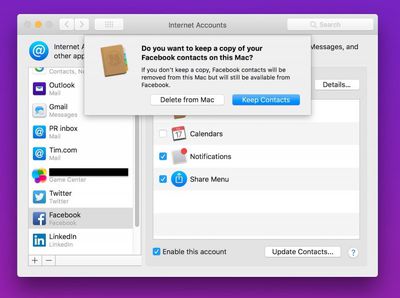
  6. You may be asked if you want to keep any contacts related to the account stored in your iCloud Contacts. To nuke those too, click Delete from Mac.
    delete facebook from your mac4

Top Rated Comments

C DM Avatar
99 months ago
I am very surprised that Apple even let them integrate in the first place. Common sense kicked in later and it was removed. If Steve Jobs was around he would not have allowed for it to be integrated.
How would we know what Steve Jobs would do?
Score: 2 Votes (Like | Disagree)
Morgenland Avatar
99 months ago
As TallGuyGT has said, try the new password method. Although, don''t be surprised to see them reappear randomly when they want... if they want, where they want...
whoever wants ;-)
Score: 1 Votes (Like | Disagree)
stylinexpat Avatar
99 months ago
Great move by Apple by getting rid of Facebook. Zuckerberg can not be trusted. Getting rid of spy apps integrated into IOS was a great move by Apple. Should never have been integrated in the first place. Those that want the are free to download the app on their own from the App Store.
Score: 1 Votes (Like | Disagree)
randomgeeza Avatar
99 months ago
As TallGuyGT has said, try the new password method. Although, don''t be surprised to see them reappear randomly when they want... if they want, where they want...
Score: 1 Votes (Like | Disagree)
5097842 Avatar
99 months ago
I actually like having the Mac integration, primarily because it downloads profile pictures of my contacts from social media (LinkedIn preferred). Makes using Messages much easier.

The notifications are hit and miss. I think the sites intentionally make it hard to moderate the number of notifications. But easy to dismiss and often helpful.
[doublepost=1525434143][/doublepost]
That’s not permanent however. If you ever restore the OS, or buy a new Mac and setup as new, those accounts come back. So how do we delete them for real?
Delete them from System Prefernces, then go into Keychain Access to delete any references. It’s hit or miss - it can often be a challenge to delete system-type data from iCloud. I have old passwords reappear that I’ve deleted many times.

A brute force method is to clear the iCloud Keychain, sign out of all your iCloud devices, and then change your password. This has been more effective for me in clearing iCloud data that doesn’t have a direct way of deleting.
Score: 1 Votes (Like | Disagree)
bergert Avatar
99 months ago
Delete account LOL - I never signed up!
Score: 1 Votes (Like | Disagree)

Popular Stories

iOS 26

iOS 26.4 and iOS 27 Features Revealed in New Leak

Friday December 12, 2025 10:56 am PST by
Macworld's Filipe Espósito today revealed a handful of features that Apple is allegedly planning for iOS 26.4, iOS 27, and even iOS 28. The report said the features are referenced within the code for a leaked internal build of iOS 26 that is not meant to be seen by the public. However, it appears that Espósito and/or his sources managed to gain access to it, providing us with a sneak peek...
iOS 26

iOS 26.2 Coming Soon With These 8 New Features on Your iPhone

Thursday December 11, 2025 8:49 am PST by
Apple seeded the second iOS 26.2 Release Candidate to developers earlier this week, meaning the update will be released to the general public very soon. Apple confirmed iOS 26.2 would be released in December, but it did not provide a specific date. We expect the update to be released by early next week. iOS 26.2 includes a handful of new features and changes on the iPhone, such as a new...
iOS 26

Apple Releases iOS 26.2 With Alarms for Reminders, Lock Screen Changes, Enhanced Safety Alerts and More

Friday December 12, 2025 10:10 am PST by
Apple today released iOS 26.2, the second major update to the iOS 26 operating system that came out in September, iOS 26.2 comes a little over a month after iOS 26.1 launched. ‌iOS 26‌.2 is compatible with the ‌iPhone‌ 11 series and later, as well as the second-generation ‌iPhone‌ SE. The new software can be downloaded on eligible iPhones over-the-air by going to Settings >...
AirPods Pro Firmware Feature

Apple Releases New Firmware for AirPods Pro 2 and AirPods Pro 3

Thursday December 11, 2025 11:28 am PST by
Apple today released new firmware designed for the AirPods Pro 3 and the prior-generation AirPods Pro 2. The AirPods Pro 3 firmware is 8B30, up from 8B25, while the AirPods Pro 2 firmware is 8B28, up from 8B21. There's no word on what's include in the updated firmware, but the AirPods Pro 2 and AirPods Pro 3 are getting expanded support for Live Translation in the European Union in iOS...
macOS Tahoe 26 Thumb

Apple Releases macOS Tahoe 26.2 With Edge Light

Friday December 12, 2025 10:08 am PST by
Apple today released macOS Tahoe 26.2, the second major update to the macOS Tahoe operating system that came out in September. macOS Tahoe 26.2 comes five weeks after Apple released macOS Tahoe 26.1. Mac users can download the macOS Tahoe update by using the Software Update section of System Settings. macOS Tahoe 26.2 includes Edge Light, a feature that illuminates your face with soft...
AirTag 2 Mock Feature

Apple AirTag 2: Four New Features Found in iOS 26 Code

Thursday December 11, 2025 10:31 am PST by
The AirTag 2 will include a handful of new features that will improve tracking capabilities, according to a new report from Macworld. The site says that it was able to access an internal build of iOS 26, which includes references to multiple unreleased products. Here's what's supposedly coming: An improved pairing process, though no details were provided. AirTag pairing is already...
ipados 26 1 slide over

Apple Releases iPadOS 26.2 With Multitasking Improvements

Friday December 12, 2025 10:09 am PST by
Apple today released iPadOS 26.2, the second major update to the iPadOS 26 operating system released in September. iPadOS 26.2 comes a month after iPadOS 26.1. The new software can be downloaded on eligible iPads over-the-air by going to Settings > General > Software Update. iPadOS 26.2 continues with the multitasking improvements that were added with iPadOS 26.1. You can now drag and...
bug security vulnerability issue fix larry

Update Now: iOS 26.2 Fixes 20+ Security Vulnerabilities

Friday December 12, 2025 11:11 am PST by
Apple today released iOS 26.2, iPadOS 26.2, and macOS 26.2, all of which introduce new features, bug fixes, and security improvements. Apple says that the updates address over 20 vulnerabilities, including two bugs that are known to have been actively exploited. There are a pair of WebKit vulnerabilities that could allow maliciously crafted web content to execute code or cause memory...