Fortnite has been unavailable to play on the iPhone and iPad since Apple banned it from the App Store amid an ongoing legal battle with Epic Games, but the battle royale game has returned to iOS devices thanks to Microsoft's Xbox Cloud Gaming service. This article explains how to get Fortnite up and running on the service – keep reading to learn how it works.
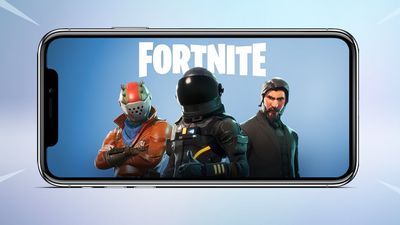
Apple removed popular title Fortnite from the App Store in August 2020, after developer Epic Games added a direct payment option to the game in violation of the App Store's rules. However, if want to play Fortnite on the iPhone and the iPad, the good news is that the Xbox Cloud Gaming service now supports Fortnite, which means you can play on your iOS device using Safari or another browser.
The Xbox Cloud Gaming service is available in 26 countries and allows you to play games streamed from a remote server via a web app, so you don't need to download and install any game data to your iOS device, and some games are free to play – including Fortnite. (The game includes a ton of in-app purchases, but they are entirely optional).
To play Fortnite on your iPhone or iPad, all you need is to be connected to Wi-Fi and have a Microsoft account (don't worry if you don't have one - creating an account is free). Fortnite has touch controls, so playing with a controller is optional. You can get up and running in minutes by following these steps.
- Launch Safari on your iPhone or iPad.
- Visit the xbox.com/play website.
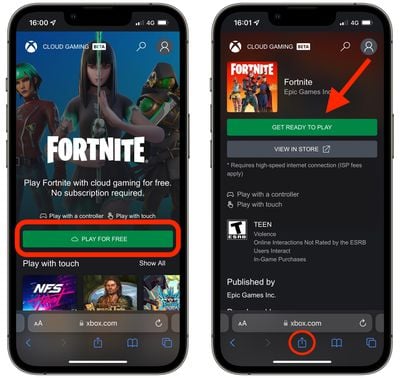
- Tap Play For Free underneath the Fortnite graphic, which should be at the top of the website. (If you don't see it, search for it in the games list.)
- Tap Get Ready to Play on the next page.

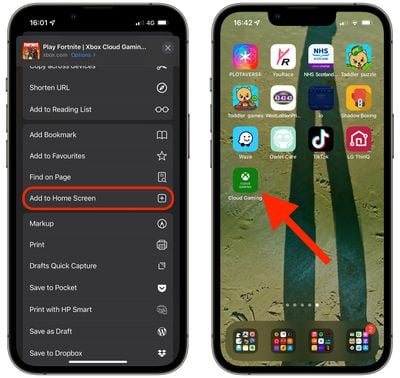
- Follow the onscreen prompt request to add the Xbox Cloud Gaming icon to your Home Screen: Tap Safari's Share icon (the square with arrow pointing out), choose Add to Home Screen from the actions menu, then tap Add.
- Now, tap the Cloud Gaming icon on your device's Home Screen to open the Xbox service in a separate window.
- Select Fortnite as the game you want to play.
- Tap the Sign In button and enter a Microsoft account. This can be a live.com or even hotmail.com account – you don't need to sign up for an Xbox subscription. (If you don't have a Microsoft account, you can create one for free.)
- After you've signed in, you'll be returned to the Fortnite page, where you can tap Play. Wait for the game to load, then tap Press to Start.
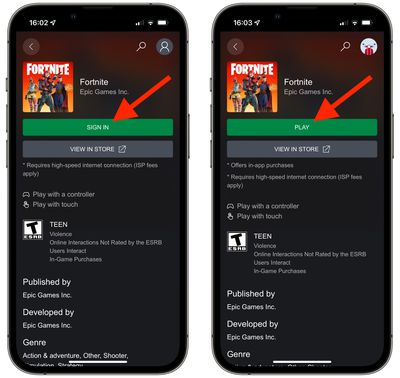
That's all there is to it. You should now be able to play the game on your iPhone or iPad. Be sure to disable orientation lock so that you can play the game fullscreen in landscape orientation.
Bear in mind that Xbox Cloud Gaming is a streaming web app and you're playing Fortnite on a remote server, so you'll need to be connected to a Wi-Fi network at all times in order to play it, and performance will depend on the quality of the internet connection.
Note that Fortnite can also be played on GeForce NOW, another cross-platform, subscription-based service that allows users to stream hundreds of games across multiple devices.