

If you're a fan of classic Nintendo games and own an iPhone, we have great news for you. Apple has recently updated its App Review Guidelines to allow game emulators in the App Store. This change opens up new possibilities for playing your favorite retro games on modern devices. Keep reading to learn what's changed and how you can get gaming in no time.
Delta Feature

Apple's App Store Policies: What Changed

In April 2024, Apple revised its App Review Guidelines to permit "retro game console emulator apps" on the ‌App Store‌. This policy shift marks a significant change as emulators have long existed in a grey legal area despite a U.S. court ruling affirming their legality.

Game emulators have managed to sneak onto the ‌‌App Store‌‌ several times over the years by using hidden functionality, but Apple has not explicitly permitted them until now. The rule change that allows for game emulators is worldwide.

ROMS: Your Source of Retro Games

While emulators themselves are legal, as reinforced by U.S. law, it is critical to understand the legality surrounding the possession and use of game ROMs (Read-Only Memory). ROMs are digital copies of games, and while downloading them without proper ownership is illegal, there are legal avenues to obtain these files.

Users can legally acquire ROMs by using their own game cartridges with a ROM reader or downloading games from websites that offer classic games within the public domain or under a Creative Commons license. Some developers also release their games or ROMs for free as part of promotional campaigns or for archival purposes.

Delta: The Best Game Emulator Available

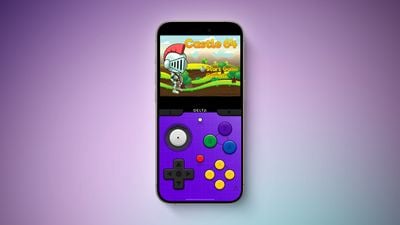
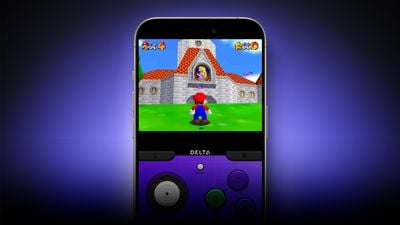
Among the various emulator apps available, Delta by developer Riley Testut is a standout choice recommended for ‌iPhone‌ users. Delta's broad compatibility is a key feature, supporting multiple systems such as the Nintendo Entertainment System (NES), Super Nintendo Entertainment System (SNES), and various Game Boy iterations up to the Nintendo DS. What makes Delta particularly appealing is its polished interface that closely mimics the classic gaming consoles it emulates, enhancing the nostalgic experience.
Emulators in the App Store What to Know 2
In summary, here's what makes Delta the emulator of choice:

  • Comprehensive System Support: Emulates NES, SNES, Nintendo 64, Game Boy through Nintendo DS, ensuring a wide range of gaming experiences.
  • Adaptive Controls: Offers customizable on-screen controls and support for external game controllers, adapting to your preferred gaming style.
  • Save States and Cheat Codes: Enables saving gameplay at any moment and integrating cheat codes, enhancing gameplay flexibility.
  • Cloud Sync and ROM upload: No games included with Delta, but it can open zipped files that are uploaded to iCloud Drive, Dropbox, or Google Drive. Cloud support also allows progress syncing across devices.
  • Local Multiplayer Support: Delta supports local multiplayer for NES, SNES, and N64 games, allowing up to four players to enjoy games together, making it a fantastic choice for group entertainment.
  • AirPlay Support: Includes the ability to stream games to Apple TV via AirPlay, providing a big-screen experience that’s perfect for more immersive gameplay.

Note that, as of writing, ‌iPhone‌ users in the EU can only download Delta from AltStore PAL, an alternative app marketplace made by the creator of Delta, Riley Testut. Testut has been working on AltStore PAL since Apple announced plans to support alternative app marketplaces in iOS 17.4. Alternative app marketplaces are not available outside of the European Union.


With these enhanced capabilities, Delta not only replicates the classic gaming experience but also elevates it to meet modern gaming standards. So why note embrace the nostalgia with Delta, and dive back into the games that defined a generation of gaming, only now with the convenience of your ‌iPhone‌.

Popular Stories

iOS 26

iOS 26.4 and iOS 27 Features Revealed in New Leak

Friday December 12, 2025 10:56 am PST by
Macworld's Filipe Espósito today revealed a handful of features that Apple is allegedly planning for iOS 26.4, iOS 27, and even iOS 28. The report said the features are referenced within the code for a leaked internal build of iOS 26 that is not meant to be seen by the public. However, it appears that Espósito and/or his sources managed to gain access to it, providing us with a sneak peek...
iOS 26

Apple Releases iOS 26.2 With Alarms for Reminders, Lock Screen Changes, Enhanced Safety Alerts and More

Friday December 12, 2025 10:10 am PST by
Apple today released iOS 26.2, the second major update to the iOS 26 operating system that came out in September, iOS 26.2 comes a little over a month after iOS 26.1 launched. ‌iOS 26‌.2 is compatible with the ‌iPhone‌ 11 series and later, as well as the second-generation ‌iPhone‌ SE. The new software can be downloaded on eligible iPhones over-the-air by going to Settings >...
Apple Foldable Thumb

Leak Reveals Foldable iPhone Details

Monday December 15, 2025 9:09 am PST by
The first foldable iPhone will feature a series of design and hardware firsts for Apple, according to details shared by the Weibo leaker known as Digital Chat Station. According to a new post, via machine translation, Apple is developing what the leaker describes as a "wide foldable" device, a term used to refer to a horizontally oriented, book-style foldable with a large internal display....
iOS 26

iOS 26.2 Coming Soon With These 8 New Features on Your iPhone

Thursday December 11, 2025 8:49 am PST by
Apple seeded the second iOS 26.2 Release Candidate to developers earlier this week, meaning the update will be released to the general public very soon. Apple confirmed iOS 26.2 would be released in December, but it did not provide a specific date. We expect the update to be released by early next week. iOS 26.2 includes a handful of new features and changes on the iPhone, such as a new...
macOS Tahoe 26 Thumb

Apple Releases macOS Tahoe 26.2 With Edge Light

Friday December 12, 2025 10:08 am PST by
Apple today released macOS Tahoe 26.2, the second major update to the macOS Tahoe operating system that came out in September. macOS Tahoe 26.2 comes five weeks after Apple released macOS Tahoe 26.1. Mac users can download the macOS Tahoe update by using the Software Update section of System Settings. macOS Tahoe 26.2 includes Edge Light, a feature that illuminates your face with soft...
AirPods Pro Firmware Feature

Apple Releases New Firmware for AirPods Pro 2 and AirPods Pro 3

Thursday December 11, 2025 11:28 am PST by
Apple today released new firmware designed for the AirPods Pro 3 and the prior-generation AirPods Pro 2. The AirPods Pro 3 firmware is 8B30, up from 8B25, while the AirPods Pro 2 firmware is 8B28, up from 8B21. There's no word on what's include in the updated firmware, but the AirPods Pro 2 and AirPods Pro 3 are getting expanded support for Live Translation in the European Union in iOS...
ipados 26 1 slide over

Apple Releases iPadOS 26.2 With Multitasking Improvements

Friday December 12, 2025 10:09 am PST by
Apple today released iPadOS 26.2, the second major update to the iPadOS 26 operating system released in September. iPadOS 26.2 comes a month after iPadOS 26.1. The new software can be downloaded on eligible iPads over-the-air by going to Settings > General > Software Update. iPadOS 26.2 continues with the multitasking improvements that were added with iPadOS 26.1. You can now drag and...
airpods max 2024 colors

AirPods Max 2 Likely to Offer These 10 New Features

Monday December 15, 2025 7:41 am PST by
Apple released the AirPods Max on December 15, 2020, meaning the over-ear headphones launched five years ago today. While the AirPods Max were updated with a USB-C port and new color options last year, followed by support for lossless audio and ultra-low latency audio this year, the headphones lack some of the features that have been introduced for newer generations of the regular AirPods and the ...


















