If you're having problems getting one of your AirPods or AirPods Pro to charge, read on. This article outlines the solutions available to you.
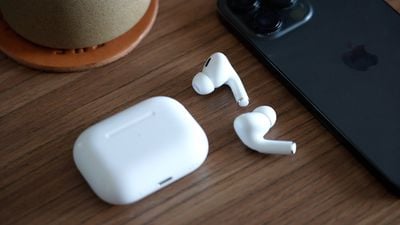
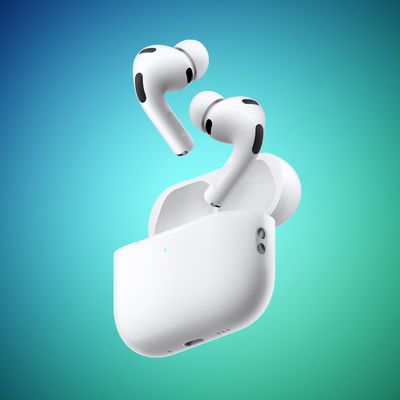
Whether you own original AirPods, AirPods 2, AirPods 3, AirPods 4, AirPods Pro, or AirPods Pro 2, all of these models can sometimes suffer from a problem where one AirPod refuses to charge in the Charging Case.
It's a common issue that's not only frustrating but it can effectively press pause on your plans for the day. Fortunately, the problem is usually fixable at home without having to contact Apple or return the AirPods. Try the following tips before you do anything else.
1. Check Charging Case Battery Level
When one AirPod stops charging, the culprit is very often the Charging Case. Generally speaking, if its charge is less than 10%, then the case doesn't have enough juice to charge both AirPods.
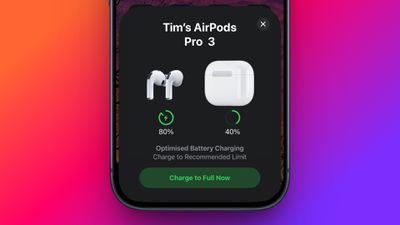
To check the battery level of your Charging Case, first put the AirPods inside the case and close the lid. Next, bring the case closer to your iPhone and open the lid. You should see an AirPods card appear on the iPhone's screen, showing the battery level of the Charging Case and both AirPods.
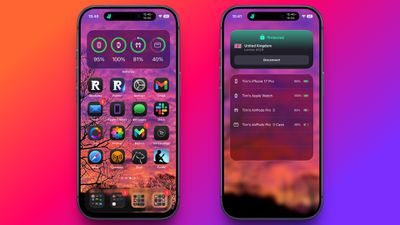
You can also check the charge status of your AirPods using the Batteries widget. This can be added to your iPhone's Today View (swipe right on the Lock screen or on your Home screen's first screen of apps) by tapping the Edit button at the bottom of the screen. Alternatively, you can add the Batteries widget to your Home screen.
If the battery level of the Charging Case is sufficient but one AirPod still isn't charging (i.e. there's no "lightning bolt" charging icon next to it), skip to the next step in this article.
If it was the low battery in the Charging Case that was the cause of your problem, now you know to charge the case using a Lightning or USB-C cable, depending on the case model. It's easy to forget to plug the Charging Case into a power outlet because its battery lasts pretty long on one charge, so it's best to get into a habit of charging it every day or every other day, even if it's just for 15 minutes. That way, you'll never be left without battery for your AirPods when you're on the go.
2. Reinsert the AirPod
If the AirPod won't charge despite plenty of battery being in the Charging Case, the earpiece could be sitting incorrectly in the case and not have proper contact with the charging port. Take off any accessories such as foam eartips, then try reinserting the AirPod, and see if the charging icon appears next to it when you bring the AirPods close to your iPhone.
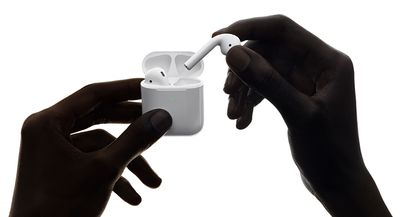
If the AirPod still isn't charging, it could be that the contacts are dirty and that the AirPod stem and/or Charging Case need cleaning. See the cleaning tips below to learn how.
3. Clean the AirPod and Charging Case
Perhaps the most common reason an AirPod stops charging is because the charging contacts are dirty and have grime on the AirPod stem, inside the Charging Case, or both. This prevents the electrical charge from passing through sufficiently, but you can clean things up using the method outlined below.
What You'll Need
- Lint-free or mirofiber cloth
- Periodontal brush, straw cleaner, or Q-tip
- 70% isopropyl alcohol (optional)
Using the dry, lint-free fabric, clean the stem of the AirPod, focusing around the silver contacts on the end.
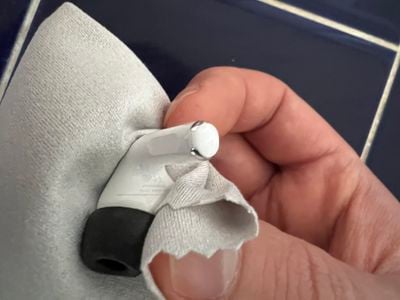
Then take a periodontal brush or similar tool, and clean the internal contact points in each AirPod bay inside the Charging Case. If you encounter any stubborn gunk, take a Q-tip and moisten it with water, or spray it with some isopropyl alcohol (DO NOT spray alcohol or water directly on the case) and work the Q-tip over the dirty area.
If you use your AirPods daily, to recover and maintain proper contact between the AirPods and the Charging Case, ideally you should clean them every week.
4. Reset AirPods
Apple's original AirPods, AirPods 2, AirPods 3, AirPods 4, and AirPods Pro (1st, 2nd, and 3rd generation) all have a reset function that returns them to their factory settings. This can come in handy if you're having any sort of problem with them, such as when one AirPod refuses to charge.
- Put your AirPods in their case and close the lid.
- Wait 30 seconds, then open the lid.
- On your iOS device, go to Settings ➝ [Name of your AirPods]. Alternatively, go to Settings ➝ Bluetooth and tap the circled "i" icon next to your AirPods.
- Scroll to the bottom and tap Forget This Device, then tap again to confirm.
- With the AirPods case lid open, press and hold the button on the back of the case for about 15 seconds until you see the status light flashing amber. (If you have AirPods 4 or AirPods Pro 3, double-tap the case, just below the status light.) If your AirPods case charges only over a wired connection, the status light is inside the case between the AirPods.
- With the case lid open, place your AirPods close to your device and follow the steps on your device's screen to reconnect your AirPods.
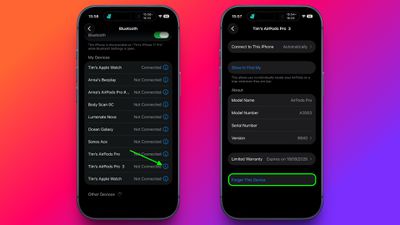
And that's all there is to it. Note that now the AirPods are reset they will no longer automatically recognize any of the devices linked to your Apple account. Opening the AirPods case near an iOS device will initiate the setup process, just like the first time you used them.
5. Contact Apple Support
If none of the above suggestions fixed the issue of one AirPod not charging, then it's probably time to contact Apple Support, as Apple's team will be able to determine whether your AirPod or Charging Case needs to be repaired or replaced.