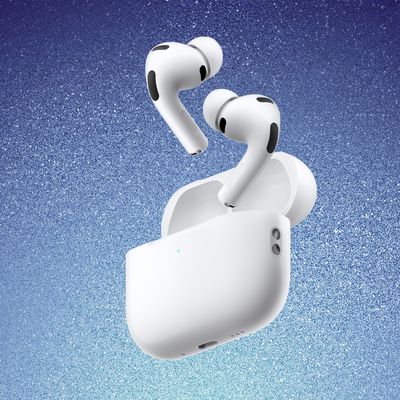
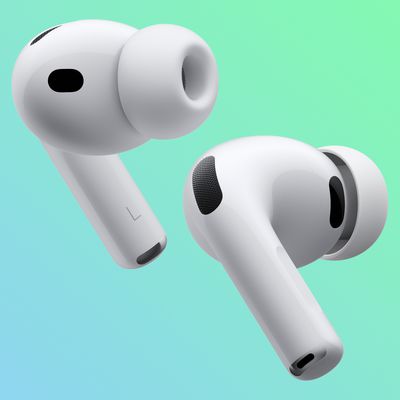
With last year's release of iOS 17, Apple introduced new features for second-generation AirPods Pro, such as Adaptive Audio, the ability mute/unmute yourself when on a phone call, and more.
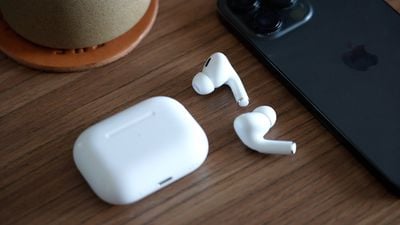
airpods pro 2 thumbnail
Keep reading to learn what use cases the new noise control features are designed for, and how you can control them in iOS 17 when your iPhone is connected to AirPods Pro 2 with updated firmware. To skip to a specific feature, hit one of the links below.

The new features are available on iPhones running iOS 17 when paired with second-generation AirPods Pro updated with the latest firmware. That includes second-generation AirPods Pro with the new USB-C MagSafe Charging Case, as well as second-generation AirPods Pro with the Lightning ‌MagSafe‌ Charging Case.

Check Your AirPods Pro Firmware

Apple does not offer instructions on how to upgrade AirPods software, but firmware is generally installed over-the-air while the ‌‌AirPods‌‌ are connected to an iOS device. Putting the ‌‌‌‌‌AirPods‌‌‌‌‌ in the case, connecting the ‌‌‌‌‌AirPods‌‌‌‌‌ to a power source, and then pairing the ‌‌‌‌‌AirPods‌‌‌‌‌ to an iOS device or Mac should force the update.

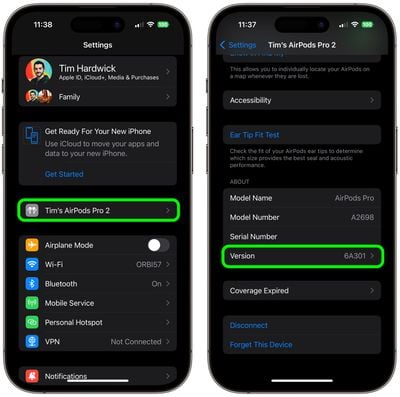
You can check your‌ ‌‌‌‌‌‌‌AirPods Pro‌‌‌‌‌‌‌‌ firmware by connecting them to your ‌iPhone‌ and following these steps:

  1. Open the Settings app.
  2. Tap [your name]'s AirPods Pro.
  3. Scroll down to the "About" section.
  4. Look for the Version number.

settings

If your AirPods Pro are updated with the latest version number (6E188 as of March 2024) you're ready to enjoy the new features in iOS 17.

Adaptive Audio

When the second-generation ‌AirPods Pro‌ were introduced, their Adaptive Transparency feature offered a new way to reduce loud environmental noise for more comfortable everyday listening.

Adaptive Audio, or Adaptive Noise Control, takes that approach to the next level by dynamically blending the existing Transparency and Active Noise Cancellation modes together to deliver the best audio experience in the moment. Adaptive Audio tailors the noise control as you move between different environments and interactions.

airpods pro adaptive audio
This way, loud or distracting noises surrounding, such as the sound of a leaf blower, are automatically reduced, while other noises, like the sudden beep of a car horn, will still be audible.

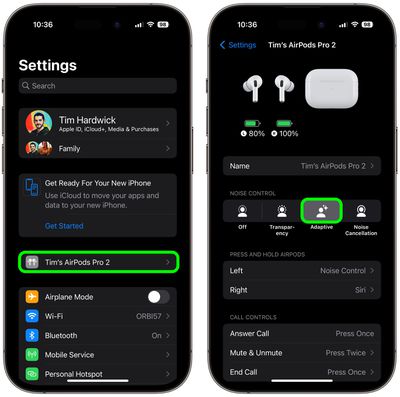
To enable or disable Adaptive Audio on AirPods Pro, connect them to your ‌iPhone‌ and follow one of these series of steps.

Method 1:

  1. Open Settings.
  2. Tap [your name]'s AirPods Pro.
  3. Under "Noise Control," tap Adaptive.

settings

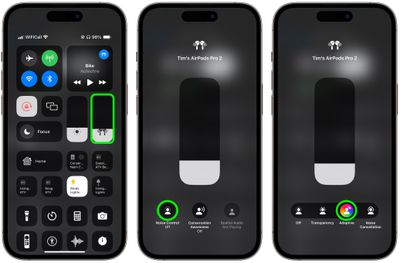
Method 2:

  1. Bring up the Control Center from your ‌iPhone‌ by swiping down from the upper right corner of the screen (on an ‌‌iPhone‌‌ with a Home button, swipe up from the bottom of the screen).
  2. Long press on the AirPods Pro volume slider.
  3. Tap the Noise Control button.
  4. Select Adaptive.

settings

Button Control

You can also switch to Adaptive Audio with a long button press, but first you need to assign it to your AirPods Pro 2 controls, like so:

  1. Open Settings.
  2. Tap [your name]'s AirPods Pro.
  3. Under "Press and Hold AirPods," tap Left or Right.
  4. Select Noise Control, then check Adaptive. You can also check Noise Cancellation and/or Transparency to switch between these modes using the same button, or check Off to turn off Noise Control using another long press.
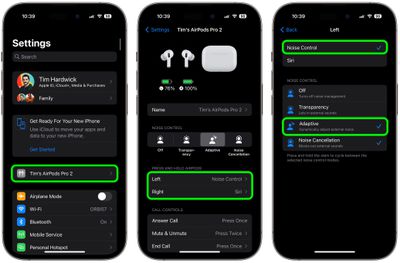
settings

Conversation Awareness

Conversation Awareness is able to detect when someone starts talking to you, and will lower the volume of the audio you're listening to and cut down on background noise accordingly.

airpods pro conversation boost
Conversation Awareness also helps when you're on a call, by reducing noise around you while you speak. As a sub-component of Adaptive Audio, this feature also enhances the voices in front of you so you can hear what's going on.

To enable or disable Conversation Awareness, connect your AirPods Pro 2 to your ‌iPhone‌ and follow these steps.

  1. Open Settings.
  2. Tap [your name]'s AirPods Pro.
  3. Scroll down to the "Audio" section and toggle on/off the switch next to Conversation Awareness.
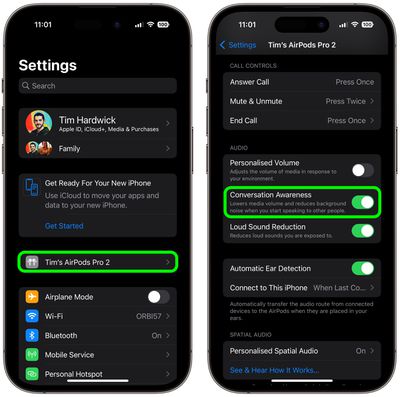
settings

Personalized Volume

Similar to Adaptive Audio, Personalized Volume uses machine learning to fine-tune your listening experience by understanding environmental conditions and listening preferences.
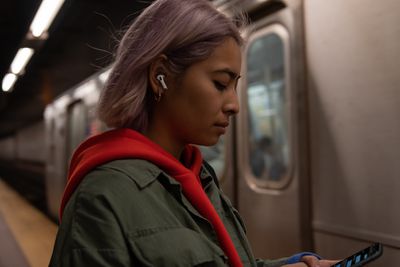
airpods pro person
Thanks to this feature, your ‌‌‌iPhone‌‌‌ is able to learn more about the volume that you prefer over time, and will tweak it as necessary to match your desired sound level.
To enable or disable Personalized Volume, connect your AirPods Pro 2 to your ‌iPhone‌ and follow these steps.

  1. Open Settings.
  2. Tap [your name]'s AirPods Pro.
  3. Scroll down to "Audio" and toggle on/off the switch next to Personalized Volume.
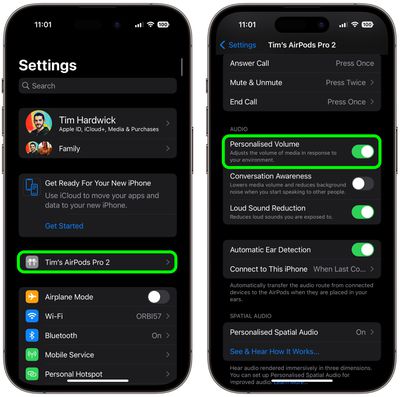
settings

Mute Controls

Prior to the release of iOS 17, ‌AirPods Pro‌ did not include an assignable on-board mute function. Thankfully, that's no longer the case. If you press the stem of your ‌‌AirPods Pro‌‌ earbuds, you will be able to mute and unmute yourself while you're on a call.
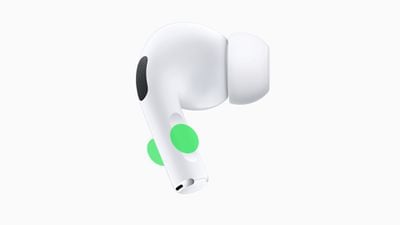
airpods pro 2 mute
You can assign mute and unmute call controls to activate with a single press or a double press of the button on your AiPods Pro 2. Connect your AirPods Pro 2 to your ‌iPhone‌ and follow these steps to set your preference.

  1. Open Settings.
  2. Tap [your name]'s AirPods Pro.
  3. Scroll down to "Call Controls", then tap Mute & Unmute.
  4. Select either Press Once or Press Twice.
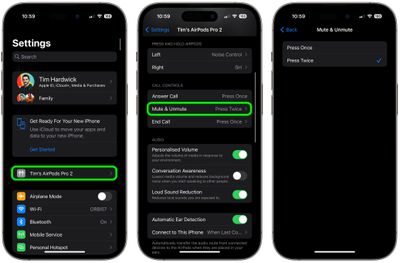
settings

Other AirPods Changes

AirPods have been criticized in the past for sluggish performance when attempting to automatically switch between Apple devices. Fortunately, ‌‌AirPods Pro‌‌ 2 automatically switch between Apple devices much quicker in ‌‌iOS 17 and later‌‌.

Hey Siri vs Siri
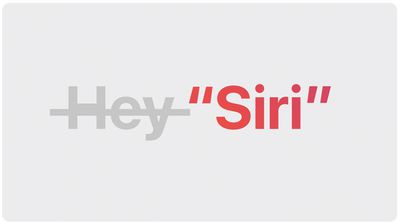
And don't forget, Apple has simplified the voice command to invoke Siri on iPhones running iOS 17 and this also works with second-generation ‌AirPods Pro‌. Instead of "Hey ‌‌Siri‌‌," you can simply say "‌‌Siri‌‌" to activate the voice assistant when wearing your AirPods. You can also issue multiple queries and commands in succession without having to say "‌‌Siri‌‌" again.

Related Roundup: AirPods Pro 3
Buyer's Guide: AirPods Pro (Buy Now)
Related Forum: AirPods

Top Rated Comments

wdog119 Avatar
29 months ago
I used Conversation Awareness for about 10 minutes before turning it off.

It takes about 4-5 seconds to start the audio back up after it has paused it. If it was quicker maybe it would better but I find it too slow.
Score: 9 Votes (Like | Disagree)
abatabia Avatar
29 months ago
Which feature will keep my AirPods Pro 2 case from draining to nothing once a day now, while Apple support telling me that’s normal behavior. This happened, mind you, with them sitting on my shelf, not being used. Never happened with any previous AirPods I ever owned. Can’t say I’m thrilled with this, or the decline in Apple support.
Score: 7 Votes (Like | Disagree)
fwmireault Avatar
29 months ago

Basically all of those features create unpredictable behavior and negatively affect hearing experience, rather than an easy “on” or “off”. Apple has no way to know what matters the most at any given moment regardless. Trying to outsmart the complexity of the real world is just pointless.
Transparency mode and Active noise cancellation are still an option. If Adaptative audio doesn't work for you, just don't use it. I tried it over the weekend and I quite like it. I'm all for providing options and letting customers making their own choices.
Score: 6 Votes (Like | Disagree)
Shirasaki Avatar
29 months ago
Basically all of those features create unpredictable behavior and negatively affect hearing experience, rather than an easy “on” or “off”. Apple has no way to know what matters the most at any given moment regardless. Trying to outsmart the complexity of the real world is just pointless.
Score: 5 Votes (Like | Disagree)
tobybrut Avatar
29 months ago
Does the mute feature work if on a web call, such as Skype or even in a chat such as Discord? It’s not as useful if it’s only for phone calls.
Score: 4 Votes (Like | Disagree)
lcs101 Avatar
29 months ago
I don't want my music to get quieter if I have a conversation; I want my music to stop playing. Until they allow that, I don't have any interest in conversation awareness.
Score: 3 Votes (Like | Disagree)

Popular Stories

iOS 26

iOS 26.4 and iOS 27 Features Revealed in New Leak

Friday December 12, 2025 10:56 am PST by
Macworld's Filipe Espósito today revealed a handful of features that Apple is allegedly planning for iOS 26.4, iOS 27, and even iOS 28. The report said the features are referenced within the code for a leaked internal build of iOS 26 that is not meant to be seen by the public. However, it appears that Espósito and/or his sources managed to gain access to it, providing us with a sneak peek...
apple beta 26 lineup

Apple Leak Confirms Work on Foldable iPhone, AirTag 2, and Dozens More Devices

Monday December 15, 2025 2:05 pm PST by
Last week, details about unreleased Apple devices and future iOS features were shared by Macworld. This week, we learned where the information came from, plus we have more findings from the leak. As it turns out, an Apple prototype device running an early build of iOS 26 was sold, and the person who bought it shared the software. The OS has a version number of 23A5234w, and the first...
Apple Foldable Thumb

Leak Reveals Foldable iPhone Details

Monday December 15, 2025 9:09 am PST by
The first foldable iPhone will feature a series of design and hardware firsts for Apple, according to details shared by the Weibo leaker known as Digital Chat Station. According to a new post, via machine translation, Apple is developing what the leaker describes as a "wide foldable" device, a term used to refer to a horizontally oriented, book-style foldable with a large internal display....
Apple Logo Top Half

Early iOS 26 Software Leak Uncovers Dozens of Upcoming Apple Features

Monday December 15, 2025 3:05 pm PST by
Software from an iPhone prototype running an early build of iOS 26 leaked last week, giving us a glimpse at future Apple devices and iOS features. We recapped device codenames in our prior article, and now we have a list of some of the most notable feature flags that were found in the software code. In some cases, it's obvious what the feature flags are referring to, while some are more...
iOS 26

Apple Releases iOS 26.2 With Alarms for Reminders, Lock Screen Changes, Enhanced Safety Alerts and More

Friday December 12, 2025 10:10 am PST by
Apple today released iOS 26.2, the second major update to the iOS 26 operating system that came out in September, iOS 26.2 comes a little over a month after iOS 26.1 launched. ‌iOS 26‌.2 is compatible with the ‌iPhone‌ 11 series and later, as well as the second-generation ‌iPhone‌ SE. The new software can be downloaded on eligible iPhones over-the-air by going to Settings >...
iOS 26

iOS 26.2 Coming Soon With These 8 New Features on Your iPhone

Thursday December 11, 2025 8:49 am PST by
Apple seeded the second iOS 26.2 Release Candidate to developers earlier this week, meaning the update will be released to the general public very soon. Apple confirmed iOS 26.2 would be released in December, but it did not provide a specific date. We expect the update to be released by early next week. iOS 26.2 includes a handful of new features and changes on the iPhone, such as a new...
macOS Tahoe 26 Thumb

Apple Releases macOS Tahoe 26.2 With Edge Light

Friday December 12, 2025 10:08 am PST by
Apple today released macOS Tahoe 26.2, the second major update to the macOS Tahoe operating system that came out in September. macOS Tahoe 26.2 comes five weeks after Apple released macOS Tahoe 26.1. Mac users can download the macOS Tahoe update by using the Software Update section of System Settings. macOS Tahoe 26.2 includes Edge Light, a feature that illuminates your face with soft...
AirPods Pro Firmware Feature

Apple Releases New Firmware for AirPods Pro 2 and AirPods Pro 3

Thursday December 11, 2025 11:28 am PST by
Apple today released new firmware designed for the AirPods Pro 3 and the prior-generation AirPods Pro 2. The AirPods Pro 3 firmware is 8B30, up from 8B25, while the AirPods Pro 2 firmware is 8B28, up from 8B21. There's no word on what's include in the updated firmware, but the AirPods Pro 2 and AirPods Pro 3 are getting expanded support for Live Translation in the European Union in iOS...