macOS Sierra and iOS 10 both include a new Continuity feature that allows Apple Pay to be used to make purchases on the web using Safari, giving Apple users an alternative to other web-based payment services like PayPal.

On Macs, Apple Pay for the web requires an iPhone with Touch ID and Apple Pay support or an Apple Watch, as payments are authenticated through the phone or watch. Apple Pay on the web requires merchants to adopt Apple Pay, so it isn't yet available everywhere, but support has started rolling out.
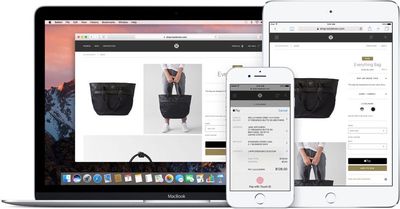
applepayweb
Sites like Time Inc., Wayfair, and Apple's own online Apple Store have started accepting Apple Pay, and payment processors like Stripe, Big Commerce, Shopify, and Squarespace all offer support, so it may be almost everywhere in just a couple of months.

Here's how it works:

  1. Visit a website that supports Apple Pay on the web, like Apple.com. I'll be using Apple's online store as an example.

    checkoutwithapplepay

  2. Choose a product you want to purchase and click "Add to Bag."
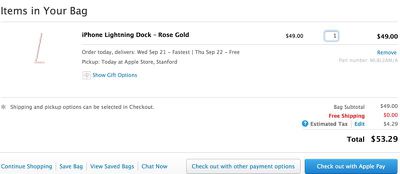
  3. On Apple's site, you're automatically taken to the cart, where "Check out with Apple Pay" is an option. Choose it.
  4. At the next checkout screen, choose delivery options and then click on the Apple Pay button.
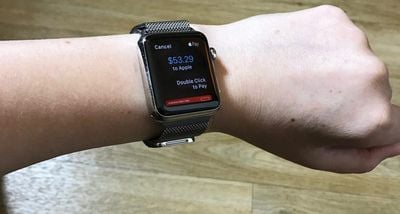
  5. If you're wearing an authenticated Apple Watch, you'll be asked to verify the payment with the watch. Double tap on the side button (watchOS 3) to confirm and make the purchase.

    applepayonapplewatch

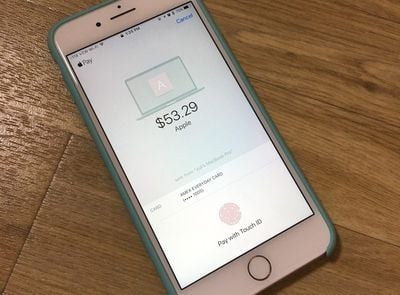
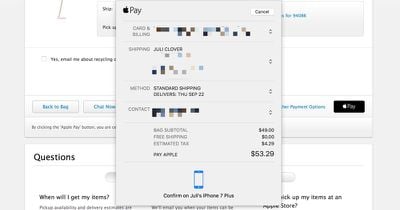
  6. With no Apple Watch, a confirmation screen will pop up on a connected iPhone, locked or unlocked. It requires a fingerprint to be placed on the Touch ID home button to confirm the payment.

    applepayiphone

  7. Once the payment is confirmed on the Apple Watch or the iPhone, that's it. The purchase is made and on its way.
When checking out on the web, all payment and shipping information is entered automatically, so you don't need to do anything but tap the confirm button to pay. It's quick, simple, fast, and safe. There is, however, a popup that will let you select the card you want to use, choose the shipping address, and more, if you need to make alterations.
applepayconfirm
Apple Pay on the web is a Continuity feature so it requires a Mac with Bluetooth 4.0 support. It is compatible with the following machines running macOS Sierra:

- MacBook (Early 2015 or newer)
- MacBook Pro (2012 or newer)
- MacBook Air (2012 or newer)
- Mac mini (2012 or newer)
- iMac (2012 or newer)
- Mac Pro (Late 2013)

Apple Pay also requires an iPhone 6 or later running iOS 10 or an Apple Watch with watchOS 3, and it only works with the Safari browser. Apple Pay on the web is also available on iOS devices and will be available as long as one card has been added to the Wallet app on the iPhone.


Related Forum: macOS Sierra

Top Rated Comments

jent Avatar
121 months ago
Not sure this is appealing to me. It seems like more work. Is it just because it's more secure?
It also allows you to make purchases online without giving your credit card information.
Score: 5 Votes (Like | Disagree)
ghostface147 Avatar
121 months ago
Crap. I'm one year too old for Apple Pay on the web. That's ok. I'd rather have my 17" MacBook Pro.
Score: 3 Votes (Like | Disagree)
garirry Avatar
121 months ago
I'm curious though, when the MacBook Pro will be released, if it'll have a fingerprint scanner, would you be able to add Apple Pay directly to macOS and pay without an iPhone? Alternatively, you may be able to use your phone's Apple Pay info but by authenticating through the MBP's touch ID.
Not sure this is appealing to me. It seems like more work. Is it just because it's more secure?
Oh trust me it just seems difficult. Click "pay by apple pay" and a prompt pops up on your watch or iPhone. It's definitely not difficult.
Score: 2 Votes (Like | Disagree)
sythesigh Avatar
121 months ago
Crap. I'm one year too old for Apple Pay on the web. That's ok. I'd rather have my 17" MacBook Pro.
That's what the continuity hack solves
Score: 2 Votes (Like | Disagree)
marine0816 Avatar
121 months ago
So I have to run upstairs to get my iPhone to pay for something? I do the same with my wallet
Score: 1 Votes (Like | Disagree)
Nunyabinez Avatar
121 months ago
Not sure this is appealing to me. It seems like more work. Is it just because it's more secure?
Score: 1 Votes (Like | Disagree)

Popular Stories

iOS 26

iOS 26.2 Coming Soon With These 8 New Features on Your iPhone

Thursday December 11, 2025 8:49 am PST by
Apple seeded the second iOS 26.2 Release Candidate to developers earlier this week, meaning the update will be released to the general public very soon. Apple confirmed iOS 26.2 would be released in December, but it did not provide a specific date. We expect the update to be released by early next week. iOS 26.2 includes a handful of new features and changes on the iPhone, such as a new...
iOS 26

iOS 26.4 and iOS 27 Features Revealed in New Leak

Friday December 12, 2025 10:56 am PST by
Macworld's Filipe Espósito today revealed a handful of features that Apple is allegedly planning for iOS 26.4, iOS 27, and even iOS 28. The report said the features are referenced within the code for a leaked internal build of iOS 26 that is not meant to be seen by the public. However, it appears that Espósito and/or his sources managed to gain access to it, providing us with a sneak peek...
iOS 26

Apple Releases iOS 26.2 With Alarms for Reminders, Lock Screen Changes, Enhanced Safety Alerts and More

Friday December 12, 2025 10:10 am PST by
Apple today released iOS 26.2, the second major update to the iOS 26 operating system that came out in September, iOS 26.2 comes a little over a month after iOS 26.1 launched. ‌iOS 26‌.2 is compatible with the ‌iPhone‌ 11 series and later, as well as the second-generation ‌iPhone‌ SE. The new software can be downloaded on eligible iPhones over-the-air by going to Settings >...
AirPods Pro Firmware Feature

Apple Releases New Firmware for AirPods Pro 2 and AirPods Pro 3

Thursday December 11, 2025 11:28 am PST by
Apple today released new firmware designed for the AirPods Pro 3 and the prior-generation AirPods Pro 2. The AirPods Pro 3 firmware is 8B30, up from 8B25, while the AirPods Pro 2 firmware is 8B28, up from 8B21. There's no word on what's include in the updated firmware, but the AirPods Pro 2 and AirPods Pro 3 are getting expanded support for Live Translation in the European Union in iOS...
macOS Tahoe 26 Thumb

Apple Releases macOS Tahoe 26.2 With Edge Light

Friday December 12, 2025 10:08 am PST by
Apple today released macOS Tahoe 26.2, the second major update to the macOS Tahoe operating system that came out in September. macOS Tahoe 26.2 comes five weeks after Apple released macOS Tahoe 26.1. Mac users can download the macOS Tahoe update by using the Software Update section of System Settings. macOS Tahoe 26.2 includes Edge Light, a feature that illuminates your face with soft...
AirTag 2 Mock Feature

Apple AirTag 2: Four New Features Found in iOS 26 Code

Thursday December 11, 2025 10:31 am PST by
The AirTag 2 will include a handful of new features that will improve tracking capabilities, according to a new report from Macworld. The site says that it was able to access an internal build of iOS 26, which includes references to multiple unreleased products. Here's what's supposedly coming: An improved pairing process, though no details were provided. AirTag pairing is already...
ipados 26 1 slide over

Apple Releases iPadOS 26.2 With Multitasking Improvements

Friday December 12, 2025 10:09 am PST by
Apple today released iPadOS 26.2, the second major update to the iPadOS 26 operating system released in September. iPadOS 26.2 comes a month after iPadOS 26.1. The new software can be downloaded on eligible iPads over-the-air by going to Settings > General > Software Update. iPadOS 26.2 continues with the multitasking improvements that were added with iPadOS 26.1. You can now drag and...
bug security vulnerability issue fix larry

Update Now: iOS 26.2 Fixes 20+ Security Vulnerabilities

Friday December 12, 2025 11:11 am PST by
Apple today released iOS 26.2, iPadOS 26.2, and macOS 26.2, all of which introduce new features, bug fixes, and security improvements. Apple says that the updates address over 20 vulnerabilities, including two bugs that are known to have been actively exploited. There are a pair of WebKit vulnerabilities that could allow maliciously crafted web content to execute code or cause memory...