How to Limit What a Toddler Can Do When You Hand Over Your iPhone or iPad - MacRumorsOpen MenuShow RoundupsShow Forums menuVisit ForumsOpen Sidebar
Skip to Content

How to Limit What a Toddler Can Do When You Hand Over Your iPhone or iPad

by

If you've ever handed your iPhone or iPad to a baby or toddler to entertain them while you do something else, you'll probably know just how easily their little fingers can navigate into all manner of screens and settings they shouldn't be messing with.

ipad kids playing
Fortunately, Apple includes a feature in iOS that allows you to keep your device locked into a single app and control which features are available. It's called Guided Access, and this article explains how you can use it.

How to Enable Guided Access on iPhone and iPad

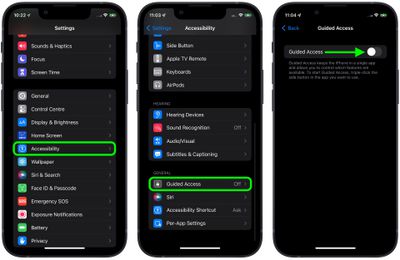
  1. Launch the Settings app on your iPhone or ‌iPad‌.
  2. Tap Accessibility.
  3. Scroll down to "General" and tap Guided Access.
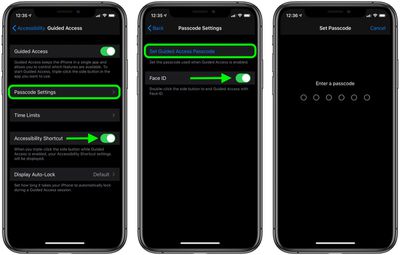
  4. Tap the switch next to Guided Access to toggle it to the green ON position and reveal further options.
    settings

  5. If you use any other accessibility options, turn on the switch next to Accessibility Shortcut so that you can access them when Guided Access is active, using a triple-click of the Home button or Side button (depending on your device).
  6. Tap Passcode Settings, then tap Set Guided Access Passcode to set a special passcode for exiting the feature. Optionally, turn on the toggle next to Face ID or Touch ID (depending on your device) if you want to be able to use biometric authentication to exit Guided Access.
    settings

How to Use Guided Access on iPhone and iPad

  1. Launch the app that you want to limit access to. In our example, we're using the BBC iPlayer app to play a kids' show.
  2. If your device has a Home button, triple-click it to enter the Guided Access initialization screen. If your device has Face ID in lieu of a Home button, triple-click the Side button instead.
    guided access

  3. The screen area will appear within a frame. If you want to make certain areas of the screen inaccessible, simply circle them using your finger.
    guided access

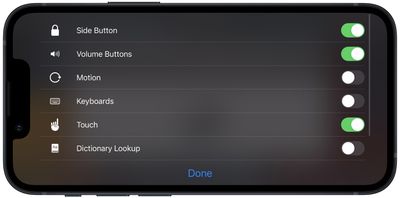
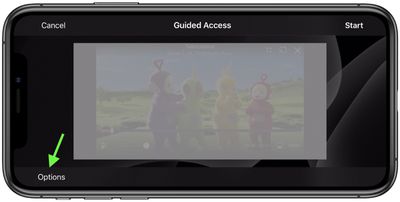
  4. Tap Options in the bottom-left corner, then use the switches to control access to the Side Button, Volume Buttons, Motion, Keyboards, Touch, or to set a Time Limit. In our example, to prevent the video (and audio) from being disrupted by little fingers, we would disable Side Button, Volume, and Touch by toggling off the associated switches.
    guided access

  5. Tap Done.
  6. Tap Start at the top-right corner of the screen to activate Guided Access proper. A banner will briefly appear on the screen advising you that the feature is active.
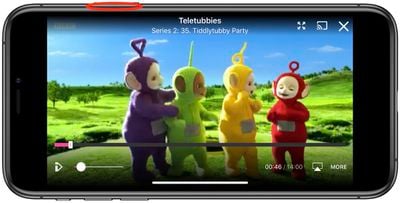
With Guided Access enabled, the only way to leave the app is by double-clicking the Side button to activate ‌Face ID‌, or by triple-clicking the Side/Home button and entering the pre-set passcode. So you can leave your little ones to watch their favorite video or play their favorite game, safe in the knowledge that they can't delete your email account, phone a random number, or worse.

Apart from using the triple-click to bring up the Accessibility Shortcut, you can also add a Guided Access shortcut to your device's Control Center.


Top Rated Comments

57 months ago
Alternative option: don’t handle iPads or the likes to toddlers.

There is an entire world out there for them to discover.
Score: 30 Votes (Like | Disagree)
57 months ago
At this point, the research is pretty damning. Only an idiot allows a baby or toddler any sort of screen time.
Score: 23 Votes (Like | Disagree)
Mac Fly (film) Avatar
57 months ago
Parents: don't give your toddler a tablet.
Score: 17 Votes (Like | Disagree)
57 months ago
I know a few (young) families where they complain they can't get their two year old off their iPad and laugh. Yeah, real funny. If you can't get your two year old off your ipad, and they have a conniption when they can't use it, you are doing something wrong. Have them play outside, get dirty, eat dirt, and play with bugs. That is where the real learning begins.
Score: 13 Votes (Like | Disagree)
yellow8 Avatar
57 months ago
It's been proven that screens are dangerous for kids and it's highly recommended not to show them before at least 3 years old.

DON'T FOLLOW THIS ARTICLE's ADVICE --> JUST DON'T GIVE ANY DEVICE TO TODDLERS.

Your kids will thank you.
Score: 10 Votes (Like | Disagree)
djplong Avatar
57 months ago
It's not access to apps that I worry about. It's damage. Toddlers and babies wouldn't be entrusted with a device covered in glass that costs hundreds of dollars under any other circumstances. This is one area where, if you MUST hand over a device, the cheap Fire tablets with the bumpers all around are a better choice.
Score: 9 Votes (Like | Disagree)

Popular Stories

iOS 27 on iPhone 17 1

iOS 27 Will Add These New Features to Your iPhone

Saturday May 2, 2026 8:43 am PDT by
Apple is expected to unveil iOS 27 during its WWDC 2026 keynote on June 8, and there are already many rumored features and changes for iPhones. The first developer beta of iOS 27 will likely be available immediately following the keynote, and a public beta typically follows in July. Following beta testing, the software update should be released to all users with a compatible iPhone in...
Apple Event Logo

Apple Just Released a New Accessory

Monday May 4, 2026 8:13 am PDT by
Apple today released a new Pride Edition Sport Loop for the Apple Watch. The band features a rainbow design with 11 colors of woven nylon yarns. The new Pride Edition Sport Loop is available to order now on Apple.com and in the Apple Store app in 40mm, 42mm, and 46mm sizes, and it will be available at Apple Store locations starting later this week. In the U.S., the band costs $49. There...
Apple Announces 2026 Pride Band Watch Face and iPhone Wallpaper Article 2

iOS 26.5 Coming Soon With These New Features

Monday May 4, 2026 8:40 am PDT by
iOS 26.5 is expected to be released next week, following more than a month of beta testing. The update is relatively minor, but there are a couple of new features and changes across the operating system that we have recapped below. iOS 26.5 lays the groundwork for end-to-end encryption for RCS in the Messages app and ads in the Apple Maps app, and it will include a new Pride wallpaper and a...
Related Apple News: Education | Ipad | Lifestyle | Travel | Business