find my app iconIn iOS 13 and iPadOS, Apple combined the earlier Find My Friends and ‌Find My‌ iPhone apps into a single app called "‌Find My‌," a sort of catch-all place on your iOS device that you can use for finding whatever you need to find.

‌Find My‌ works much like the apps it replaces. For example, the new app features a section that allows you to locate friends and family members that have shared their location with you, and lets you share your location in kind.

The following steps show you how you can locate your friends using the ‌Find My‌ app.

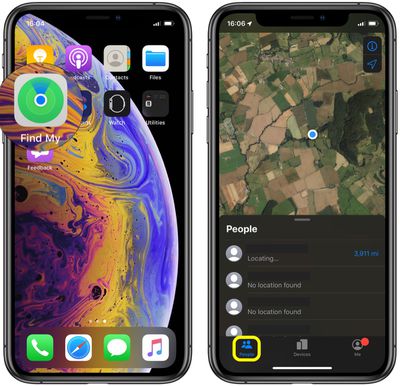
  1. Launch the Find My app on your ‌iPhone‌ or iPad. (The ‌Find My‌ app is available by default on all new iOS devices, but if you've deleted it, you need to download the free app from the App Store.)
  2. Tap the People tab at the bottom of the screen, if it's not already selected.
    how to locate friends using find my 0

  3. Drag up the People card onto the screen with a swipe of your finger to see a list of people who are sharing their location with you, or who have shared their location with you in the past.
  4. Tap a person who has been located to see their whereabouts on the map. (If no location is found, it's possible that person's device is turned off or they have stopped sharing their location with you.)
    how to locate friends using find my 1

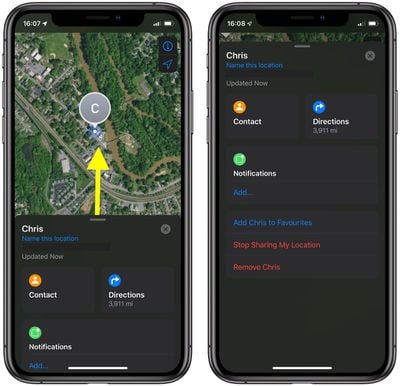
Note that the person's location card appears below the map showing their location, and provides some actions and links that can come in handy. From here, you can access their contact card, as well as directions for getting to their location.

Drag up the person's location card over the map and you'll see additional actions including an option to add them to your favorites, remove them from the People section, or get notifications when they leave or arrive at a specific location.

Tapping Add... under Notifications also gives you the option of notifying your friend when you leave or arrive at a specific notification (assuming you've shared your location with them).


Related Forum: iOS 13

Popular Stories

Aston Martin CarPlay Ultra Screen

Apple's CarPlay Ultra to Expand to These Vehicle Brands Later This Year

Sunday February 1, 2026 10:08 am PST by
Last year, Apple launched CarPlay Ultra, the long-awaited next-generation version of its CarPlay software system for vehicles. Nearly nine months later, CarPlay Ultra is still limited to Aston Martin's latest luxury vehicles, but that should change fairly soon. In May 2025, Apple said many other vehicle brands planned to offer CarPlay Ultra, including Hyundai, Kia, and Genesis. In his Powe...
Apple Logo Black

Apple's Next Launch is 'Imminent'

Sunday February 1, 2026 12:31 pm PST by
The calendar has turned to February, and a new report indicates that Apple's next product launch is "imminent," in the form of new MacBook Pro models. "All signs point to an imminent launch of next-generation MacBook Pros that retain the current form factor but deliver faster chips," Bloomberg's Mark Gurman said on Sunday. "I'm told the new models — code-named J714 and J716 — are slated...
Apple MacBook Pro M4 hero

New MacBook Pros Reportedly Launching Alongside macOS 26.3

Sunday February 1, 2026 5:42 am PST by
Apple is planning to launch new MacBook Pro models with M5 Pro and M5 Max chips alongside macOS 26.3, according to Bloomberg's Mark Gurman. "Apple's faster MacBook Pros are planned for the macOS 26.3 release cycle," wrote Gurman, in his Power On newsletter today. "I'm told the new models — code-named J714 and J716 — are slated for the macOS 26.3 software cycle, which runs from...
iOS 26

iOS 26.3 and iOS 26.4 Will Add These New Features to Your iPhone

Tuesday February 3, 2026 7:47 am PST by
We are still waiting for the iOS 26.3 Release Candidate to come out, so the first iOS 26.4 beta is likely still at least a week or two away. Following beta testing, iOS 26.4 will likely be released to the general public in March or April. Below, we have recapped known or rumored iOS 26.3 and iOS 26.4 features so far. iOS 26.3 iPhone to Android Transfer Tool iOS 26.3 makes it easier...
14 inch MacBook Pro Keyboard

Apple Changes How You Order a Mac

Saturday January 31, 2026 10:51 am PST by
Apple recently updated its online store with a new ordering process for Macs, including the MacBook Air, MacBook Pro, iMac, Mac mini, Mac Studio, and Mac Pro. There used to be a handful of standard configurations available for each Mac, but now you must configure a Mac entirely from scratch on a feature-by-feature basis. In other words, ordering a new Mac now works much like ordering an...