How to Link Shazam to Your Spotify Account - MacRumorsOpen MenuShow RoundupsShow Forums menuVisit ForumsOpen Sidebar
Skip to Content

How to Link Shazam to Your Spotify Account

by

Shazam is an Apple-owned popular service that can identify the names and lyrics of songs, music videos, TV shows, and more, simply by listening to and deciphering whatever is playing.
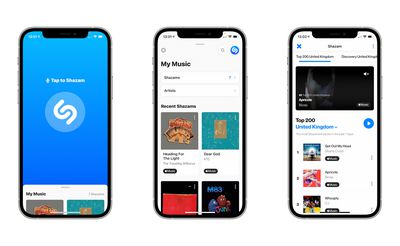
shazam 14
After you've identified songs in the Shazam app by pressing the big Shazam button, you can use streaming services like Spotify and Apple Music to listen to them. In this article, we're going to show you how to link Shazam to your Spotify account.

  1. First, make sure you have the Spotify and Shazam apps downloaded on your iPhone, iPad, or iPod touch, otherwise you won't be able to connect the two services. Both apps are available on the App Store.
    shazam spotify app store

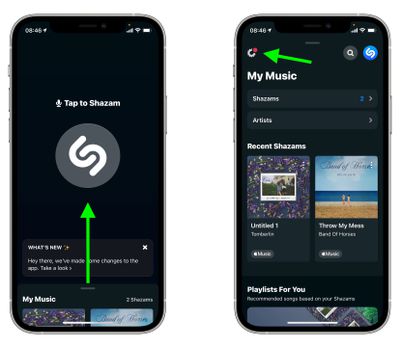
  2. Next, launch the Shazam app on your iOS device, then swipe up to My Music from the main Shazam screen and tap the Settings button (the cog icon in the upper left corner of the screen).
    Shazam

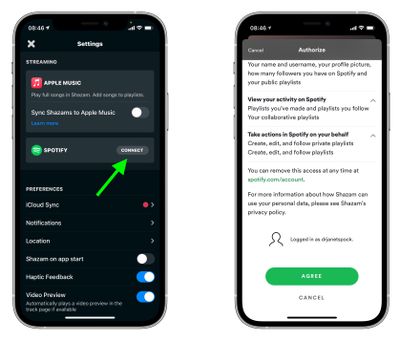
  3. In Settings, tap Connect next to Spotify, then when Spotify opens, scroll down and tap the green Agree button to authorize the link.

    Shazam

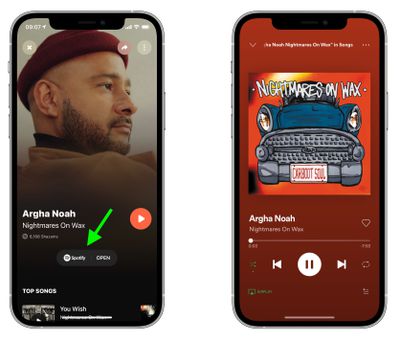
Once you've connected Shazam to your Spotify account, you can listen to your Shazams in full. In Shazam, tap the play button next to a song to listen to a 30-second preview. To listen to the whole song in Spotify, tap Spotify next to a Shazam or when viewing a Shazam in fullscreen.
Shazam
You can also get Shazam to create a "My Shazam Tracks" playlist in Spotify. Simply go into Shazam's Settings and toggle the switch next to Sync Shazams to Spotify to the green ON position. Once that's done, you'll be able to listen to all your previous Shazams in the "My Shazam Tracks" playlist in the Spotify app.


Top Rated Comments

67 months ago
How about Youtube Music?
Score: 1 Votes (Like | Disagree)
dyvog Avatar
67 months ago

For someone like myself that never uses Shazam or SoundHound, can someone tell me one or two reasons why it's so helpful and should be a part of my listening experience?
you can ask Siri-
"Hey Siri, what am I Listening to?" or "Hey Siri, what is this song?" and hold your phone near an audio source, it many cases it should be able to identify the song in about 15 seconds.
Score: 1 Votes (Like | Disagree)
67 months ago
I’ve found that, for my uses, SoundHound works a lot better than Shazam. Easy integration with Spotify too!
Score: 1 Votes (Like | Disagree)

Popular Stories

iPhone 18 Pro Deep Red Feature

iPhone 18 Pro Launching Later This Year With These 12 New Features

Wednesday March 18, 2026 7:39 am PDT by
While the iPhone 18 Pro and iPhone 18 Pro Max are not expected to launch for another six months or so, there are already plenty of rumors about the devices. It was initially reported that the iPhone 18 Pro models would have fully under-screen Face ID, with only a front camera visible in the top-left corner of the screen. However, the latest rumors indicate that only one Face ID component...
ios 26 4 yellow

Here Are Apple's Release Notes for iOS 26.4

Wednesday March 18, 2026 11:56 am PDT by
Apple provided developers and public beta testers with the release candidate versions of iOS 26.4 and iPadOS 26.4, which means we're going to see a public launch as soon as next week. The RC versions of the software include Apple's official release notes, giving us final details on what's included in the update. Apple Music - Playlist Playground (beta) generates a playlist from your...
Apple Logo Sketch Feature

Apple Has Now Unveiled Eight New Products This Month

Tuesday March 17, 2026 9:25 am PDT by
Apple has unveiled a whopping eight new products so far this March, including an iPhone 17e, iPad Air models with the M4 chip, MacBook Air models with the M5 chip, MacBook Pro models with M5 Pro and M5 Max chips, the all-new MacBook Neo, an updated Studio Display, a higher-end Studio Display XDR, and now the AirPods Max 2 this week. iPhone 17e features the same overall design as the iPhone...
Related Apple News: Health | Sport | Reviews | Business | Iphone