

iPhone 15: How to Take Portrait Mode Photos - MacRumorsOpen MenuShow RoundupsShow Forums menuVisit ForumsOpen Sidebar
Skip to Content

iPhone 15: How to Take Portrait Mode Photos

by

On iPhone 15 models, Apple has added a new way to take portrait photos. This article explains what's changed.
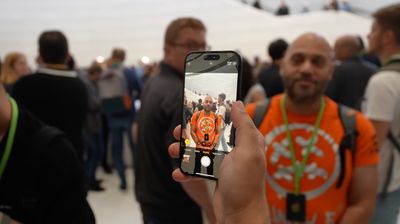
iphone 15 portrait photo
Apple's Portrait Mode has become a popular way of taking impressive shots using a depth-of-field effect known as bokeh, allowing iPhone users to shoot a photo that keeps the subject sharp with a blurred background.

With the launch of the iPhone 15, Apple has upped its portrait game further thanks to an improved camera system that makes it easier to capture portraits with greater detail and provides better low light performance for portraits.

Not only that, iPhone 15 user can now take portraits without even having to switch to Portrait mode. Here's how it's done.

  1. With the Camera app open, aim the camera at a person, dog, or cat.
  2. Wait for a circular f icon to appear in the bottom-left corner of the viewfinder. If the icon doesn’t appear, tap a subject in the viewfinder to focus on it.
  3. Tap the f icon so that a yellow circle surrounds it.
  4. When you're ready, tap the shutter button to take the photo with the Portrait effect.
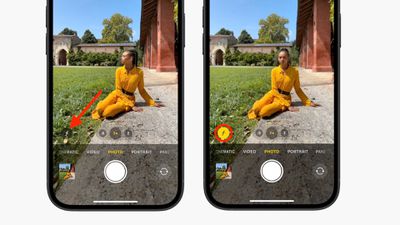
iphone 15 portrait

That's all there is to it. Your portrait picture is now ready to view by tapping it in the corner of the Camera interface.

The next-generation Portrait mode that is exclusive to iPhone 15 models also allows you to turn a photo into a Portrait with depth information after the image has been taken. Check out our dedicated how-to article to learn how it's done.


Related Forum: iPhone

Popular Stories

iOS 27 on iPhone 17 1

iOS 27 Will Add These New Features to Your iPhone

Saturday May 2, 2026 8:43 am PDT by
Apple is expected to unveil iOS 27 during its WWDC 2026 keynote on June 8, and there are already many rumored features and changes for iPhones. The first developer beta of iOS 27 will likely be available immediately following the keynote, and a public beta typically follows in July. Following beta testing, the software update should be released to all users with a compatible iPhone in...
Apple Event Logo

Apple Just Released a New Accessory

Monday May 4, 2026 8:13 am PDT by
Apple today released a new Pride Edition Sport Loop for the Apple Watch. The band features a rainbow design with 11 colors of woven nylon yarns. The new Pride Edition Sport Loop is available to order now on Apple.com and in the Apple Store app in 40mm, 42mm, and 46mm sizes, and it will be available at Apple Store locations starting later this week. In the U.S., the band costs $49. There...
Apple Announces 2026 Pride Band Watch Face and iPhone Wallpaper Article 2

iOS 26.5 Coming Soon With These New Features

Monday May 4, 2026 8:40 am PDT by
iOS 26.5 is expected to be released next week, following more than a month of beta testing. The update is relatively minor, but there are a couple of new features and changes across the operating system that we have recapped below. iOS 26.5 lays the groundwork for end-to-end encryption for RCS in the Messages app and ads in the Apple Maps app, and it will include a new Pride wallpaper and a...
Related Apple News: News | Iphone 16 Rumors Roundup | Apple Vision Pro | Apple Events | Find My Return Lost Items
















