

Apple Maps in iOS 18 introduces two helpful new features: a centralized Library for saved content and the ability to add personal notes to locations. Here's how to take advantage of these new tools.

Using the New Library
Apple's iOS 18 update brings significant improvements to the Maps app, and streamlines the process of saving and organizing your favorite locations. Building on the existing Guides feature, the new version introduces a simple "+" button on location listings for quick saving.
A new Library menu now houses all of your saved places, including those from Guides and Pinned locations. The Library also automatically incorporates previously saved locations, offering a comprehensive view of your favorite spots.
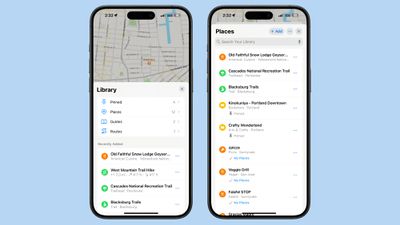
You can individually search through your Pinned, Places, Guides, and Routes collections, and use the three-dot button to sort them by date added, name, or distance, and toggle between list and grid views. The update also enables direct saving of new locations from within the Library itself, via the + Add button.
In summary, the new Library consolidates content that was previously spread across different sections of the app, which makes your saved place information a lot more accessible.
Adding Notes to Locations
iOS 18 also introduces the ability to add personal notes to any location in Apple Maps. This feature allows you to jot down reminders, impressions, or any other information you want to associate with a specific place. To add a note:
- Search for or tap on a location in Maps.
- Tap the More button (three dots) in the location's information card.
- Tap Add a Note.
- Type your note, then tap Done.
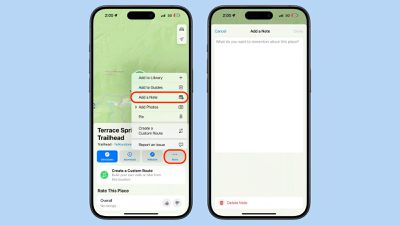
Your notes are private and stored only on devices logged into your Apple account. This feature can be particularly useful for remembering details about restaurants, marking meeting spots, or keeping track of places you want to visit.
These new features in iOS 18's Maps app offer enhanced organization and personalization, and there are other additional tools checking out that we've covered elsewhere, including custom routes, hiking trails, and a new Search Here function.
















Top Rated Comments
Just give me a setting for “North at top” as in any printed map
https://www.zdnet.com/article/us-cell-carriers-selling-access-to-real-time-location-data/
Apple Maps is OK for getting to familiar places. However it left me stranded far too many times.
Just in the last two years:
- asked it for a gas stop before dropping off a rental. When resumed the trip, it routed me to a service drive at the wrong end of the airport. Took me an extra 25 minutes to get through the traffic. Barely made my flight.
- Went to a first meeting with a customer. AM gets me to the opposite side of a major freeway - I could see their office across the road, but had to drive a few miles and turn around to get there.
- Another customer moved their operations to a new building in 2021. Apple Maps still shows old location. They submitted error reports to Apple. I submitted error reports to Apple. Still showing old address as of last year.
- Just this past Sunday - driving back from a getaway weekend upstate, wanted to stop for lunch at a restaurant that we’ve been to a dozen times before. AM could not recognize the name or could not find it several times in a row. Finally I gave up and asked Google Maps, found it right away.
When it does work it’s great and super convenient. And I like the design more. But when I need to go to an unfamiliar location and it’s important to get there on time, I use Google Maps.
YMMV. Take more than one map everywhere.