iOS 18: Using the New 'Search Here' Feature in Apple Maps - MacRumorsOpen MenuShow RoundupsShow Forums menuVisit ForumsOpen Sidebar
Skip to Content

iOS 18: Using the New 'Search Here' Feature in Apple Maps

by

In iOS 18, Apple Maps has gained a new "Search here" button that makes it much easier to find what you're looking for in areas that aren't your current location or when you're exploring any new place on the map.
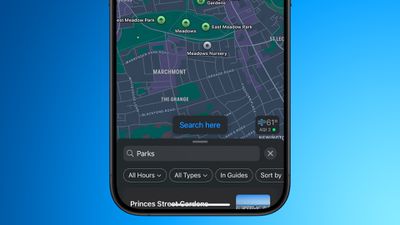
apple maps search here ios 18 2
In earlier versions of iOS, if you search nearby for, say, gas stations or restaurants in Apple Maps, and then drag the map to another location with your finger, it will usually (but not always) auto-populate the new area with search results for the same request.

That behavior hasn't changed in iOS 18, but what you now get in addition is a "Search here" button that gives you more manual fine-grained control of the area in which to search. This is especially useful if you adjust the zoom level of the map, or scroll away only slightly from the original search – two instances where auto-populating results can be spotty or sometimes not appear at all.

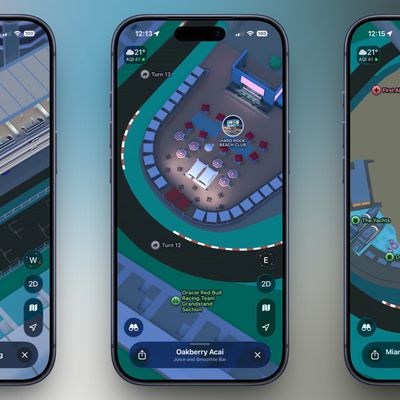
Google Maps has had this feature for years, so it's good to see that Apple Maps has finally adopted it. iOS 18 also adds other improvements to Apple Maps, including topographic maps complete with trail networks and hikes (a feature that Apple first brought to the Apple Watch last year), as well as options to save favorite trails, download them for offline use, add notes, and get information like elevation and length.
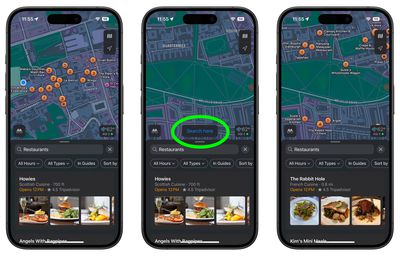
maps
iOS 18 is currently in public beta and will be officially released in the fall, around mid-September, when the iPhone 16 series is launched.

Related Forums: iOS 18, iPadOS 18

Top Rated Comments

21 months ago
It would be nice if “add stop” would search along the route you’re already driving. Trying to find gas stations or rest stops does not work. At least not in Europe. Maps always searches far away from the highways, easily adding 15 to 25 min to the route. No idea why it’s this stupid.
Score: 12 Votes (Like | Disagree)
UltimateSyn Avatar
21 months ago
This is about 15 years overdue, but I'll (gladly) take it. Last major annoyance of Apple Maps for me gets resolved with this one.
Score: 8 Votes (Like | Disagree)
21 months ago
need to get rid of garbage that is Yelp
Score: 6 Votes (Like | Disagree)
21 months ago
Apple Maps almost never auto-populates the new map area for me. I don’t know why. I often had to switch to Google Maps because of this. So I’m very glad for this feature.

And this is more of a Siri thing, but I also really wish I could ask Siri to navigate me to a specific place in a specific city—eg. “Siri, navigate to Home Depot in West Hills”. But she never understands this, so I always have to look at a list of results on the CarPlay screen, and I don’t know if it’s just me but these are almost not useful at all. It gives me results of all locations in like a 100 mile radius, and only shows the first part of the addresses—number and street and NOT the city—and who memorizes the street number of businesses? And the location markers on the map are not tap-able and don’t seem to visually correspond to locations on the list, so I’m not actually sure what the purpose of the markers are. Nor can I zoom in on the map. So it’s often near impossible to identify which location is the one I want. So that’s the other thing—in Maps, show the more relevant information in list results, like the city location instead of reviews, and have the map location markers be tap-able or at least correspond to list results and be zoomable.
Maybe it’s just me using it wrong, but I really wonder if the engineers are actually using their product in depth.
Score: 4 Votes (Like | Disagree)
21 months ago
This was much needed, I always wondered how they didn't have this in the first place for many many years
Score: 2 Votes (Like | Disagree)
21 months ago
Great! This made sense to add about 10 years ago. Certainly 5 years ago. Now, if Apple could start labeling all businesses when searching on a map. And start tagging exit numbers on highways. Nothing major…
Score: 2 Votes (Like | Disagree)

Popular Stories

imac video apple feature

Apple Released Yet Another New Product Today

Friday March 20, 2026 2:39 pm PDT by
Apple has unveiled a whopping nine new products so far this March, including an iPhone 17e, iPad Air models with the M4 chip, MacBook Air models with the M5 chip, MacBook Pro models with M5 Pro and M5 Max chips, the all-new MacBook Neo, an updated Studio Display, a higher-end Studio Display XDR, AirPods Max 2, and now the Nike Powerbeats Pro 2. iPhone 17e features the same overall design as...
iPhone 18 Pro Deep Red Feature

iPhone 18 Pro Launching Later This Year With These 12 New Features

Wednesday March 18, 2026 7:39 am PDT by
While the iPhone 18 Pro and iPhone 18 Pro Max are not expected to launch for another six months or so, there are already plenty of rumors about the devices. It was initially reported that the iPhone 18 Pro models would have fully under-screen Face ID, with only a front camera visible in the top-left corner of the screen. However, the latest rumors indicate that only one Face ID component...
ios 26 4 pastel

iOS 26.4: Top 10 New Features Coming to Your iPhone

Friday March 20, 2026 2:44 pm PDT by
iOS 26.4 isn't the major update with new Siri features that we hoped for, but there are some useful quality of life improvements, and a little bit of fun with an AI playlist generator and new emoji characters. Playlist Playground - Apple Music has a Playlist Playground option that lets you generate playlists from text-based descriptions. You can include moods, feelings, activities, or...
Related Apple News: Travel | Reviews | Mac | South Africa | Culture