One frequent complaint of smartphone users is the limited amount of battery life our tech devices have. With the constant trend toward making devices thinner and lighter, battery life is a key tradeoff to be considered, and some users find their devices not lasting as long as they'd prefer.

For those pushing their devices to the limit, Apple has added a new feature to iOS 9 that is designed to help you conserve those last few drops of juice when you wont be able to charge your iPhone anytime soon. The new feature is known as Low Power Mode, and it can increase your battery life up to three hours but at the expense of some functions of your device. It is only available on iPhone devices running iOS 9.
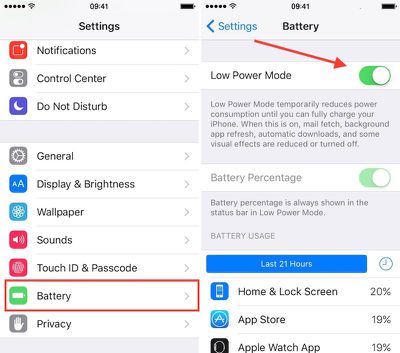
Low Power Mode
Enabling Low Power Mode only takes a few steps.

  1. Open the Settings app on your iPhone.
  2. Select Battery from the menu list.
  3. Toggle Low Power Mode to the On position.
  4. The battery icon will turn yellow to indicate that you are using Low Power Mode.

Low Power Mode reduces your iPhone's performance and cuts out some background activities. For example, mail must be fetched manually, background app refresh is disabled, and motion and brightness are reduced.

Benchmarks have shown the iPhone's CPU performance with Low Power Mode on is significantly reduced in an effort to save on power consumption, so while simple tasks may continue to work just fine on an iPhone in Low Power Mode, more demanding ones may become sluggish.

You don't have to keep Low Power Mode on all of the time; you can manually shut it off whenever you want. However, the general impression of users has been that the real-world slowdown is not so severe that you can't continue to use your iPhone.

With iOS 9, you will receive a prompt when your iOS device goes below 20 percent of its battery power left. The popup will allow you to quickly toggle Low Power Mode on so you can still use your device for only the most necessary of functions until you are able to recharge it.

This feature might be familiar to Apple Watch owners, as Power Reserve is a somewhat similar feature designed to allow the wrist-worn device to continue functioning as a basic watch as the battery drains toward zero by cutting off all other functions of the device.

Low Power Mode is a nice addition to iOS 9 for improving the performance of your iPhone's battery.


Related Forum: iOS 9

Top Rated Comments

KALLT Avatar
134 months ago
A shame that they didn’t include an option to automatically enable it without a popup. I also think that they should have added it to the control centre.
Score: 10 Votes (Like | Disagree)
Westside guy Avatar
134 months ago
It's too bad you can't just pick a battery level and tell iOS to automatically turn on Low Power Mode when it hits that point.

I'll go out on a limb and predict this idea will be in a new jailbreak tweak within a few days of iOS 9 being jailbroken, because it's so bleeding obvious.
Score: 4 Votes (Like | Disagree)
simmonsj Avatar
134 months ago
Looks like IOS9 turns low power mode off automatically.

I left my phone in low power mode last night, but charging. This morning, I missed the exact message, but it had automatically turned off low power mode and said something like "Low Power mode turned off because you now have sufficient battery charge".

Edit: Thanks to the other posters who have confirmed this happens when your phone hits 80% charge.
Score: 2 Votes (Like | Disagree)
rediffusion Avatar
134 months ago
I wish you could set specific times of the day to automatically go into Low Battery mode (i.e. night time, when I'm at work, etc)
Score: 2 Votes (Like | Disagree)
JohnApples Avatar
134 months ago
A shame that they didn’t include an option to automatically enable it without a popup. I also think that they should have added it to the control centre.
That's actually a great, simple idea. I would much rather have a Low Power Mode in CC than the Camera, especially since my Camera app is in my dock.
Score: 2 Votes (Like | Disagree)
macsba Avatar
134 months ago
Wonder why this feature hasn't been added to both the iPad and iPod Touch.
Score: 2 Votes (Like | Disagree)

Popular Stories

iOS 26

iOS 26.4 and iOS 27 Features Revealed in New Leak

Friday December 12, 2025 10:56 am PST by
Macworld's Filipe Espósito today revealed a handful of features that Apple is allegedly planning for iOS 26.4, iOS 27, and even iOS 28. The report said the features are referenced within the code for a leaked internal build of iOS 26 that is not meant to be seen by the public. However, it appears that Espósito and/or his sources managed to gain access to it, providing us with a sneak peek...
iOS 26

iOS 26.2 Coming Soon With These 8 New Features on Your iPhone

Thursday December 11, 2025 8:49 am PST by
Apple seeded the second iOS 26.2 Release Candidate to developers earlier this week, meaning the update will be released to the general public very soon. Apple confirmed iOS 26.2 would be released in December, but it did not provide a specific date. We expect the update to be released by early next week. iOS 26.2 includes a handful of new features and changes on the iPhone, such as a new...
iOS 26

Apple Releases iOS 26.2 With Alarms for Reminders, Lock Screen Changes, Enhanced Safety Alerts and More

Friday December 12, 2025 10:10 am PST by
Apple today released iOS 26.2, the second major update to the iOS 26 operating system that came out in September, iOS 26.2 comes a little over a month after iOS 26.1 launched. ‌iOS 26‌.2 is compatible with the ‌iPhone‌ 11 series and later, as well as the second-generation ‌iPhone‌ SE. The new software can be downloaded on eligible iPhones over-the-air by going to Settings >...
AirPods Pro Firmware Feature

Apple Releases New Firmware for AirPods Pro 2 and AirPods Pro 3

Thursday December 11, 2025 11:28 am PST by
Apple today released new firmware designed for the AirPods Pro 3 and the prior-generation AirPods Pro 2. The AirPods Pro 3 firmware is 8B30, up from 8B25, while the AirPods Pro 2 firmware is 8B28, up from 8B21. There's no word on what's include in the updated firmware, but the AirPods Pro 2 and AirPods Pro 3 are getting expanded support for Live Translation in the European Union in iOS...
macOS Tahoe 26 Thumb

Apple Releases macOS Tahoe 26.2 With Edge Light

Friday December 12, 2025 10:08 am PST by
Apple today released macOS Tahoe 26.2, the second major update to the macOS Tahoe operating system that came out in September. macOS Tahoe 26.2 comes five weeks after Apple released macOS Tahoe 26.1. Mac users can download the macOS Tahoe update by using the Software Update section of System Settings. macOS Tahoe 26.2 includes Edge Light, a feature that illuminates your face with soft...
AirTag 2 Mock Feature

Apple AirTag 2: Four New Features Found in iOS 26 Code

Thursday December 11, 2025 10:31 am PST by
The AirTag 2 will include a handful of new features that will improve tracking capabilities, according to a new report from Macworld. The site says that it was able to access an internal build of iOS 26, which includes references to multiple unreleased products. Here's what's supposedly coming: An improved pairing process, though no details were provided. AirTag pairing is already...
ipados 26 1 slide over

Apple Releases iPadOS 26.2 With Multitasking Improvements

Friday December 12, 2025 10:09 am PST by
Apple today released iPadOS 26.2, the second major update to the iPadOS 26 operating system released in September. iPadOS 26.2 comes a month after iPadOS 26.1. The new software can be downloaded on eligible iPads over-the-air by going to Settings > General > Software Update. iPadOS 26.2 continues with the multitasking improvements that were added with iPadOS 26.1. You can now drag and...
bug security vulnerability issue fix larry

Update Now: iOS 26.2 Fixes 20+ Security Vulnerabilities

Friday December 12, 2025 11:11 am PST by
Apple today released iOS 26.2, iPadOS 26.2, and macOS 26.2, all of which introduce new features, bug fixes, and security improvements. Apple says that the updates address over 20 vulnerabilities, including two bugs that are known to have been actively exploited. There are a pair of WebKit vulnerabilities that could allow maliciously crafted web content to execute code or cause memory...