

iOS 26: Restore Safari's Old Layout From iOS 18 - MacRumorsOpen MenuShow RoundupsShow Forums menuVisit ForumsOpen Sidebar
Skip to Content

iOS 26: Restore Safari's Old Layout From iOS 18

by

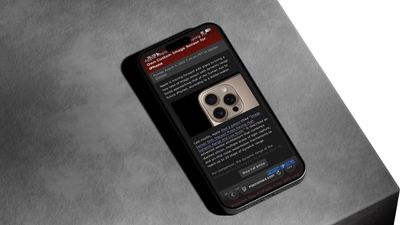
Missing the familiar Safari design from iOS 18? In iOS 26, currently in beta, Apple has learned from past criticism and made it easy to ditch the new Compact layout in favor of the classic tab layouts you may well prefer.
safari iphone
iOS 26 introduces a new "Compact" Safari design as the default, but Apple has included two additional layout options that essentially restore the iOS 18 experience. Here's how to get your old Safari back in just a few taps.

How to Switch to the iOS 18 Layouts

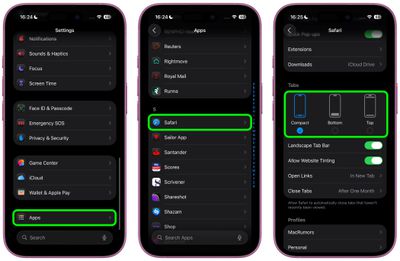
  1. Open Settings on your iPhone.
  2. Scroll down and tap Apps, then locate and tap Safari in the alphabetical list.
  3. Scroll down to the "Tabs" section.
  4. Select either Bottom or Top instead of Compact.
safari tabs settings ios

Both the Bottom and Top options function exactly like the Safari tab bar layouts from iOS 18, so you don't need to relearn how to navigate between tabs or access your bookmarks.

What's the Difference?

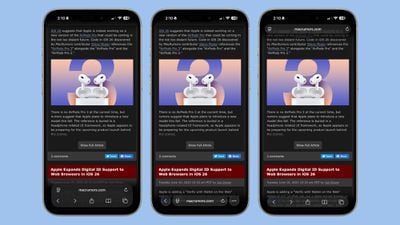
  • Compact Layout (Default): Hides the share, bookmark, and tab settings behind a three-dot button on the right side of the URL bar. It saves screen space but requires an extra tap to access frequently used features.
  • Bottom Layout: Places all Safari controls at the bottom of the screen, making them easily reachable with your thumb during one-handed use.
  • Top Layout: Keeps the traditional desktop-style layout with controls at the top of the browser.
ios 26 safari design dark mode

iOS 26's three Tab options from left to right: Bottom, Compact, Top

All three options now feature Apple's new Liquid Glass translucent design that blends the URL bar and buttons into the background of whatever webpage you're viewing. The translucent effect works in both Light and Dark Mode, and auto-adapts to match the webpage's color scheme.

Apple Learned From Its Mistake

This isn't the first time Apple has rethought Safari's design after user feedback. During iOS 15's beta testing, Apple initially changed Safari's design without providing layout alternatives and received full-throated negative feedback in return. It ultimately added options to revert to the original design. This time, Apple has gotten ahead of potential complaints by building choice directly into iOS 26, which will see a general release in September 2025.


Tag: Safari

Top Rated Comments

10 months ago
I just want to know which layout doesn't drain my battery by 1% every minute just reading MacRumors content.
Score: 8 Votes (Like | Disagree)
longofest Avatar
10 months ago

What lunatic puts the address bar to the bottom when every browser since Netscape 1.0 had it placed at the top.
The lunatics that realized that on a phone, your fingers/thumbs are at the bottom of the screen and so its easier to tap on the URL bar when its at the bottom of the window rather than the top for mobile browsers.
Score: 6 Votes (Like | Disagree)
n-evo Avatar
10 months ago
I’m really bummed out by the fact Safari for Mac doesn’t have a compact option anymore.
Score: 6 Votes (Like | Disagree)
transpo1 Avatar
10 months ago
Thank you, Apple, for giving us a choice in this matter. Now give us the choice to fully revert Photos to the iOS17 layout.

Again, thank you.
Score: 6 Votes (Like | Disagree)
10 months ago
Gotta say, the new design is much cleaner. Everything gets out of your way.

I’m not too sure how those who must have the address bar at the top manage, for me everything is within access of my thumb.

Good work.
Score: 4 Votes (Like | Disagree)
10 months ago
Good to see that users are given an option to choose from. I prefer the top version, however don't mind the compact version too.
Score: 3 Votes (Like | Disagree)

Popular Stories

iOS 27 on iPhone 17 1

iOS 27 Will Add These New Features to Your iPhone

Saturday May 2, 2026 8:43 am PDT by
Apple is expected to unveil iOS 27 during its WWDC 2026 keynote on June 8, and there are already many rumored features and changes for iPhones. The first developer beta of iOS 27 will likely be available immediately following the keynote, and a public beta typically follows in July. Following beta testing, the software update should be released to all users with a compatible iPhone in...
Apple Event Logo

Apple Just Released a New Accessory

Monday May 4, 2026 8:13 am PDT by
Apple today released a new Pride Edition Sport Loop for the Apple Watch. The band features a rainbow design with 11 colors of woven nylon yarns. The new Pride Edition Sport Loop is available to order now on Apple.com and in the Apple Store app in 40mm, 42mm, and 46mm sizes, and it will be available at Apple Store locations starting later this week. In the U.S., the band costs $49. There...
Apple Announces 2026 Pride Band Watch Face and iPhone Wallpaper Article 2

iOS 26.5 Coming Soon With These New Features

Monday May 4, 2026 8:40 am PDT by
iOS 26.5 is expected to be released next week, following more than a month of beta testing. The update is relatively minor, but there are a couple of new features and changes across the operating system that we have recapped below. iOS 26.5 lays the groundwork for end-to-end encryption for RCS in the Messages app and ads in the Apple Maps app, and it will include a new Pride wallpaper and a...
Related Apple News: Lifestyle | Sport | News | Mac | Education
















