Apple's iOS 26 update brings an unexpected camera trick to AirPods 4 and AirPods Pro 2 – the ability to control iPhone photo and video capture using AirPods stem gestures. The new Camera Remote feature essentially turns your wireless earbuds into a handy hands-free photography tool. Keep reading to learn how it works.
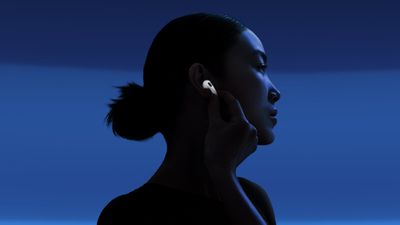
airpods 4 stem
New in iOS 26, Apple's Camera Remote feature for AirPods offers a neat solution in scenarios where standard phone photography might fall short. If you've ever used the Camera Remote app for Apple Watch, it offers similar benefits. When taking group photos, you can position your iPhone at the perfect angle, step into the frame, and trigger the shot with a simple press of your AirPods. It can also help capture steadier footage when shooting video, since you're not handling the camera and don't need to work with on-screen controls.

Getting the Beta Software

Before you can access the Camera Remote feature, you'll need to have the appropriate beta software on your devices. First, install iOS 26 beta or iPadOS 26 beta on your iPhone/iPad by following these instructions.

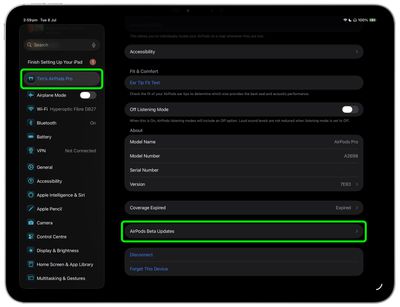
Once you have your device running the iOS 26/iPadOS 26 beta, you need to give Apple permission to install beta firmware on your AirPods.

  1. Connect your AirPods to your iPhone or iPad, then open Settings ➝ [Your Name]'s AirPods.
  2. Scroll to the bottom of the menu and select AirPods Beta Updates.
    settings

  3. Toggle the switch next to AirPods Beta Updates to the green ON position.
    settings

After you've completed these steps, the firmware update will be installed automatically when your AirPods are in their charging case and near to your iPhone/iPad/Mac. This could take anywhere from a few seconds to several minutes, so be patient.

Enabling Camera Remote

After updating the firmware of your AirPods 4 or AirPods Pro 2, you can enable and configure the Camera Remote feature:

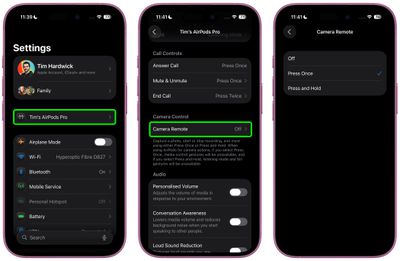
  1. Connect your AirPods to your iPhone, then open Settings.
  2. Tap your AirPods name under the Apple Account banner.
  3. Scroll down to "Camera Control", then tap Camera Remote.
  4. Choose your preferred gesture: Press Once or Press and Hold.
settings

The "Press Once" option responds to a single tap on your AirPods stem, while "Press and Hold" requires you to maintain pressure on the stem to activate the camera.

Using Camera Remote

Once enabled, the feature works seamlessly with the built-in Camera app. Wearing at least one paired AirPod, simply open the Camera app and select either Photo or Video mode, then frame your shot as you normally would. When you're ready to capture, use your chosen AirPods gesture to trigger the camera remotely.

camera ios 26 e1756384193773
When taking photos, your selected gesture triggers a 3-second countdown, after which the camera captures a burst of 10 photos. This gives you multiple shots to choose from, increasing your chances of getting the perfect image. When shooting video, the gesture starts and stops video recording, functioning much like a wireless record button.

The Camera Remote feature works at any distance within your AirPods' Bluetooth range, making it handy for wide-angle shots and creative photography where you need to be some distance away from your device.

And that's it. iOS 26 also brings additional AirPods features and improvements like auto-pause audio when asleep and improved call quality. A general release of iOS 26 is expected around mid-September.


Related Roundups: AirPods 4, AirPods Pro 3
Related Forum: AirPods

Top Rated Comments

mrmax86 Avatar
16 weeks ago
But then you're wearing AirPods in the picture...what am I missing here?
Score: 4 Votes (Like | Disagree)
jayducharme Avatar
16 weeks ago

But then you're wearing AirPods in the picture...what am I missing here?
You're wearing AirPods, and the photo will be of you with a hand on your ear. I don't see how this can be called "hands-free".
Score: 3 Votes (Like | Disagree)
Hank001 Avatar
16 weeks ago
You can already take a photo handsfree, without any special software. Simply tell Siri to turn the volume up. There was even an article about it on this very site ('https://www.macrumors.com/how-to/remotely-control-iphone-camera-no-apple-watch/'). Bit strange that the journalist, sorry, author of the article doesn't search the archives before writing and posting.
Score: 3 Votes (Like | Disagree)
Imperial926 Avatar
16 weeks ago

You're wearing AirPods, and the photo will be of you with a hand on your ear. I don't see how this can be called "hands-free".
Read the article - pressing the AirPods starts a countdown so you have time to move your hand away.
Score: 2 Votes (Like | Disagree)
BGPL Avatar
16 weeks ago
Why. Scrapin' the bottom of the idea barrel. Sure saves a lot of time not having to push the pesky volume button with my finger that's already next to it.
Score: 1 Votes (Like | Disagree)
freezelighter Avatar
16 weeks ago
In Q4 2025, I expect cameras to be controlled by thought, through neuralink or at least gestures.
Score: 1 Votes (Like | Disagree)

Popular Stories

iOS 26

iOS 26.4 and iOS 27 Features Revealed in New Leak

Friday December 12, 2025 10:56 am PST by
Macworld's Filipe Espósito today revealed a handful of features that Apple is allegedly planning for iOS 26.4, iOS 27, and even iOS 28. The report said the features are referenced within the code for a leaked internal build of iOS 26 that is not meant to be seen by the public. However, it appears that Espósito and/or his sources managed to gain access to it, providing us with a sneak peek...
Apple Foldable Thumb

Leak Reveals Foldable iPhone Details

Monday December 15, 2025 9:09 am PST by
The first foldable iPhone will feature a series of design and hardware firsts for Apple, according to details shared by the Weibo leaker known as Digital Chat Station. According to a new post, via machine translation, Apple is developing what the leaker describes as a "wide foldable" device, a term used to refer to a horizontally oriented, book-style foldable with a large internal display....
apple beta 26 lineup

Apple Leak Confirms Work on Foldable iPhone, AirTag 2, and Dozens More Devices

Monday December 15, 2025 2:05 pm PST by
Last week, details about unreleased Apple devices and future iOS features were shared by Macworld. This week, we learned where the information came from, plus we have more findings from the leak. As it turns out, an Apple prototype device running an early build of iOS 26 was sold, and the person who bought it shared the software. The OS has a version number of 23A5234w, and the first...
iOS 26

Apple Releases iOS 26.2 With Alarms for Reminders, Lock Screen Changes, Enhanced Safety Alerts and More

Friday December 12, 2025 10:10 am PST by
Apple today released iOS 26.2, the second major update to the iOS 26 operating system that came out in September, iOS 26.2 comes a little over a month after iOS 26.1 launched. ‌iOS 26‌.2 is compatible with the ‌iPhone‌ 11 series and later, as well as the second-generation ‌iPhone‌ SE. The new software can be downloaded on eligible iPhones over-the-air by going to Settings >...
iOS 26

iOS 26.2 Coming Soon With These 8 New Features on Your iPhone

Thursday December 11, 2025 8:49 am PST by
Apple seeded the second iOS 26.2 Release Candidate to developers earlier this week, meaning the update will be released to the general public very soon. Apple confirmed iOS 26.2 would be released in December, but it did not provide a specific date. We expect the update to be released by early next week. iOS 26.2 includes a handful of new features and changes on the iPhone, such as a new...
Apple Logo Top Half

Early iOS 26 Software Leak Uncovers Dozens of Upcoming Apple Features

Monday December 15, 2025 3:05 pm PST by
Software from an iPhone prototype running an early build of iOS 26 leaked last week, giving us a glimpse at future Apple devices and iOS features. We recapped device codenames in our prior article, and now we have a list of some of the most notable feature flags that were found in the software code. In some cases, it's obvious what the feature flags are referring to, while some are more...
macOS Tahoe 26 Thumb

Apple Releases macOS Tahoe 26.2 With Edge Light

Friday December 12, 2025 10:08 am PST by
Apple today released macOS Tahoe 26.2, the second major update to the macOS Tahoe operating system that came out in September. macOS Tahoe 26.2 comes five weeks after Apple released macOS Tahoe 26.1. Mac users can download the macOS Tahoe update by using the Software Update section of System Settings. macOS Tahoe 26.2 includes Edge Light, a feature that illuminates your face with soft...
AirPods Pro Firmware Feature

Apple Releases New Firmware for AirPods Pro 2 and AirPods Pro 3

Thursday December 11, 2025 11:28 am PST by
Apple today released new firmware designed for the AirPods Pro 3 and the prior-generation AirPods Pro 2. The AirPods Pro 3 firmware is 8B30, up from 8B25, while the AirPods Pro 2 firmware is 8B28, up from 8B21. There's no word on what's include in the updated firmware, but the AirPods Pro 2 and AirPods Pro 3 are getting expanded support for Live Translation in the European Union in iOS...