

Apple is now allowing Mac users running macOS Ventura and macOS Monterey to try out its latest Safari 17 browser before it officially launches alongside macOS Sonoma in the fall. Keep reading to learn what's new and how to download it.

safari icon blue banner
Last month, Apple quietly began making beta versions of Safari 17 available to download as a standalone package. Prior to this, the only way to try out the revamped version of Safari was to install the macOS Sonoma Beta, but now anyone running macOS Ventura or macOS Monterey can try out Safari 17 without having to install Apple's latest beta operating system on their Mac.

What's New in Safari 17 for macOS

As of writing, Safari 17 for macOS Ventura and Monterey has reached its fourth beta. Not only is it snappier with faster search responsiveness, it also has more relevant search suggestions – and easier-to-read suggestions. Here's what else is new:

  • Locked Private Browsing: Private browsing windows in Safari can now be locked when not in use, and require secondary authentication via Touch ID or your Mac's password to unlock and access for added privacy.
  • One-Time Code AutoFill from Mail: One-time verification codes you receive in Apple Mail now autofill in Safari, making it easy to log in without leaving the browser.
  • Advanced Tracking and Fingerprinting Protection: URLs in ‌Safari 17‌ can be stripped of all tracking information appended to the end of the URL so that websites cannot track your browsing using URL identifiers.
  • Multi-Tab Selection: You can now select multiple open tabs at once to move them around the tab bar or create a Tab Group for them.
  • Favicons in the Favorites Bar: You can now identify sites in the Favorites bar more easily with favicons.
  • Hide IP Address From Websites: There's a new option to hide IP address from both trackers and websites or only trackers when using the iCloud Private Relay feature.

  • Reading List Widget: You can now add your Safari Reading List to your Mac's Notification Center for quick access.

  • Privacy Protections for App Extensions: You can now set per-site privacy settings for app extensions in addition to web extensions.
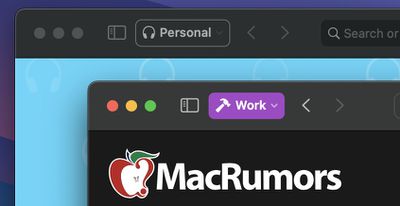
  • Safari Profiles: Safari has gained a new feature called Profiles, which is designed to help keep your browsing separate for topics like Work, School, or Personal. Each profile gets its own icon and silos your history, Tab Groups, favorites, and cookies. You can even assign specific extensions to profiles to optimize your browsing experience based on the task at hand.
macos sonoma tidbits3

How to Install Safari 17 on macOS Ventura/Monterey

In an unexpected change for 2023, anyone who signs in to Apple's developer account website with their Apple ID gets access to developer beta releases as well, even if they are not a paying member of Apple's Developer Program. So if you're still interested in trying out Safari 17, simply follow the steps below.

Note that Safari 17 Beta 4 requires macOS Ventura 13.4 or macOS Monterey 12.5 to run, and that installing it will overwrite your current Safari version. Also, bear in mind that this is beta software, so you may potentially experience bugs and issues that negatively impact your browsing. Having said that, beta 4 is very stable in our experience.

  1. Open Safari on your Mac and go to Apple's developer website.
  2. Under "Sign in to Apple Developer," enter and submit your Apple ID and password using the arrow buttons, then if required, enter the two-factor authentication code sent to your Apple devices.
  3. Now click through to the Safari Beta Downloads page.
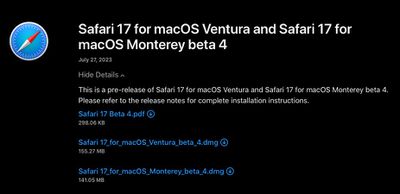
  4. Under Safari 17, click View Details, then click the Safari 17 Beta DMG link to download the installation package applicable to your macOS version.
  5. Once the package is downloaded to your Mac, double-click it and follow the onscreen instructions to complete installation.
safari 17 dowload links

Wrapping Up

When Safari 17 is officially released to the public as part of macOS Sonoma, users can expect some additional features, including the ability to save your favorite websites to the Dock as streamlined Web Apps, as well as the ability to share website passwords and passkeys with trusted contacts.


Tag: Safari

Top Rated Comments

lkrupp Avatar
33 months ago

I've long gone elsewhere too.
There are quite a few websites that don't work on Safari. In fact I see a lot of organisations actively suggesting Chrome. Having said that the vast majority of web work for me is Chrome and FIrefox. Safari is probably 5%.
Name a website that doesn’t work with Safari. I use Safari all day long and have yet to run into a website that doesn’t work. Even government websites work these days.
Score: 8 Votes (Like | Disagree)
SkimPappa Avatar
33 months ago

Last night, at 2AM in the night, I was on the bed and my phone made a sound, and that was the invitation for the beta of Safari 17 for my Mac on Monterey.

However, I no longer install betas anymore, past are those days I tested every new beta with excitement while suffering the bugs and annoyances of using beta software. Nowadays I stay with the stable releases as much as I can. Thankfully, Safari keeps getting updates on older systems such as Monterey.
I encourage you to use focus modes to prevent those notifications at 2 AM.
Score: 7 Votes (Like | Disagree)
genexx Avatar
33 months ago
For a parallel installation i would prefer and do install always the Safari Technology Preview:


This Version also gets automatic Updates but uses the same saved Bookmarks etc. so better do not delete anything.

Attachment Image
Score: 5 Votes (Like | Disagree)
MasterControlProgram Avatar
33 months ago

Name a website that doesn’t work with Safari. I use Safari all day long and have yet to run into a website that doesn’t work. Even government websites work these days.
It's been years since I've come across a site that doesn't work in Safari too. I think you'd have to be doing something really whacky and non-standard to make a site not work in Safari these days. I work in web dev and I've not come across a Safari issue with any of our systems for years (although admittedly we don't develop anything too complicated rendering-wise).
Score: 5 Votes (Like | Disagree)
H2SO4 Avatar
33 months ago

It is a start, but 80% (at least) of my Mac browsing happens on FIREFOX.

It’s the quality of the extensions that keeps me with the fox ?
I've long gone elsewhere too.
There are quite a few websites that don't work on Safari. In fact I see a lot of organisations actively suggesting Chrome. Having said that the vast majority of web work for me is Chrome and FIrefox. Safari is probably 5%.
Score: 5 Votes (Like | Disagree)
Populus Avatar
33 months ago
Last night, at 2AM in the night, I was on the bed and my phone made a sound, and that was the invitation for the beta of Safari 17 for my Mac on Monterey.

However, I no longer install betas anymore, past are those days I tested every new beta with excitement while suffering the bugs and annoyances of using beta software. Nowadays I stay with the stable releases as much as I can. Thankfully, Safari keeps getting updates on older systems such as Monterey.
Score: 4 Votes (Like | Disagree)

Popular Stories

Aston Martin CarPlay Ultra Screen

Apple's CarPlay Ultra to Expand to These Vehicle Brands Later This Year

Sunday February 1, 2026 10:08 am PST by
Last year, Apple launched CarPlay Ultra, the long-awaited next-generation version of its CarPlay software system for vehicles. Nearly nine months later, CarPlay Ultra is still limited to Aston Martin's latest luxury vehicles, but that should change fairly soon. In May 2025, Apple said many other vehicle brands planned to offer CarPlay Ultra, including Hyundai, Kia, and Genesis. In his Powe...
Apple Logo Black

Apple's Next Launch is 'Imminent'

Sunday February 1, 2026 12:31 pm PST by
The calendar has turned to February, and a new report indicates that Apple's next product launch is "imminent," in the form of new MacBook Pro models. "All signs point to an imminent launch of next-generation MacBook Pros that retain the current form factor but deliver faster chips," Bloomberg's Mark Gurman said on Sunday. "I'm told the new models — code-named J714 and J716 — are slated...
iOS 26

iOS 26.3 and iOS 26.4 Will Add These New Features to Your iPhone

Tuesday February 3, 2026 7:47 am PST by
We are still waiting for the iOS 26.3 Release Candidate to come out, so the first iOS 26.4 beta is likely still at least a week or two away. Following beta testing, iOS 26.4 will likely be released to the general public in March or April. Below, we have recapped known or rumored iOS 26.3 and iOS 26.4 features so far. iOS 26.3 iPhone to Android Transfer Tool iOS 26.3 makes it easier...
Apple MacBook Pro M4 hero

New MacBook Pros Reportedly Launching Alongside macOS 26.3

Sunday February 1, 2026 5:42 am PST by
Apple is planning to launch new MacBook Pro models with M5 Pro and M5 Max chips alongside macOS 26.3, according to Bloomberg's Mark Gurman. "Apple's faster MacBook Pros are planned for the macOS 26.3 release cycle," wrote Gurman, in his Power On newsletter today. "I'm told the new models — code-named J714 and J716 — are slated for the macOS 26.3 software cycle, which runs from...
iOS 26 Home Feature

Apple Gives Final Warning to Home App Users

Tuesday February 3, 2026 8:55 am PST by
In 2022, Apple introduced a new Apple Home architecture that is "more reliable and efficient," and the deadline to upgrade and avoid issues is fast approaching. In an email this week, Apple gave customers a final reminder to upgrade their Home app by February 10, 2026. Apple says users who do not upgrade may experience issues with accessories and automations, or lose access to their smart...
















