How to Import Your Safari Bookmarks to Chrome - MacRumorsOpen MenuShow RoundupsShow Forums menuVisit ForumsOpen Sidebar
Skip to Content

How to Import Your Safari Bookmarks to Chrome

by

Apple's native desktop browser is Safari, but just because it comes pre-installed on every Mac doesn't mean you have to use it. Chrome is actually more popular than Safari by far, and if you're new to Mac, it might already be your preferred browser.
safari chrome ios
If you've tried out Safari and decided you want to switch to Google's equivalent, you can easily import any bookmarks you've used in Apple's browser straight to Chrome. The following steps show you how.

How to Import Safari Bookmarks to Chrome

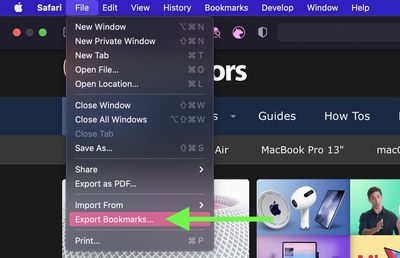
  1. Launch Safari on your Mac and select File -> Export Bookmarks... from the menu bar.
    safari

  2. Name the file containing your bookmarks and save it in a convenient location on your Mac.
  3. Launch Google Chrome on your Mac.
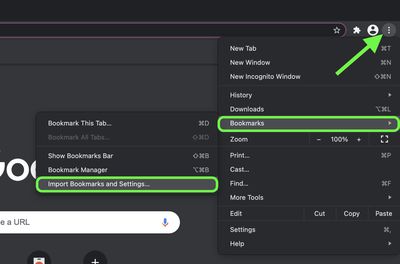
  4. Click the customize button in the top-right corner of the browser window (the vertical column of three dots).

  5. Select Bookmarks -> Import Bookmarks and settings....
    import safar passwords chrome

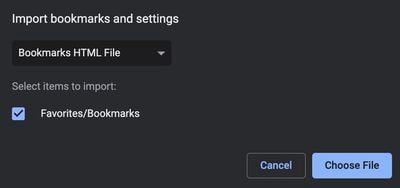
  6. In the window that appears, select Safari in the dropdown.

  7. Check the box next to Favorites/Bookmarks.
  8. Select Bookmarks HTML file in the dropdown, then click Choose File and select the Safari-exported file.
    chrome

  9. Click the Import button. Once the import is complete, click Done.
To sync your imported bookmarks to your Google account, click the circular profile icon in the top-right corner of the Chrome window and log into your Google account.


Tags: Chrome, Safari

Popular Stories

iOS 27 on iPhone 17 1

iOS 27 Will Add These New Features to Your iPhone

Saturday May 2, 2026 8:43 am PDT by
Apple is expected to unveil iOS 27 during its WWDC 2026 keynote on June 8, and there are already many rumored features and changes for iPhones. The first developer beta of iOS 27 will likely be available immediately following the keynote, and a public beta typically follows in July. Following beta testing, the software update should be released to all users with a compatible iPhone in...
Apple Event Logo

Apple Just Released a New Accessory

Monday May 4, 2026 8:13 am PDT by
Apple today released a new Pride Edition Sport Loop for the Apple Watch. The band features a rainbow design with 11 colors of woven nylon yarns. The new Pride Edition Sport Loop is available to order now on Apple.com and in the Apple Store app in 40mm, 42mm, and 46mm sizes, and it will be available at Apple Store locations starting later this week. In the U.S., the band costs $49. There...
Apple Announces 2026 Pride Band Watch Face and iPhone Wallpaper Article 2

iOS 26.5 Coming Soon With These New Features

Monday May 4, 2026 8:40 am PDT by
iOS 26.5 is expected to be released next week, following more than a month of beta testing. The update is relatively minor, but there are a couple of new features and changes across the operating system that we have recapped below. iOS 26.5 lays the groundwork for end-to-end encryption for RCS in the Messages app and ads in the Apple Maps app, and it will include a new Pride wallpaper and a...
Related Apple News: Mac | Entertainment | Reviews | Ipad | Health