Apple has begun the process of phasing out 32-bit applications on Macs, which is why many users who upgraded to macOS 10.13.4 or later will have come across the following warning message the first time they launch certain older apps.
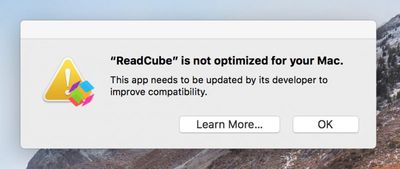
32 bit app warning message mac
This is the first of many warnings Apple plans to provide as it works to put an end to 32-bit apps on the Mac, as it did on iOS devices with the release of iOS 11. Apple has confirmed that macOS 10.14 Mojave, set for public release in the fall, will be the last version of macOS to allow 32-bit apps to run, but it will include more "aggressive" warnings about their use before they are phased out entirely.

In this article, we'll show how you can quickly find out which apps installed on your Mac are 64-bit and which are still living in the 32-bit age. If you don't rely on apps that fall in the latter camp, you can safely uninstall them. However, if you're a frequent user of one of these apps, try contacting the developer to find out if a 64-bit version is in the works. If one isn't planned, try and find an alternative app with similar functionality before the time comes when it refuses to launch.

How to Identify 32-Bit Apps on Your Mac

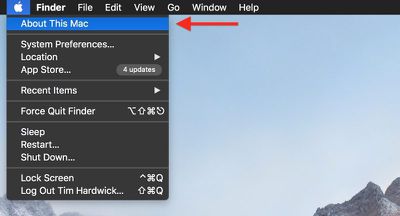
  1. Click the Apple symbol () in the menu bar on your Mac's desktop.
    check for 32 bit mac apps4

  2. Click About This Mac.

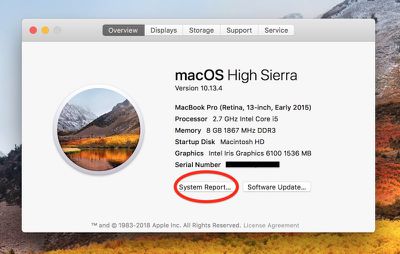
  3. In the macOS Overview pane that appears, click the System Report... button.
    check for 32 bit mac apps1

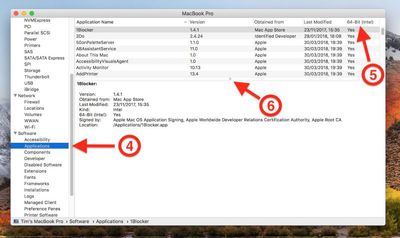
  4. In the information window that appears, scroll down the left column and click Applications under the Software list, then wait a moment while your Mac generates a list of installed apps.

  5. When the list of apps appears, click the 64-Bit (Intel) label to bring any 32-bit apps to the top of the column.

  6. Drag down the divider using the center dot to expand the viewable list of apps.
    check for 32 bit mac apps2

Anything in the list that has a "Yes" under the 64-Bit column is good to go, but there are several in our example listed as "No", which means they're 32-Bit and will stop working in a future version of macOS.
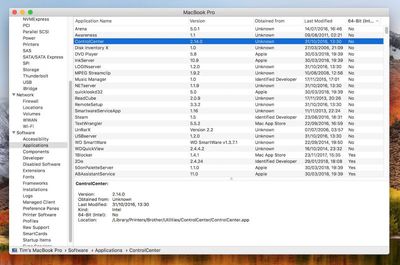
check for 32 bit mac apps3
Some popular apps in the above list, like Steam and Google Music Manager, will likely have 64-bit versions available in good time, but other items – old Brother printer drivers and utilities, for example – may not survive a forthcoming upgrade, and it could be a while before developers issue 64-bit versions of said software (assuming it's even still actively supported), so as our example shows, it pays to plan ahead.


Top Rated Comments

Eidorian Avatar
100 months ago
If your app isn't 64-bit by now, it means the developer abandoned it years ago.

It'll be nice to be 64-bit only. Means slimming down application packages for some.
Some of us still use those abandoned programs.
Score: 9 Votes (Like | Disagree)
OldSchoolMacGuy Avatar
100 months ago
If your app isn't 64-bit by now, it means the developer abandoned it years ago.

It'll be nice to be 64-bit only. Means slimming down application packages for some.
Score: 6 Votes (Like | Disagree)
Plutonius Avatar
100 months ago
If your app isn't 64-bit by now, it means the developer abandoned it years ago.
Please don't generalize. I have MacOS applications that are updated on regular basis that are not 64 bit. The issue is that some of the GUI libraries (third party) are not 64 bit and will never be updated. This means a lot of work for the application developer and some will not be willing to make their current applications 64 bit (it's not worth it for them).
Score: 6 Votes (Like | Disagree)
bgpaglia Avatar
100 months ago
Soooo... I think that next MacOS version won't have the DVD player anymore o_O


Attachment Image
Score: 3 Votes (Like | Disagree)
longofest Avatar
100 months ago
If your app isn't 64-bit by now, it means the developer abandoned it years ago.
Said by someone who is clearly not a developer.
Score: 3 Votes (Like | Disagree)
OldSchoolMacGuy Avatar
100 months ago
Said by someone who is clearly not a developer.
I've been a developer since the OS 7 days and helped to create some of the best known commercial utilities for Mac. Thanks though.

Are you actually saying people are actively developing 32-bit products for Mac to this day?
Score: 2 Votes (Like | Disagree)

Popular Stories

Aston Martin CarPlay Ultra Screen

Apple's CarPlay Ultra to Expand to These Vehicle Brands Later This Year

Sunday February 1, 2026 10:08 am PST by
Last year, Apple launched CarPlay Ultra, the long-awaited next-generation version of its CarPlay software system for vehicles. Nearly nine months later, CarPlay Ultra is still limited to Aston Martin's latest luxury vehicles, but that should change fairly soon. In May 2025, Apple said many other vehicle brands planned to offer CarPlay Ultra, including Hyundai, Kia, and Genesis. In his Powe...
Apple Logo Black

Apple's Next Launch is 'Imminent'

Sunday February 1, 2026 12:31 pm PST by
The calendar has turned to February, and a new report indicates that Apple's next product launch is "imminent," in the form of new MacBook Pro models. "All signs point to an imminent launch of next-generation MacBook Pros that retain the current form factor but deliver faster chips," Bloomberg's Mark Gurman said on Sunday. "I'm told the new models — code-named J714 and J716 — are slated...
Apple MacBook Pro M4 hero

New MacBook Pros Reportedly Launching Alongside macOS 26.3

Sunday February 1, 2026 5:42 am PST by
Apple is planning to launch new MacBook Pro models with M5 Pro and M5 Max chips alongside macOS 26.3, according to Bloomberg's Mark Gurman. "Apple's faster MacBook Pros are planned for the macOS 26.3 release cycle," wrote Gurman, in his Power On newsletter today. "I'm told the new models — code-named J714 and J716 — are slated for the macOS 26.3 software cycle, which runs from...
iOS 26

iOS 26.3 and iOS 26.4 Will Add These New Features to Your iPhone

Tuesday February 3, 2026 7:47 am PST by
We are still waiting for the iOS 26.3 Release Candidate to come out, so the first iOS 26.4 beta is likely still at least a week or two away. Following beta testing, iOS 26.4 will likely be released to the general public in March or April. Below, we have recapped known or rumored iOS 26.3 and iOS 26.4 features so far. iOS 26.3 iPhone to Android Transfer Tool iOS 26.3 makes it easier...
14 inch MacBook Pro Keyboard

Apple Changes How You Order a Mac

Saturday January 31, 2026 10:51 am PST by
Apple recently updated its online store with a new ordering process for Macs, including the MacBook Air, MacBook Pro, iMac, Mac mini, Mac Studio, and Mac Pro. There used to be a handful of standard configurations available for each Mac, but now you must configure a Mac entirely from scratch on a feature-by-feature basis. In other words, ordering a new Mac now works much like ordering an...