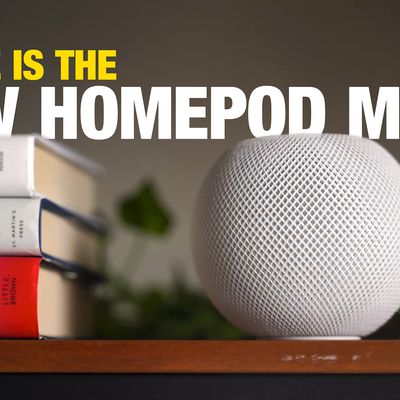
Before you can start using your new Apple HomePod, you'll need to set it up using an iPhone or iPad that's synced to an iCloud account.
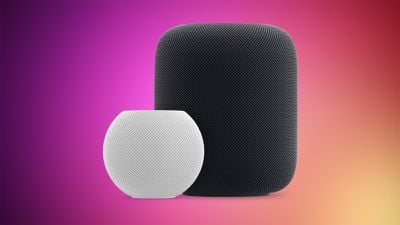
HomePod 2 and Mini feature 2
During the setup process, ‌HomePod‌ will link the ‌iCloud‌ account to personal request features accessed through the speaker via Siri voice commands, such as the ability to send messages, set up reminders, and get calendar notifications.

It will also link the ‌HomePod‌ to any existing Apple Music subscription tied to that ‌iCloud‌/iTunes user, so it's worth thinking carefully about which account holder in your household you want to associate with the speaker.

For the ‌HomePod‌ setup process to work you'll need an iOS device running iOS 16.3 or later, so check your ‌iPhone‌ or ‌iPad‌ is up to date. To do so, open the Settings app, tap General -> About, and look for the version number. If you need to update, tap back to Settings, select Software Update, and follow the onscreen instructions.

Enable iCloud Keychain and Two-Factor Authentication

To pair ‌HomePod‌ with your chosen ‌iCloud‌ account you'll also need to have ‌iCloud‌ Keychain and Two-Factor Authentication enabled. You can simplify the the speaker's setup process by making sure these functions are already activated. See our separate step-by-step guides for using iCloud Keychain and Two-Factor Authentication on your ‌iPad‌ and ‌iPhone‌, and meet us back here when you've enabled both.

Once you've unboxed the ‌HomePod‌, place it on a stable flat surface that's about waist-height and close to a power outlet. Don't worry too much about where you put it in the room, as ‌HomePod‌ will dynamically adjust its audio output by analyzing the environmental acoustics. Now plug in the speaker unit using the supplied power cable and follow the instructions below.

Initial HomePod Setup Using an iPhone or iPad

You're now ready to begin the account-linking setup procedure for your new ‌HomePod‌. The speaker will communicate wirelessly with other Apple devices, so if you've ever connected a pair of wireless AirPods to an ‌iPhone‌ or ‌iPad‌ then you're already in familiar territory. Here are all the steps you need to follow to set up ‌HomePod‌.

  1. Make sure your ‌iPhone‌ or ‌iPad‌ has Bluetooth turned on, and bring it close to the speaker.
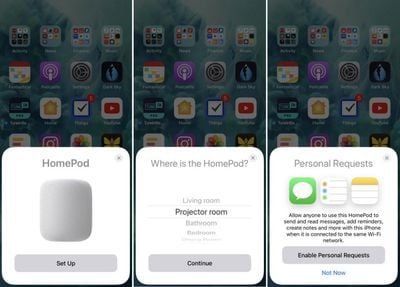
  2. Tap Set Up on the pairing card that appears on your iOS device's screen.
  3. If you have HomeKit enabled and use multiple homes, you'll be asked which one you want ‌HomePod‌ to be associated with. Choose an option from the list and tap Continue.
  4. Select which room of your home the ‌HomePod‌ is in and tap Continue.
    homepod setup 1
  5. Select Enable Personal Requests to let ‌Siri‌ access your messages, reminders, and notes whenever your iOS device is on the same Wi-Fi network, or tap Not now if you'd rather not grant this permission for privacy reasons. You can adjust this setting later.
  6. If you enabled Personal Requests in the last step, you'll be asked if you want to "Use This Device" when sharing your location. You can either tap to agree, or tap Don't Enable to turn off the Personal Requests function.
  7. Tap Continue on the "‌Siri‌ on ‌HomePod‌" card.
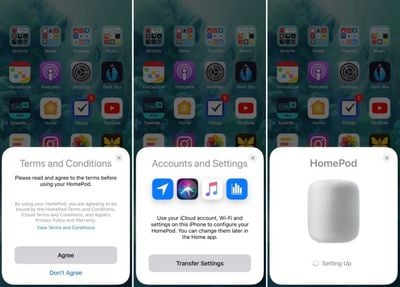
  8. Tap Agree to agree to Apple's terms and conditions.
  9. Tap Transfer Settings to use your ‌iCloud‌ account, Wi-Fi, and other relevant settings on your ‌iPhone‌ or ‌iPad‌ to configure your ‌HomePod‌. You can change them later in the Home app.
homepod setup part 2
At this point, any existing ‌Apple Music‌ subscription will automatically be synced to ‌HomePod‌, while users without a subscription will be offered a free three-month trial.

Note that if the setup screen doesn't appear automatically (step 2 above), open the Home app on your iOS device, tap the plus (+) symbol in the upper right of the screen, and then tap Add Accessory. Lastly, tap "Don't Have a Code or Can't Scan?" and select ‌HomePod‌ in the "Nearby Accessories" list.

Related Roundups: HomePod, HomePod mini

Top Rated Comments

wwchris Avatar
102 months ago
Hmmm. I have 2 different accounts. One for Apple Music (set up long before itunes store, icloud etc) and one for everything else (reminders, messages, etc). Am I screwed?
It allowed me to use two accounts that it automatically took from my phone setup. One I use for the Apple Store (music) and one for my iCloud (notes, iMessage etc.).
Score: 1 Votes (Like | Disagree)
bruinsrme Avatar
103 months ago
I read that as well, I thought that meant that it could be registered at the same time however it was not clear if it could play at the same time?
I just signed up for the family plan.
I’m curious if it will play any playlist from anyone under the plan.
For instance
Siri play Scott’s hair band playlist
Siri play Julianne’s pop playlist.
Score: 1 Votes (Like | Disagree)
bruinsrme Avatar
103 months ago
Any Apple product that needs a guide to set it up has already failed...Can't wait to hear it though!! :)
I was less than impressed with the guide.
Sign in to your iCloud account
Turn on HP
Follow prompts
Enjoy
:p:p
[doublepost=1518173621][/doublepost]
Does anyone know what happens if I link my account (with music subscription) to the HomePod and my OH wants to stream via it at the same time as me streaming on a train? We have 2 personal subscriptions (free with phone plans for 6 months).
It’s been mentioned that stream to the HomePod doesn’t count as a device. If it did it would render the HP useless.
Not sure if that answers your question.
Score: 1 Votes (Like | Disagree)

Popular Stories

iOS 26

iOS 26.4 and iOS 27 Features Revealed in New Leak

Friday December 12, 2025 10:56 am PST by
Macworld's Filipe Espósito today revealed a handful of features that Apple is allegedly planning for iOS 26.4, iOS 27, and even iOS 28. The report said the features are referenced within the code for a leaked internal build of iOS 26 that is not meant to be seen by the public. However, it appears that Espósito and/or his sources managed to gain access to it, providing us with a sneak peek...
apple beta 26 lineup

Apple Leak Confirms Work on Foldable iPhone, AirTag 2, and Dozens More Devices

Monday December 15, 2025 2:05 pm PST by
Last week, details about unreleased Apple devices and future iOS features were shared by Macworld. This week, we learned where the information came from, plus we have more findings from the leak. As it turns out, an Apple prototype device running an early build of iOS 26 was sold, and the person who bought it shared the software. The OS has a version number of 23A5234w, and the first...
Apple Foldable Thumb

Leak Reveals Foldable iPhone Details

Monday December 15, 2025 9:09 am PST by
The first foldable iPhone will feature a series of design and hardware firsts for Apple, according to details shared by the Weibo leaker known as Digital Chat Station. According to a new post, via machine translation, Apple is developing what the leaker describes as a "wide foldable" device, a term used to refer to a horizontally oriented, book-style foldable with a large internal display....
Apple Logo Top Half

Early iOS 26 Software Leak Uncovers Dozens of Upcoming Apple Features

Monday December 15, 2025 3:05 pm PST by
Software from an iPhone prototype running an early build of iOS 26 leaked last week, giving us a glimpse at future Apple devices and iOS features. We recapped device codenames in our prior article, and now we have a list of some of the most notable feature flags that were found in the software code. In some cases, it's obvious what the feature flags are referring to, while some are more...
iOS 26

Apple Releases iOS 26.2 With Alarms for Reminders, Lock Screen Changes, Enhanced Safety Alerts and More

Friday December 12, 2025 10:10 am PST by
Apple today released iOS 26.2, the second major update to the iOS 26 operating system that came out in September, iOS 26.2 comes a little over a month after iOS 26.1 launched. ‌iOS 26‌.2 is compatible with the ‌iPhone‌ 11 series and later, as well as the second-generation ‌iPhone‌ SE. The new software can be downloaded on eligible iPhones over-the-air by going to Settings >...
iOS 26

iOS 26.2 Coming Soon With These 8 New Features on Your iPhone

Thursday December 11, 2025 8:49 am PST by
Apple seeded the second iOS 26.2 Release Candidate to developers earlier this week, meaning the update will be released to the general public very soon. Apple confirmed iOS 26.2 would be released in December, but it did not provide a specific date. We expect the update to be released by early next week. iOS 26.2 includes a handful of new features and changes on the iPhone, such as a new...
macOS Tahoe 26 Thumb

Apple Releases macOS Tahoe 26.2 With Edge Light

Friday December 12, 2025 10:08 am PST by
Apple today released macOS Tahoe 26.2, the second major update to the macOS Tahoe operating system that came out in September. macOS Tahoe 26.2 comes five weeks after Apple released macOS Tahoe 26.1. Mac users can download the macOS Tahoe update by using the Software Update section of System Settings. macOS Tahoe 26.2 includes Edge Light, a feature that illuminates your face with soft...
AirPods Pro Firmware Feature

Apple Releases New Firmware for AirPods Pro 2 and AirPods Pro 3

Thursday December 11, 2025 11:28 am PST by
Apple today released new firmware designed for the AirPods Pro 3 and the prior-generation AirPods Pro 2. The AirPods Pro 3 firmware is 8B30, up from 8B25, while the AirPods Pro 2 firmware is 8B28, up from 8B21. There's no word on what's include in the updated firmware, but the AirPods Pro 2 and AirPods Pro 3 are getting expanded support for Live Translation in the European Union in iOS...