How to Use Spotify With HomePod Through AirPlay - MacRumorsOpen MenuShow RoundupsShow Forums menuVisit ForumsOpen Sidebar
Skip to Content

How to Use Spotify With HomePod Through AirPlay

by

Apple's new HomePod smart speaker is designed primarily for Apple devices, and it's heavily tied to the Apple ecosystem. Natively, you can only stream music on the HomePod through an Apple Music subscription, iTunes purchases, or iTunes Match content uploaded to iCloud Music Library.

It might sound like you're out of luck if you subscribe to a third-party music service like Spotify, Pandora, Amazon Prime Music, Google Play Music, Tidal, or another option, but it's not impossible -- you can still play content from these services to HomePod, you'll just need to use AirPlay to do it.
homepodspotify
With most music apps, you can start up a song and then choose a device to play to right from within the app. These instructions will be specific to Spotify.

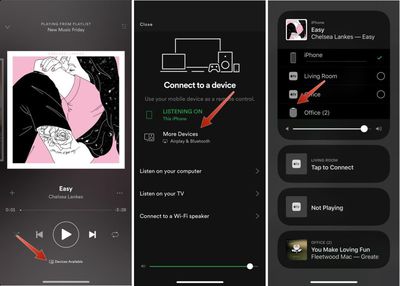
  1. Open Spotify and choose a track to play.
  2. On the main screen that shows song details, tap on "Devices Available."
  3. Choose "More Devices." spotifyairplayhomepod1
  4. Tap on the icon for your HomePod, and music will be streamed directly to it.
Here's an alternative method that works with Spotify and all other music apps:

  1. Start a song in Spotify or another app.
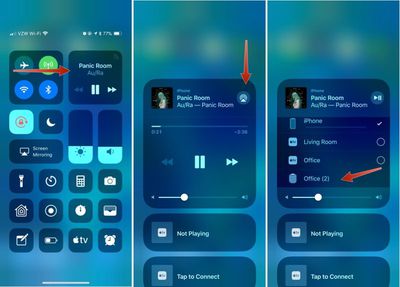
  2. Open the Control Center on the iPhone or iPad.
  3. 3D Touch or long press on the music widget.
  4. Tap on the AirPlay icon in the upper right side of the widget. spotifyairplayhomepod2
  5. Select the HomePod icon.

It will take a few seconds for the iPhone or iPad to connect to HomePod, but once it's connected, your music will be streamed to HomePod from your iPhone.

You generally need an Apple device to stream music to the HomePod because it requires AirPlay functionality, but some HTC phones support AirPlay, and there are unofficial third-party Android apps that work with AirPlay, so these devices may also work with the HomePod. You can't, however, connect devices to the HomePod over a Bluetooth connection.

When streaming music to HomePod through AirPlay, you're not going to have full Siri support, but you can use Siri to play/pause music, change the volume, and change music tracks.


Related Roundup: HomePod
Buyer's Guide: HomePod (Caution)

Top Rated Comments

penajmz Avatar
107 months ago
Seems like a pain in the ass.

I'll stick with my Echo and Sonos.
Seriously? Lol
Score: 12 Votes (Like | Disagree)
107 months ago
Seems like a pain in the ass.

I'll stick with my Echo and Sonos.
Score: 7 Votes (Like | Disagree)
bpp85 Avatar
107 months ago
It’s amazing to see how fast technology has advanced that now we are like “omg I can’t activate my speaker by voice to play music through my app of choice so I have to use AirPlay :eek:“
Score: 4 Votes (Like | Disagree)
107 months ago
Just get Apple Music! You own an iPhone!
Apple Music sucks.

Specifically
- Music discovery sucks compared to Spotify
- Lack of year-end playlists (your most listened tracks etc.) and other fun features...sucks
- UI sucks
- Lack of free tier sucks for some people
- In conclusion, Apple Music sucks and the only reason to get it instead of Spotify is if you’re desperate to be as far up Apple’s #*@# as possible.
Score: 4 Votes (Like | Disagree)
GadgetBen Avatar
107 months ago
Just get Apple Music! You own an iPhone!
Score: 4 Votes (Like | Disagree)
107 months ago
Seems like a pain in the ass.

I'll stick with my Echo and Sonos.
The struggle is real.
Score: 4 Votes (Like | Disagree)

Popular Stories

iOS 27 on iPhone 17 1

iOS 27 Will Add These New Features to Your iPhone

Saturday May 2, 2026 8:43 am PDT by
Apple is expected to unveil iOS 27 during its WWDC 2026 keynote on June 8, and there are already many rumored features and changes for iPhones. The first developer beta of iOS 27 will likely be available immediately following the keynote, and a public beta typically follows in July. Following beta testing, the software update should be released to all users with a compatible iPhone in...
Apple Event Logo

Apple Just Released a New Accessory

Monday May 4, 2026 8:13 am PDT by
Apple today released a new Pride Edition Sport Loop for the Apple Watch. The band features a rainbow design with 11 colors of woven nylon yarns. The new Pride Edition Sport Loop is available to order now on Apple.com and in the Apple Store app in 40mm, 42mm, and 46mm sizes, and it will be available at Apple Store locations starting later this week. In the U.S., the band costs $49. There...
Apple Announces 2026 Pride Band Watch Face and iPhone Wallpaper Article 2

iOS 26.5 Coming Soon With These New Features

Monday May 4, 2026 8:40 am PDT by
iOS 26.5 is expected to be released next week, following more than a month of beta testing. The update is relatively minor, but there are a couple of new features and changes across the operating system that we have recapped below. iOS 26.5 lays the groundwork for end-to-end encryption for RCS in the Messages app and ads in the Apple Maps app, and it will include a new Pride wallpaper and a...
Related Apple News: App Store | Apple Watch Live Activities Fix | Iphone | Fixed Focus Digital | Make Homepod Alert You To Smoke Alarms