

In iOS 18, currently in beta, Apple has broadened the customization options for the Home Screen on iPhone, and thanks to a new setting it is now possible to make app icons and widgets bigger by hiding their labels.
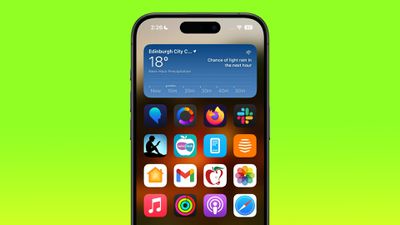
big icons home screen
With the setting enabled in iOS 18, the names of apps are removed from the grid, which increases the size of the icons and widgets on your Home Screen with the space saved. With larger icons, you still get a maximum of six icon rows with four icons each, the same that you're limited to when icon names are turned on.

If you're familiar enough with your favorite apps that you don't feel the need to see the names underneath the icons, then it's worth giving it a try. With the labels removed, the design of your app icons takes center stage, resulting in a cleaner look for your Home Screen. Note that this setting is universal, so you cannot have small icons on one app page and large icons on a different app page.

The following steps show you how it's done.

  1. Press on an empty space on your Home Screen to enter jiggle mode.
  2. Tap the Edit button in the top-left corner, then choose Customize.
  3. Tap the Large option in the customization panel.
  4. Tap on an empty space to hide the customization panel.
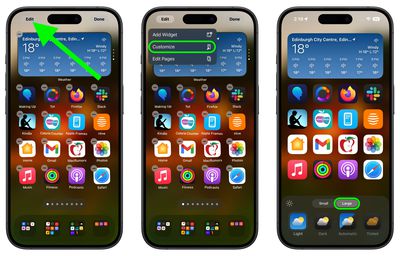
Home Screen
That's all there is to it. If you decide you want to see app labels again, simply repeat the steps, but choose the Small option in the customization panel instead. iOS 18 is currently in public beta and will be officially released to iPhone users in the fall.


Top Rated Comments

drinkingtea Avatar
20 months ago
I wish we could hide the labels without the icons going gigantic. Ugly.
Score: 37 Votes (Like | Disagree)
krspkbl Avatar
20 months ago
i want to keep icons the same size and remove names. when i increase the icon size it makes my iphone feel like a silly kids toy and a phone my grandparents would use!
Score: 29 Votes (Like | Disagree)
gatorvet96 Avatar
20 months ago
Keep icons the same size and remove the titles and we can get an extra row of icons on page. On my Max the icons look ridiculously large.
Score: 21 Votes (Like | Disagree)
Zwhaler Avatar
20 months ago
Finally after a dozen years, iPhone is catching up to Android in terms of basic home screen customization.
Score: 13 Votes (Like | Disagree)
markgpearse Avatar
20 months ago
It not only removes app names :), but also removes folder names :(. I would like to remove app names only and keep the small size.
Score: 8 Votes (Like | Disagree)
axantas Avatar
20 months ago

As well as covering more of the picture in the background.

Seems like something they can tweak through the Beta process (i.e. keep icons same size but remove text).

*someone on Beta program please request.
The option is just "make icons bigger". "Remove description" it can not be chosen separately. And as markgpearse writes, it also removes folder names. This is a bit silly then. I will report this.

Request done:
- make it selectable by user / Icon size / text /
- do not hide folder names, if selected.
Score: 8 Votes (Like | Disagree)

Popular Stories

iOS 26

iOS 26.3 and iOS 26.4 Will Add These New Features to Your iPhone

Tuesday February 3, 2026 7:47 am PST by
We are still waiting for the iOS 26.3 Release Candidate to come out, so the first iOS 26.4 beta is likely still at least a week or two away. Following beta testing, iOS 26.4 will likely be released to the general public in March or April. Below, we have recapped known or rumored iOS 26.3 and iOS 26.4 features so far. iOS 26.3 iPhone to Android Transfer Tool iOS 26.3 makes it easier...
Aston Martin CarPlay Ultra Screen

Apple's CarPlay Ultra to Expand to These Vehicle Brands Later This Year

Sunday February 1, 2026 10:08 am PST by
Last year, Apple launched CarPlay Ultra, the long-awaited next-generation version of its CarPlay software system for vehicles. Nearly nine months later, CarPlay Ultra is still limited to Aston Martin's latest luxury vehicles, but that should change fairly soon. In May 2025, Apple said many other vehicle brands planned to offer CarPlay Ultra, including Hyundai, Kia, and Genesis. In his Powe...
Apple Logo Black

Apple's Next Launch is 'Imminent'

Sunday February 1, 2026 12:31 pm PST by
The calendar has turned to February, and a new report indicates that Apple's next product launch is "imminent," in the form of new MacBook Pro models. "All signs point to an imminent launch of next-generation MacBook Pros that retain the current form factor but deliver faster chips," Bloomberg's Mark Gurman said on Sunday. "I'm told the new models — code-named J714 and J716 — are slated...
Apple MacBook Pro M4 hero

New MacBook Pros Reportedly Launching Alongside macOS 26.3

Sunday February 1, 2026 5:42 am PST by
Apple is planning to launch new MacBook Pro models with M5 Pro and M5 Max chips alongside macOS 26.3, according to Bloomberg's Mark Gurman. "Apple's faster MacBook Pros are planned for the macOS 26.3 release cycle," wrote Gurman, in his Power On newsletter today. "I'm told the new models — code-named J714 and J716 — are slated for the macOS 26.3 software cycle, which runs from...
iOS 26 Home Feature

Apple Gives Final Warning to Home App Users

Tuesday February 3, 2026 8:55 am PST by
In 2022, Apple introduced a new Apple Home architecture that is "more reliable and efficient," and the deadline to upgrade and avoid issues is fast approaching. In an email this week, Apple gave customers a final reminder to upgrade their Home app by February 10, 2026. Apple says users who do not upgrade may experience issues with accessories and automations, or lose access to their smart...
















