

iPhones running iOS 16 or later include a feature called Live Activities that you can use to follow sports scores in real time on your Lock Screen, so you don't miss a thing. Keep reading to learn how it works.
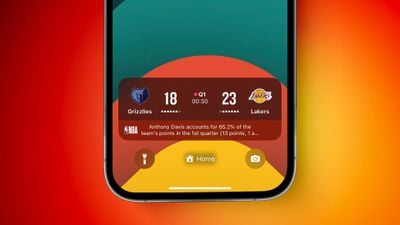
Introduced in iOS 16, Live Activities are lingering interactive notifications that provide real-time updating information directly on an iPhone's Lock Screen and in the Dynamic Island on iPhone models that support it. If you're following a sports game, for example, a Live Activity can show you the updated score.
When an iPhone 14 Pro or iPhone 15 is locked, the score is shown in a widget on the Lock Screen instead. On the iPhone 14 and iPhone 14 Plus, and on all other iPhone models without the Dynamic Island, Live Activities are limited to the Lock Screen.
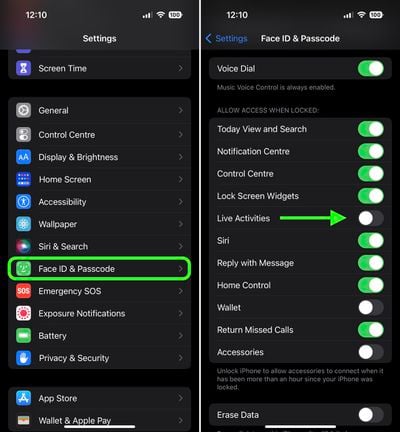
You can enable Live Activities for the Lock Screen on an iPhone running iOS 16.1 or later by following these steps.
- Launch the Settings app.
- Scroll down and tap Face ID & Passcode.
- Enter your passcode to continue.
- Scroll down and under "Allow Access When Locked," toggle the switch next to Live Activities to the green ON position.
Controlling Live Activities for Individual Apps
Apple apps like the TV app and (in iOS 17.2, coming December 2023) Apple News app support Live Activities for sports events.
Apple has also made a Live Activities API available for developers, and there are several third-party apps in the App Store that make use of the feature, including sports-related apps.
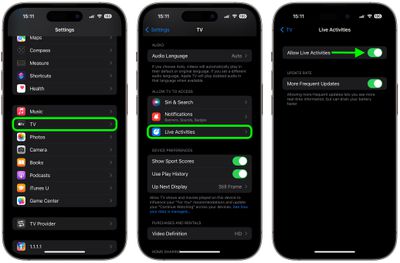
You can enable or disable Live Activities for individual apps by following these steps.
- Open the Settings app.
- Scroll down and tap the app in question (the TV app in our example).
- Toggle on/off the switch next to Live Activities, or tap Live Activities, then toggle the switch next to Allow Live Activities.
Live Activities in the TV app are available for MLB games for users in the U.S., Canada, Australia, U.K., Brazil, Mexico, Japan, and South Korea, in addition to NBA and Premier League games for users in the U.S. and Canada only. The feature will likely be expanded to other sports leagues in the future.





















