

With the release of iOS 18.1 beta 2, Apple has apparently opened up access to Apple Intelligence for English speakers located in the European Union, something that was not possible in previous versions.
One of the reasons Apple limited region access to Apple Intelligence was that it only supports US English. Another reason Apple Intelligence was previously not available in the EU was because Apple geo-locked access within the bloc, likely due to regulatory issues related to the Digital Markets Act. On the face of it, those issues still remain, and it's still not clear whether they will be resolved by the time iOS 18.1 is released in October. But at least for now, there doesn't seem to be anything stopping users in the EU who have a US App Store ID from testing out Apple Intelligence in the beta if their device supports it.
Supported Devices
Apple Intelligence encompasses a range of capabilities, including composing text and emails, automating actions across various apps, generating images, summarizing documents and texts, and more. However, these features require a lot of on-device computing power, so before you do anything, it's worth checking if your device is compatible. iPhone users need either an iPhone 15 Pro or iPhone 15 Pro Max to run Apple Intelligence, while only iPads powered by M1 or later Apple silicon processors are compatible.
Install Beta Software
If your device is supported, the first thing you need to do is install the iOS 18.1 developer beta for your device. Once you've followed the instructions provided in the linked article and your device is up and running with the latest beta, follow these steps on your iPhone or iPad.
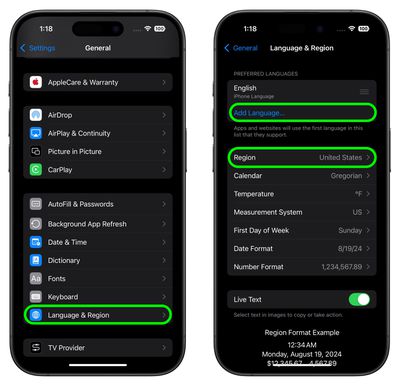
- Open Settings, then tap through to General ➝ Language & Region.
- Tap Add Language.. and choose English (US).
- Tap Region and choose United States. (Note that this won't affect your App Store regions or purchases.)

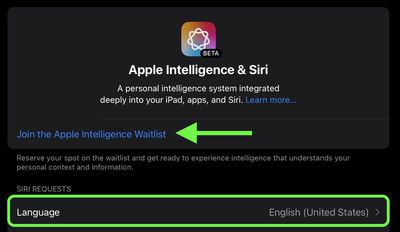
- Return to the main Settings menu and tap Apple Intelligence & Siri.
- Tap Language and choose English (United States).
- You will now be able to join the Apple Intelligence waitlist, which in most cases gets accepted in just a few minutes. Under the Apple Intelligence header text, tap Join Waitlist.
- After what should hopefully be a short wait, the message will change to Turn On Apple Intelligence. Tap it, and a welcome message should appear, indicating you have sucessfully enabled the AI features on your device.
You can learn more here about all of the Apple Intelligence features available in the second iOS 18.1 developer beta. Note that some of the Apple Intelligence additions won't be coming until later next year.
Article revised to add that this method appears to require that the device is signed in with a US App Store ID, according to some user reports.






















Top Rated Comments
Edit
In the EU...
Also, reading comments and Threads, I'm truly amazed at how many people still don't know the difference between "Europe" and the "EU".
The only time ChatGPT is used is if Siri is asked a query it cannot answer. Previously, it'd give you search engine suggestions that'll likely give reasonable results. Now, it will instead - after in theory on the very first attempt, asking you to give it permission - ask ChatGPT to answer the query. Then you have to go to a search engine anyway because obviously you cannot trust LLM output given the propensity to hallucinate, and chances are, if you're asking a question, it's because you don't know the answer so have no way of knowing if the LLM is telling lies without verifying the output with a search engine anyway.
TL;DR, ChatGPT remains largely useless and unreliable, unless you want to generate bland pseudo-fictional prose that screams "this was written by an LLM because I couldn't be arsed writing it myself".
Well, yes. At what point in any of the non-hype reports about AI performance have you been led to believe that any of the crapware being sold by these for-profit, self-interested companies is actually reliable? The whole fundamental basis of LLMs is not solid and never will be. ChatGPT 4 (not 4o) is about as good as we'll ever see, because it's been trained on just about all text ever written already. The Apple models are dramatically smaller, and so are guaranteed to be dramatically less accurate.
A standard pre-"LLM GenAI hype era" machine learning model or even just a simple rules engine would do a far better job, as seen by the likes of Alexa's superior-to-Siri performance for a few years before the LLM hypetrain started rolling.
Besides everyone is using some kind of loophole, before anyone could install the Beta Softwares there was a market worldwide on ebay to buy a “UDID” Slot from developer accounts to get access to the early software releases.
It’s nothing special to use loopholes….