Generate Images in iPhone's Messages App Using DALL·E - MacRumorsOpen MenuShow RoundupsShow Forums menuVisit ForumsOpen Sidebar
Skip to Content

Generate Images in iPhone's Messages App Using DALL·E

by

With iOS 18.2, Apple introduced ChatGPT integration with Apple Intelligence to expand the range of AI capabilities accessible to users on supported iPhone models. One skill in particular that you may not be aware of is the ability to generate images in the Messages app, ready for sharing. ChatGPT leverages DALL·E to generate the images, and the results are almost invariably better than Apple's Image Playground. Keep reading to learn how it's done.
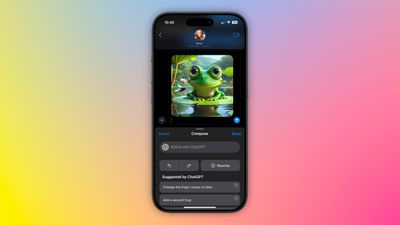
chatgpt image messages

Set Up ChatGPT on Your iPhone

If you have Apple Intelligence enabled on an iPhone 15 Pro or iPhone 16, setting up ChatGPT integration requires just a few steps, and you can begin without even having a ChatGPT account. You can always start with the basic setup and upgrade to a connected account later if needed, although in our tests there isn't too much difference between them when used within the context of daily iPhone usage.

  1. Open Settings.
  2. Tap Apple Intelligence & Siri.
  3. Under "Extensions," tap ChatGPT.
  4. Toggle on the switch next to Use ChatGPT.
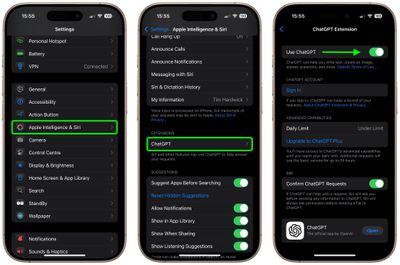
settings

If you have a ChatGPT account (free or paid), you can optionally Sign In from this last screen using your account credentials.

Generate Images in Messages

When ChatGPT integration is enabled, whenever you invoke Siri, the voice assistant analyzes your request to see if it's something that needs to be answered by ChatGPT. However, you can specify that you want to use ChatGPT simply by starting a Siri query with "ChatGPT."

So the next time you're in a Messages conversation and want to express something with an image, tap inside the input field, hold down the Side button on your device to rouse Siri, then say something like, "ChatGPT, generate an image of a cat reading a book about fish." Give it a few seconds to think, and ChatGPT will drop the image into the text field, ready for it to be shared in the conversation.
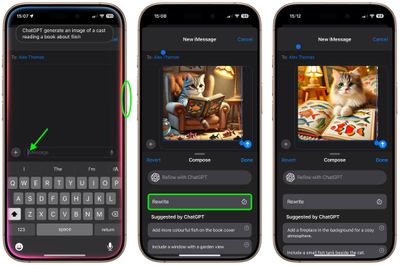
messages
If you're happy with the output, just tap the Send button to send it on its way. If the image doesn't turn out quite how you hoped, you have a few options. You can tap Rewrite, and ChatGPT will re-generate from scratch a new image based on your prompt.

Alternatively, you can tap one of the provided suggestions from ChatGPT to add specific details to the image, or you can tap Refine with ChatGPT and type your own description for more exact detail requests. Simply hit the colored arrow button to send the prompt to ChatGPT, and it will work its magic.
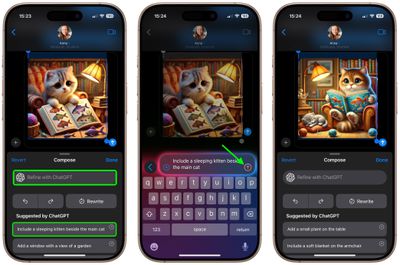
messages
As you can see, the combination of Siri and ChatGPT easily enhances the voice assistant's capabilities compared to what most iPhone users will be used to. The integration works well even for complex queries involving problem solving, writing assistance, detailed explanations, and step-by-step instructions. For everything you can do with ChatGPT in iOS 18.2 and later, be sure to check out our dedicated guide.


Top Rated Comments

turbineseaplane Avatar
15 months ago
What does one even do with this output?

Is this just sort of a fun bauble?
Score: 17 Votes (Like | Disagree)
Dwalls90 Avatar
15 months ago
It's wild to me that Image Playground still can't do this
Score: 7 Votes (Like | Disagree)
15 months ago
So Apple could better have used their programmers for solving bugs in iOS 18 than writing code for image playgrounds which aren’t as good as with ChatGPT and dall.e?

What a world we live in 🤷🏻‍♂️
Score: 6 Votes (Like | Disagree)
15 months ago
Why is generative AI only able to render chubby faced cats? I haven’t seen one that was able to generate a photo of a more narrow faced cat.
Score: 6 Votes (Like | Disagree)
Gix1k Avatar
15 months ago
Serious question....people actually use this feature? There's no situation in my life where I need a pic of a cat reading a book or a frog in a space suit.
Score: 5 Votes (Like | Disagree)
sw1tcher Avatar
15 months ago
I hope this isn't the sort of innovation Tim Cook talked about ('https://forums.macrumors.com/threads/apple-ceo-tim-cook-theres-a-lot-of-innovation-left-for-future-iphone-development.2448438/') during yesterday's earnings call.
Score: 5 Votes (Like | Disagree)

Popular Stories

imac video apple feature

Apple Released Yet Another New Product Today

Friday March 20, 2026 2:39 pm PDT by
Apple has unveiled a whopping nine new products so far this March, including an iPhone 17e, iPad Air models with the M4 chip, MacBook Air models with the M5 chip, MacBook Pro models with M5 Pro and M5 Max chips, the all-new MacBook Neo, an updated Studio Display, a higher-end Studio Display XDR, AirPods Max 2, and now the Nike Powerbeats Pro 2. iPhone 17e features the same overall design as...
iPhone 18 Pro Deep Red Feature

iPhone 18 Pro Launching Later This Year With These 12 New Features

Wednesday March 18, 2026 7:39 am PDT by
While the iPhone 18 Pro and iPhone 18 Pro Max are not expected to launch for another six months or so, there are already plenty of rumors about the devices. It was initially reported that the iPhone 18 Pro models would have fully under-screen Face ID, with only a front camera visible in the top-left corner of the screen. However, the latest rumors indicate that only one Face ID component...
ios 26 4 pastel

iOS 26.4: Top 10 New Features Coming to Your iPhone

Friday March 20, 2026 2:44 pm PDT by
iOS 26.4 isn't the major update with new Siri features that we hoped for, but there are some useful quality of life improvements, and a little bit of fun with an AI playlist generator and new emoji characters. Playlist Playground - Apple Music has a Playlist Playground option that lets you generate playlists from text-based descriptions. You can include moods, feelings, activities, or...
Related Apple News: Education | Business | Politics | World News | News