How to Enable Dark Mode in iOS 13 - MacRumorsOpen MenuShow RoundupsShow Forums menuVisit ForumsOpen Sidebar
Skip to Content

How to Enable Dark Mode in iOS 13

by

In iOS 13, Apple has included a system-wide Dark Mode option similar to the one it brought to the Mac in 2018 with the release of macOS Mojave.
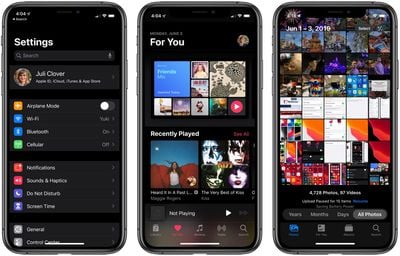
darkmodesettingsmusicphotos
‌Dark Mode‌ is designed to be easier on the eyes by providing less harsh display brightness in situations where ambient lighting is lower, while maintaining contrast and vibrancy.

If you have an OLED iPhone, such as an iPhone X, iPhone XS, or iPhone XS Max, enabling ‌Dark Mode‌ may also conserve battery life whenever true blacks are on screen, since black pixels in an OLED panel basically switch off and consume far less power.

Enabling ‌Dark Mode‌ in iOS 13 is easy – simply follow the steps below.

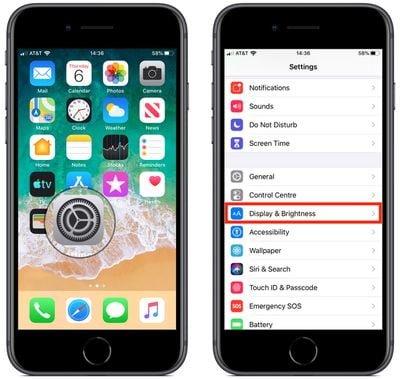
  1. Launch the Settings app on your iPhone or iPad.how to enable dark mode in ios 13 0
  2. Tap Display & Brightness.how to enable dark mode in ios 13 1
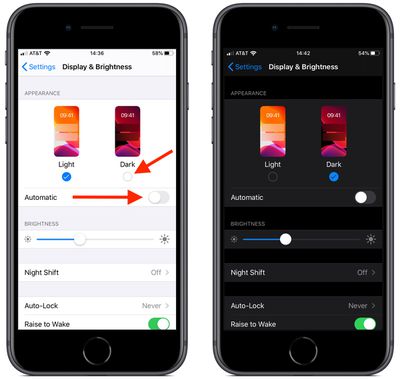
  3. Under Appearance, tap Dark to switch to ‌Dark Mode‌.

Note that the Display & Brightness settings screen also includes an Automatic switch that you can toggle – doing so will cause your device to automatically enable ‌Dark Mode‌ at sunset, and Light Mode at sunrise.

Alternately, you can set a custom schedule for the display change by using the Options menu that appears when you toggle on the Automatic switch.


Related Forum: iOS 13

Top Rated Comments

Chazzle Avatar
90 months ago
Also, through Control Center. Long press or force touch on the brightness controls, then toggle light or dark mode.
Score: 19 Votes (Like | Disagree)
TMRJIJ Avatar
90 months ago
Batman and I are very pleased with this feature.


Attachment Image
Score: 9 Votes (Like | Disagree)
QCassidy352 Avatar
90 months ago
Used dark mode for about a day on mojave, then forgot it existed. I’m glad it’s there for those who want it, but I really don’t see the big deal.
Score: 6 Votes (Like | Disagree)
90 months ago
I’m very happy to hear it can be activated by sunset. Did they add that function to Catalina?
Yes.
Score: 6 Votes (Like | Disagree)
90 months ago
You know it’s official when MR makes a how to on it. Long time coming!
Especially when it’s not even available yet for the masses in September.....
Score: 6 Votes (Like | Disagree)
DogHouseDub Avatar
90 months ago
I feel the same way about dark mode as I do about condiment bottles that stand on the lid. Awesome, but aren’t we a little embarrassed about how long it took?
Score: 5 Votes (Like | Disagree)

Popular Stories

iOS 27 on iPhone 17 1

iOS 27 Will Add These New Features to Your iPhone

Saturday May 2, 2026 8:43 am PDT by
Apple is expected to unveil iOS 27 during its WWDC 2026 keynote on June 8, and there are already many rumored features and changes for iPhones. The first developer beta of iOS 27 will likely be available immediately following the keynote, and a public beta typically follows in July. Following beta testing, the software update should be released to all users with a compatible iPhone in...
Apple Event Logo

Apple Just Released a New Accessory

Monday May 4, 2026 8:13 am PDT by
Apple today released a new Pride Edition Sport Loop for the Apple Watch. The band features a rainbow design with 11 colors of woven nylon yarns. The new Pride Edition Sport Loop is available to order now on Apple.com and in the Apple Store app in 40mm, 42mm, and 46mm sizes, and it will be available at Apple Store locations starting later this week. In the U.S., the band costs $49. There...
Apple Announces 2026 Pride Band Watch Face and iPhone Wallpaper Article 2

iOS 26.5 Coming Soon With These New Features

Monday May 4, 2026 8:40 am PDT by
iOS 26.5 is expected to be released next week, following more than a month of beta testing. The update is relatively minor, but there are a couple of new features and changes across the operating system that we have recapped below. iOS 26.5 lays the groundwork for end-to-end encryption for RCS in the Messages app and ads in the Apple Maps app, and it will include a new Pride wallpaper and a...
Related Apple News: Lifestyle | Travel | Buyers Guide | South Africa | Health