

 Web browsing on your iPhone and iPad is designed to be a smooth and enjoyable experience, and not one cluttered by annoying ads, which can take up valuable screen space, slow down webpage loading times, and eat up valuable bandwidth. That's why Apple added native support for content blockers to its Safari mobile browser.
Content blockers offer a simple one-click solution for preventing ads like popups and banners from loading on websites you visit. They can also protect your privacy from online tracking by disabling cookies, beacons, and scripts that sites attempt to load.
You can find various free and paid-for third-party content blockers by searching the App Store for "content blockers." Once you've installed a content blocker, simply follow the steps below to activate it, and you should see the benefits almost immediately the next time you browse the web using Safari.
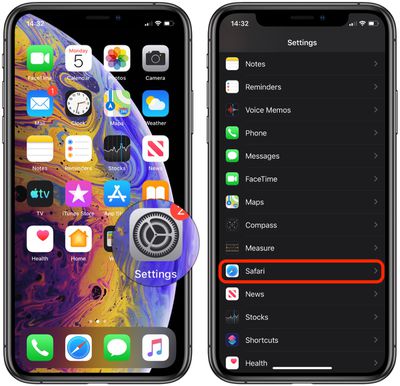
- Launch the Settings app.
- Scroll down and tap Safari.

- Under General, tap Content Blockers.
- To activate content blockers, toggle the switches next to them to the green ON position.
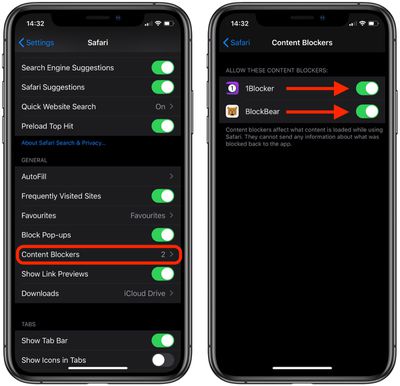
Note that the Content Blockers option doesn't appear in Safari's settings until you've installed at least one third-party content blocker from the App Store.
If a content blocker inadvertently blocks a useful web page element that's not ad-related, you can always temporarily disable it. Click here to learn how.





















