

Don't Put a Wet iPhone in Rice, Says Apple - What to Do Instead - MacRumorsOpen MenuShow RoundupsShow Forums menuVisit ForumsOpen Sidebar
Skip to Content

Don't Put a Wet iPhone in Rice, Says Apple - What to Do Instead

by

Apple's iPhones have been resistant to splashes, dunks, and even water submersion for several years now, but there are still times when they can get too wet, causing a liquid-detection alert to be displayed on the screen.
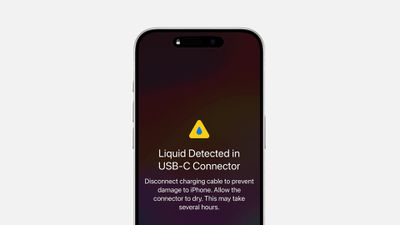
liquid detected iphone alert
A well-known, long-running folk remedy for such occasions is to put your iPhone in a bag of rice. According to the theory, the dry, absorbent rice will help extract the moisture from the device. But according to tests, it's not even particularly effective. And in a recently updated support document, Apple has come out and said that it's just a bad idea all round.

"Don't put your iPhone in a bag of rice. Doing so could allow small particles of rice to damage your iPhone," says Apple. Instead, the company recommends a series of steps to properly dry an iPhone:

  1. If a liquid other than water splashes on your iPhone, rinse the affected area with tap water.
  2. Wipe your iPhone off with a soft, lint-free cloth, such as a lens cloth.
  3. To dry your iPhone, tap it gently against your hand with the Lightning or USB-C connector facing down to remove excess liquid.
  4. Leave your iPhone in a dry area with some airflow. Placing your iPhone in front of a fan blowing cool air directly into the Lightning or USB-C connector might help the drying process.
  5. Avoid using an external heat source or inserting a foreign object, like a cotton swab or a paper towel, into the Lightning or USB-C connector.

Furthermore, it's important not to charge the iPhone until it is completely dry, as charging a wet iPhone might damage it. If you receive a liquid detection alert, it's a sign that there's moisture in the connector, and you should allow up to 24 hours for it to dry out fully before attempting to charge or connect an accessory again.


Popular Stories

iOS 27 on iPhone 17 1

iOS 27 Will Add These New Features to Your iPhone

Saturday May 2, 2026 8:43 am PDT by
Apple is expected to unveil iOS 27 during its WWDC 2026 keynote on June 8, and there are already many rumored features and changes for iPhones. The first developer beta of iOS 27 will likely be available immediately following the keynote, and a public beta typically follows in July. Following beta testing, the software update should be released to all users with a compatible iPhone in...
Apple Event Logo

Apple Just Released a New Accessory

Monday May 4, 2026 8:13 am PDT by
Apple today released a new Pride Edition Sport Loop for the Apple Watch. The band features a rainbow design with 11 colors of woven nylon yarns. The new Pride Edition Sport Loop is available to order now on Apple.com and in the Apple Store app in 40mm, 42mm, and 46mm sizes, and it will be available at Apple Store locations starting later this week. In the U.S., the band costs $49. There...
Apple Announces 2026 Pride Band Watch Face and iPhone Wallpaper Article 2

iOS 26.5 Coming Soon With These New Features

Monday May 4, 2026 8:40 am PDT by
iOS 26.5 is expected to be released next week, following more than a month of beta testing. The update is relatively minor, but there are a couple of new features and changes across the operating system that we have recapped below. iOS 26.5 lays the groundwork for end-to-end encryption for RCS in the Messages app and ads in the Apple Maps app, and it will include a new Pride wallpaper and a...
Related Apple News: Ios 18 New Features | Sport | Iphone 16 | How To | Culture
















