How to Disable the Ultra Wideband Chip in Your iPhone 11 Pro to Prevent Location Data Usage - MacRumorsOpen MenuShow RoundupsShow Forums menuVisit ForumsOpen Sidebar
Skip to Content

How to Disable the Ultra Wideband Chip in Your iPhone 11 Pro to Prevent Location Data Usage

by

In December 2019, a security researcher discovered that Apple's iPhone 11 Pro models access user location data even when all apps and system services on the iPhone are set to not request the data.
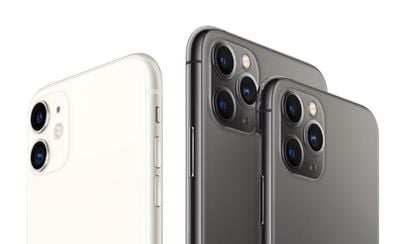
iphone 11 and 11 pro no background
Apple responded by explaining that ‌these iPhone‌ models have a U1 Ultra Wideband chip, and there are some areas where Ultra Wideband technology is not allowed because of international regulations. These iPhones use location data to make sure they're not in restricted areas. In other words, what the researcher had discovered was expected behavior.

Apple says that the location checks are done on-device and no data about location is being sent to Apple's servers. Even so, with the release of iOS 13.3.1, Apple is adding an option to its iPhone software that allows users to turn off the UI chip entirely if they so wish.

The new option is hidden away in settings, but you can find it by following the steps below.

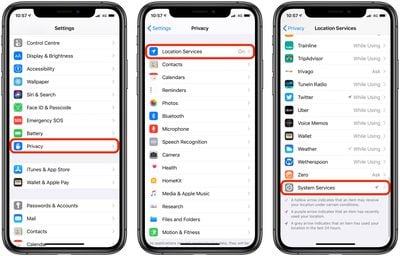
  1. Launch the Settings app on your iPhone.
  2. Tap Privacy.
  3. Tap Location Services.
  4. Tap System Services at the bottom of the menu.
    settings

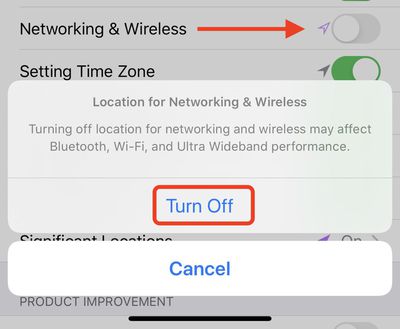
  5. Toggle the Networking & Wireless switch to the grey OFF position.
  6. A prompt will appear – tap Turn Off to confirm.settings

Note that leaving the Ultra Wideband chip disabled in this way may also affect your iPhone's Bluetooth and Wi-Fi performance, so it's best to weigh up the pros and cons with regards to your own needs and circumstances.


Popular Stories

iOS 27 on iPhone 17 1

iOS 27 Will Add These New Features to Your iPhone

Saturday May 2, 2026 8:43 am PDT by
Apple is expected to unveil iOS 27 during its WWDC 2026 keynote on June 8, and there are already many rumored features and changes for iPhones. The first developer beta of iOS 27 will likely be available immediately following the keynote, and a public beta typically follows in July. Following beta testing, the software update should be released to all users with a compatible iPhone in...
Apple Event Logo

Apple Just Released a New Accessory

Monday May 4, 2026 8:13 am PDT by
Apple today released a new Pride Edition Sport Loop for the Apple Watch. The band features a rainbow design with 11 colors of woven nylon yarns. The new Pride Edition Sport Loop is available to order now on Apple.com and in the Apple Store app in 40mm, 42mm, and 46mm sizes, and it will be available at Apple Store locations starting later this week. In the U.S., the band costs $49. There...
Apple Announces 2026 Pride Band Watch Face and iPhone Wallpaper Article 2

iOS 26.5 Coming Soon With These New Features

Monday May 4, 2026 8:40 am PDT by
iOS 26.5 is expected to be released next week, following more than a month of beta testing. The update is relatively minor, but there are a couple of new features and changes across the operating system that we have recapped below. iOS 26.5 lays the groundwork for end-to-end encryption for RCS in the Messages app and ads in the Apple Maps app, and it will include a new Pride wallpaper and a...
Related Apple News: Ipad | Culture | Iphone | Opinion | South Africa