How to Disable Lock Screen Notification Previews on iPhone and iPad - MacRumorsOpen MenuShow RoundupsShow Forums menuVisit ForumsOpen Sidebar
Skip to Content

How to Disable Lock Screen Notification Previews on iPhone and iPad

by

If you're concerned about people reading the contents of notifications that appear on the Lock screen of your iPhone or iPad when you're not around, you'll be happy to learn that Apple's mobile software provides a quick solution.
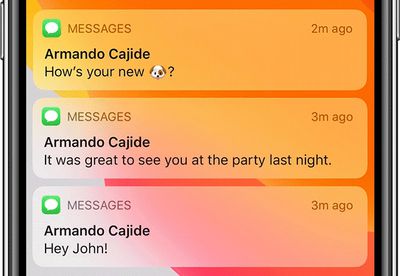
messages lock screen
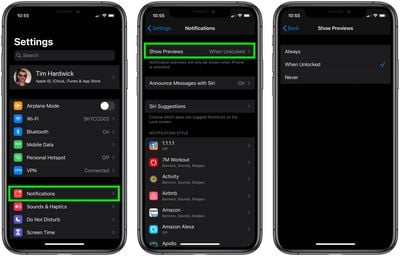
In iOS, you can set your iPhone or ‌iPad‌ to never show notification previews, or to show them only when the device is unlocked. The following steps show you how it's done. Note that the setting applies to alerts from both native Apple apps and third-party apps.

  1. Launch the Settings app on your iPhone or ‌iPad‌.
  2. Tap Notifications.
  3. Tap Show Previews.
  4. Tap Never or When Unlocked.
    settings

With the When Unlocked setting turned on, every app that you have notifications enabled for will appear on the Lock Screen, but without the actual content of the notification displayed.

If your iOS device has Face ID, you can quickly make that content appear by glancing at your phone screen. Otherwise, place your finger on the Home Button to activate Touch ID and unlock your device.

If you choose Never in the Show Preview settings described above, notifications won't show their content even when your iPhone or ‌iPad‌ is unlocked. Note that on devices with ‌Face ID‌, the option to show previews when the iPhone is unlocked is the default option.

Popular Stories

iOS 27 on iPhone 17 1

iOS 27 Will Add These New Features to Your iPhone

Saturday May 2, 2026 8:43 am PDT by
Apple is expected to unveil iOS 27 during its WWDC 2026 keynote on June 8, and there are already many rumored features and changes for iPhones. The first developer beta of iOS 27 will likely be available immediately following the keynote, and a public beta typically follows in July. Following beta testing, the software update should be released to all users with a compatible iPhone in...
Apple Event Logo

Apple Just Released a New Accessory

Monday May 4, 2026 8:13 am PDT by
Apple today released a new Pride Edition Sport Loop for the Apple Watch. The band features a rainbow design with 11 colors of woven nylon yarns. The new Pride Edition Sport Loop is available to order now on Apple.com and in the Apple Store app in 40mm, 42mm, and 46mm sizes, and it will be available at Apple Store locations starting later this week. In the U.S., the band costs $49. There...
Apple MacBook Pro M4 hero

Why You Might Want to Wait to Buy a MacBook Pro

Friday May 1, 2026 3:43 pm PDT by
Apple refreshed the 14-inch and 16-inch MacBook Pro with M5 Pro and M5 Max models in March 2026, but depending on your needs and interests, you might want to skip this generation because there's something better in the works. The M5 Pro and M5 Max MacBook Pro models have faster chips, but the same design that Apple has used since 2021. An updated design with new display technology and faster ...
Related Apple News: Iphone | South Africa | Buyers Guide | News | Opinion