

How to Adjust or Disable Font Smoothing in macOS Big Sur - MacRumorsOpen MenuShow RoundupsShow Forums menuVisit ForumsOpen Sidebar
Skip to Content

How to Adjust or Disable Font Smoothing in macOS Big Sur

by

If you recently installed macOS Big Sur and you're wondering why the text looks blurry on your display, it could be because font smoothing is enabled by default. This article shows you how to disable it with a simple Terminal command.
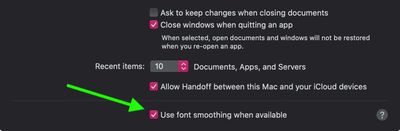
font smoothing catalina
Before macOS 11 Big Sur came along, Apple offered the ability to disable font smoothing in the General tab of System Preferences. Unfortunately for some, upgrading to Big Sur removes this option from the preferences pane and re-enables font smoothing. Fortunately, however, there is another way to re-instate it. The following steps show you how.

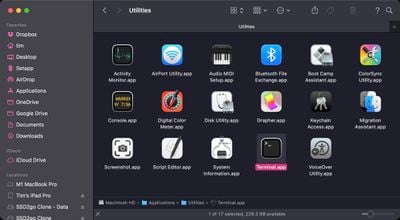
  1. Launch the Terminal app on your Mac from the /Applications/Utilities folder.
    applications terminal

  2. At the command prompt, type the following: defaults -currentHost write -g AppleFontSmoothing -int 0
    disable font smoothing big sur

  3. Restart your Mac for the changes to take effect.
Note that you can adjust the level of smoothing more granually by changing the number at the end of this command. The "0" disables font smoothing, while "1" enables light font smoothing, "2" enables default medium smoothing, and "3" enables strong smoothing. For example, if after disabling font smoothing you want to return to the default setting, replace the "0" at the end of the command with a "2."


Related Forum: macOS Big Sur

Popular Stories

iOS 27 on iPhone 17 1

iOS 27 Will Add These New Features to Your iPhone

Saturday May 2, 2026 8:43 am PDT by
Apple is expected to unveil iOS 27 during its WWDC 2026 keynote on June 8, and there are already many rumored features and changes for iPhones. The first developer beta of iOS 27 will likely be available immediately following the keynote, and a public beta typically follows in July. Following beta testing, the software update should be released to all users with a compatible iPhone in...
Apple Event Logo

Apple Just Released a New Accessory

Monday May 4, 2026 8:13 am PDT by
Apple today released a new Pride Edition Sport Loop for the Apple Watch. The band features a rainbow design with 11 colors of woven nylon yarns. The new Pride Edition Sport Loop is available to order now on Apple.com and in the Apple Store app in 40mm, 42mm, and 46mm sizes, and it will be available at Apple Store locations starting later this week. In the U.S., the band costs $49. There...
Apple Announces 2026 Pride Band Watch Face and iPhone Wallpaper Article 2

iOS 26.5 Coming Soon With These New Features

Monday May 4, 2026 8:40 am PDT by
iOS 26.5 is expected to be released next week, following more than a month of beta testing. The update is relatively minor, but there are a couple of new features and changes across the operating system that we have recapped below. iOS 26.5 lays the groundwork for end-to-end encryption for RCS in the Messages app and ads in the Apple Maps app, and it will include a new Pride wallpaper and a...
Related Apple News: Iphone | Politics | Ipad | Ipad | South Africa

















