How to Disable an Unknown AirTag Found Moving With You to Prevent Being Tracked - MacRumorsOpen MenuShow RoundupsShow Forums menuVisit ForumsOpen Sidebar
Skip to Content

How to Disable an Unknown AirTag Found Moving With You to Prevent Being Tracked

by

Apple's new AirTag item tracker lets you easily track things like your keys, wallet, purse, backpack, luggage, and more. AirTags have a small, circular design with a white side and a polished stainless steel side with an Apple logo.

Apple airtag front and back emoji 2up 042021 big
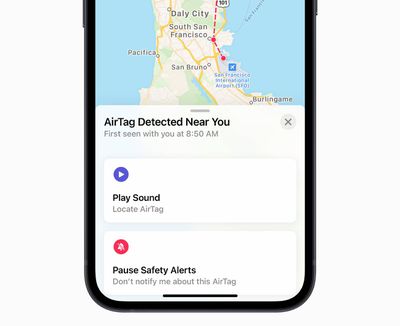
AirTag has been designed to discourage unwanted tracking. If you are an iPhone or iPad user, the built-in Find My app will notify you if an unknown AirTag is seen moving with you over time by displaying an "AirTag Found Moving With You" message on the screen. Even if you don't use an iOS device, an AirTag that isn't with the person who registered it for an extended period of time will play a sound when moved.

If an unknown AirTag is found to be moving with you, follow the steps below to disable the AirTag and stop sharing your location:

  1. Tap the "AirTag Found Moving With You" message.
  2. Tap on Continue.
  3. Tap on Instructions to Disable AirTag and follow the on-screen steps.

In a new support document, Apple says users who feel their safety is at risk should contact their local law enforcement, who can work with Apple. You might need to provide the AirTag or its serial number, according to Apple. If you need help finding the AirTag, tap Play Sound after tapping on the "AirTag Found Moving With You" message.
airtag privacy
If you find an AirTag or a lost item with an AirTag attached that has not been moving with you, follow the steps below to learn about the AirTag and how to discover information about its original owner.

  1. Tap and hold the top of your iPhone or other NFC-capable smartphone to the white side of the AirTag.
  2. Tap the notification that appears on your phone's screen. This will open a website that provides information about the AirTag, including its serial number.
  3. If the AirTag's owner marked it as lost, you might see a message with information about how to contact the owner. You can contact the owner to let them know that you found their AirTag if you feel comfortable doing so.

AirTags have unique Bluetooth identifiers that change frequently, which helps prevent you from being tracked from place to place, according to Apple. Apple says that no one, including Apple, knows the location or identity of any of the participating users or devices who help locate a missing AirTag.

For more information, read Apple's support document.

Related Roundup: AirTag
Buyer's Guide: AirTag (Buy Now)

Top Rated Comments

alexandr Avatar
64 months ago
i think this was explained, but what if someone stole your bag and then did this? wouldn't that defeat the purpose of having an airtag in it?
Score: 71 Votes (Like | Disagree)
Rudy69 Avatar
64 months ago
Basically they’re useless at finding stolen goods 🤦‍♂️
Score: 42 Votes (Like | Disagree)
BootLoxes Avatar
64 months ago

i think this was explained, but what if someone stole your bag and then did this? wouldn't that defeat the purpose of having an airtag in it?
This was exactly what I was going to post. I want these to put on my items of value. If they take my bag and get away, then couldnt they just deactivate them?
Score: 24 Votes (Like | Disagree)
64 months ago

I think a bigger issue is them alerting people on public transport along with you. Worse, a subset of those people are going to be either confused or deliberately annoying and are going to disable your tracker.
I believe as long as you are with it, it won't alert others.
Score: 19 Votes (Like | Disagree)
mazz0 Avatar
64 months ago
I think a bigger issue is them alerting people on public transport along with you. Worse, a subset of those people are going to be either confused or deliberately annoying and are going to disable your tracker.
Score: 17 Votes (Like | Disagree)
mazz0 Avatar
64 months ago
To be fair, as soon as these become popular thieves would start looking for and discarding them anyway, so they wouldn’t have been that useful for stolen goods anyway.
Score: 15 Votes (Like | Disagree)

Popular Stories

iPhone 18 Pro Deep Red Feature

iPhone 18 Pro Launching Later This Year With These 12 New Features

Wednesday March 18, 2026 7:39 am PDT by
While the iPhone 18 Pro and iPhone 18 Pro Max are not expected to launch for another six months or so, there are already plenty of rumors about the devices. It was initially reported that the iPhone 18 Pro models would have fully under-screen Face ID, with only a front camera visible in the top-left corner of the screen. However, the latest rumors indicate that only one Face ID component...
ios 26 4 yellow

Here Are Apple's Release Notes for iOS 26.4

Wednesday March 18, 2026 11:56 am PDT by
Apple provided developers and public beta testers with the release candidate versions of iOS 26.4 and iPadOS 26.4, which means we're going to see a public launch as soon as next week. The RC versions of the software include Apple's official release notes, giving us final details on what's included in the update. Apple Music - Playlist Playground (beta) generates a playlist from your...
Apple Logo Sketch Feature

Apple Has Now Unveiled Eight New Products This Month

Tuesday March 17, 2026 9:25 am PDT by
Apple has unveiled a whopping eight new products so far this March, including an iPhone 17e, iPad Air models with the M4 chip, MacBook Air models with the M5 chip, MacBook Pro models with M5 Pro and M5 Max chips, the all-new MacBook Neo, an updated Studio Display, a higher-end Studio Display XDR, and now the AirPods Max 2 this week. iPhone 17e features the same overall design as the iPhone...
Related Apple News: Sport | Business | Buyers Guide | Ipad | Reviews