

Facebook is the quintessential social network, but you may not always feel like being social every time you log in to your Facebook account. Whether it's because you don't have the energy or the time to engage with friends, you do have the option to browse Facebook without anyone knowing you're online.

The way to achieve this is by turning off your "Active Status," which can be done within the Facebook mobile app or on the Facebook website. The same global setting also lives in the Facebook Messenger app, allowing you to check your latest messages without friends jostling for your attention while you do. Keep reading to learn how it's done.
Disable Active Status on Facebook Website
- In a browser, log in to Facebook and then click the Messenger icon the top-right corner of the page.
- Click the ellipsis (three dots) icon at the top of the chats window.
- Click Active Status.
- Toggle off the switch next to Active Status: ON to disable it.
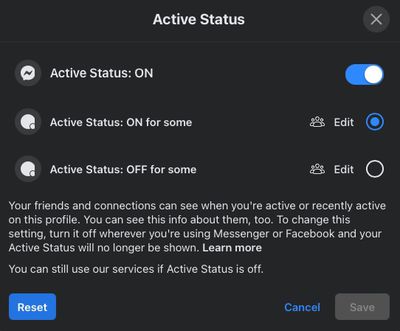
Note that there are a couple of additional options in the Active Status window that allow you to appear as active for some friends, but not others, and vice versa. Simply tap the edit button to select which friends you want to include in either list.
Disable Active Status in Facebook App
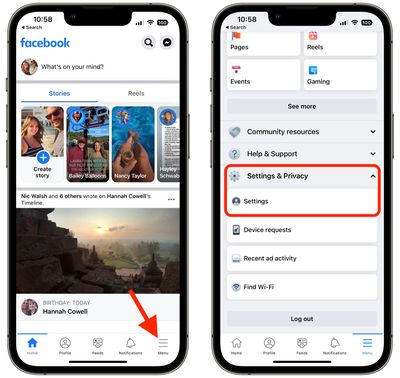
- Launch the Facebook app and tap the menu tab (three lines) in the bottom-right corner of the screen.
- Scroll down and tap Settings & Privacy to expand this section.
- Tap Settings.

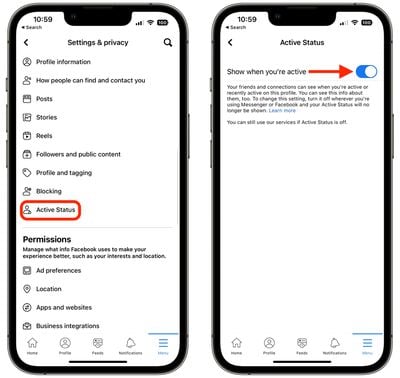
- Scroll down, and under "Audience and visibility," tap Active Status.
- Toggle off the switch next to Show when you're active.
Disable Active Status in Facebook Messenger
- Launch the Facebook Messenger app and tap your circular profile picture in the top-left corner of the screen.
- Tap Active Status.
- Toggle off the switch next to Show when you're active.
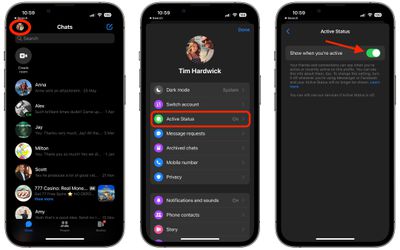
Note that when you turn off your Active Status in Facebook or Facebook Messenger, you won't see when your friends and connections are active or recently active either.





















