iOS 15: How to Deactivate or Delete a 'Hide My Email' Private Address - MacRumorsOpen MenuShow RoundupsShow Forums menuVisit ForumsOpen Sidebar
Skip to Content

iOS 15: How to Deactivate or Delete a 'Hide My Email' Private Address

by

In iOS 15, paid iCloud+ plans feature Hide My Email, which lets you create unique, random email addresses that forward messages to your personal inbox whenever you want to keep your personal email address private.

hide my email safari demo
They're really useful if you think that a business or website is likely to share your email address with ad agencies or other third-parties for marketing purposes. Providing them with a dummy address means you can deactivate or delete the address at any time, ensuring any unsolicited emails don't reach your inbox.

How to Deactivate an Address Using Hide My Email

If you aren't currently using a random address generated by Hide My Email, you can temporarily deactivate it so that you don't receive any forwarded email from it.

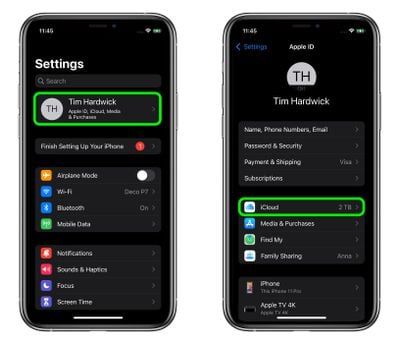
  1. Launch the Settings app on your iPhone or iPad
  2. Tap your Apple ID name at the top of the main settings menu.
  3. Tap iCloud.
    settings

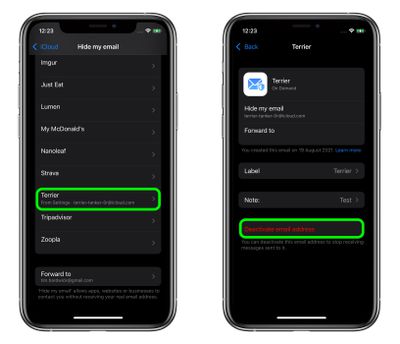
  4. Tap Hide My Email.
  5. Tap the email address in the list that you want to deactivate.
  6. Tap Deactivate email address.
  7. Tap Deactivate to confirm.
    settings

From now on, you won't receive emails sent to that address anymore. If you want to re-activate the address at any time, you'll find it in an "Inactive Addresses" section at the bottom of your active addresses list. Tap the address in question, then tap Reactivate address. Alternately, you can delete it completely by selecting Delete Address.

Paid ‌iCloud‌+ plans also include another premium feature called Private Relay, which ensures that all traffic leaving your device is fully encrypted, so that no third party between the website and your device can see the website being viewed. Check out our dedicated how-to for all the details.

Popular Stories

iPhone 18 Pro Deep Red Feature

iPhone 18 Pro Launching Later This Year With These 12 New Features

Wednesday March 18, 2026 7:39 am PDT by
While the iPhone 18 Pro and iPhone 18 Pro Max are not expected to launch for another six months or so, there are already plenty of rumors about the devices. It was initially reported that the iPhone 18 Pro models would have fully under-screen Face ID, with only a front camera visible in the top-left corner of the screen. However, the latest rumors indicate that only one Face ID component...
imac video apple feature

Apple Released Yet Another New Product Today

Friday March 20, 2026 2:39 pm PDT by
Apple has unveiled a whopping nine new products so far this March, including an iPhone 17e, iPad Air models with the M4 chip, MacBook Air models with the M5 chip, MacBook Pro models with M5 Pro and M5 Max chips, the all-new MacBook Neo, an updated Studio Display, a higher-end Studio Display XDR, AirPods Max 2, and now the Nike Powerbeats Pro 2. iPhone 17e features the same overall design as...
ios 26 4 yellow

Here Are Apple's Release Notes for iOS 26.4

Wednesday March 18, 2026 11:56 am PDT by
Apple provided developers and public beta testers with the release candidate versions of iOS 26.4 and iPadOS 26.4, which means we're going to see a public launch as soon as next week. The RC versions of the software include Apple's official release notes, giving us final details on what's included in the update. Apple Music - Playlist Playground (beta) generates a playlist from your...
Related Apple News: Use Edge Light Feature Facetime Macos | Ipad | Macbook Neo | M4 Ipad Air Vs M5 Ipad Pro | Halide