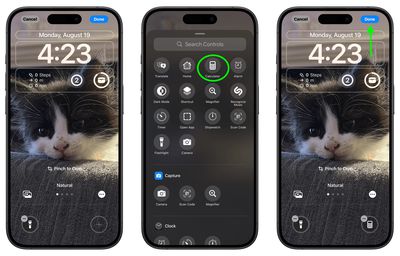
In iOS 18, currently in beta, Apple is allowing iPhone users to replace the flashlight and camera buttons on the Lock Screen with something more useful, or to make them disappear entirely.
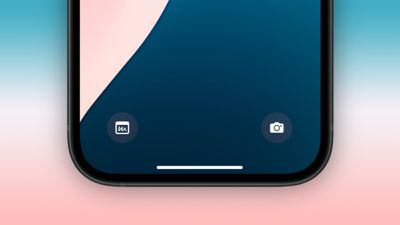
ios 18 lock screen buttons
The dedicated flashlight and camera shortcuts you see at the bottom of your iPhone's Lock Screen were introduced in their current form with the release of iOS 11 alongside the iPhone X in 2018, and the two icons have since been a staple, non-customizable feature.

But that's all set to change this September with the launch of iOS 18. The Lock Screen buttons on your iPhone can now be replaced with any Control Center option. This includes system features like Dark Mode, Airplane Mode, Accessibility options, Calculator, and Translate, as well as Shortcuts – making the functional possibilities endless.

The change in iOS 18 is part of a broader Control Center redesign, significantly expanding the quick access potential from the Lock Screen. Apple has also opened up this functionality to third-party apps, allowing their icons to be added to the Control Center and, by extension, the Lock Screen buttons.

To maintain user privacy and data security, certain options may require Face ID or Touch ID authentication before granting access from the Lock Screen. This ensures that sensitive information remains protected even with this increased accessibility.

The following steps explain how to switch up your Lock Screen buttons in iOS 18:

  1. Press and hold on the Lock Screen after authenticating.
  2. Tap Customize.
  3. Tap Lock Screen.
  4. From there, tap the "-" icon to remove apps that are assigned to those buttons. The Flashlight and Camera apps are the default, so they will need to be removed.
    Lock Screen

  5. Next, tap the "+" button and choose a new control to add from the scrolling menu of options.
  6. Repeat for the second Lock Screen button if desired.
  7. Tap Done in the top-right corner to finish.
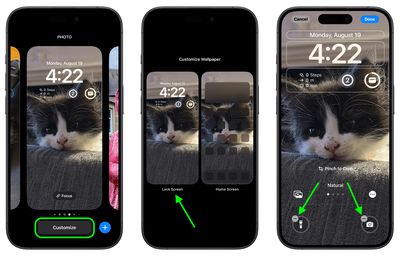
    Lock Screen

Don't forget that if you replace the camera button or remove it completely, you can still easily access the Camera app from the Lock Screen by swiping left across the screen.


Top Rated Comments

DonutHands Avatar
19 months ago
I don't need a 'clean' lock screen, let me add more than 2 buttons.
Score: 15 Votes (Like | Disagree)
WarmWinterHat Avatar
19 months ago
Finally! I can remove both! I've never wanted any icons on my Lock Screen.

Now let me disable swipe for the camera. I don't want anything accessible on my device while locked.
Score: 14 Votes (Like | Disagree)
klasma Avatar
19 months ago

you can still easily access the Camera app from the Lock Screen by swiping left across the screen.

I might prefer disabling the swiping and keeping the button.
Score: 13 Votes (Like | Disagree)
Avenged110 Avatar
19 months ago
Yet you still can’t disable that infuriating swipe-left-for-camera gesture that I never intentionally use and is always getting in the way when I try to clear notifications.
Score: 12 Votes (Like | Disagree)
CharlesShaw Avatar
19 months ago
I need to begin thinking about which two new apps I want to be accidentally turning on/opening.

Is there an option to have nothing selected for either spot? [EDIT: found it above the photo. great!]
Score: 6 Votes (Like | Disagree)
ProbablyDylan Avatar
19 months ago
I just removed both shortcuts. I have flashlight on the action button and can swipe over to the camera. Lock screen looks much cleaner.
Score: 6 Votes (Like | Disagree)

Popular Stories

Aston Martin CarPlay Ultra Screen

Apple's CarPlay Ultra to Expand to These Vehicle Brands Later This Year

Sunday February 1, 2026 10:08 am PST by
Last year, Apple launched CarPlay Ultra, the long-awaited next-generation version of its CarPlay software system for vehicles. Nearly nine months later, CarPlay Ultra is still limited to Aston Martin's latest luxury vehicles, but that should change fairly soon. In May 2025, Apple said many other vehicle brands planned to offer CarPlay Ultra, including Hyundai, Kia, and Genesis. In his Powe...
iOS 26

iOS 26.3 and iOS 26.4 Will Add These New Features to Your iPhone

Tuesday February 3, 2026 7:47 am PST by
We are still waiting for the iOS 26.3 Release Candidate to come out, so the first iOS 26.4 beta is likely still at least a week or two away. Following beta testing, iOS 26.4 will likely be released to the general public in March or April. Below, we have recapped known or rumored iOS 26.3 and iOS 26.4 features so far. iOS 26.3 iPhone to Android Transfer Tool iOS 26.3 makes it easier...
Apple Logo Black

Apple's Next Launch is 'Imminent'

Sunday February 1, 2026 12:31 pm PST by
The calendar has turned to February, and a new report indicates that Apple's next product launch is "imminent," in the form of new MacBook Pro models. "All signs point to an imminent launch of next-generation MacBook Pros that retain the current form factor but deliver faster chips," Bloomberg's Mark Gurman said on Sunday. "I'm told the new models — code-named J714 and J716 — are slated...
Apple MacBook Pro M4 hero

New MacBook Pros Reportedly Launching Alongside macOS 26.3

Sunday February 1, 2026 5:42 am PST by
Apple is planning to launch new MacBook Pro models with M5 Pro and M5 Max chips alongside macOS 26.3, according to Bloomberg's Mark Gurman. "Apple's faster MacBook Pros are planned for the macOS 26.3 release cycle," wrote Gurman, in his Power On newsletter today. "I'm told the new models — code-named J714 and J716 — are slated for the macOS 26.3 software cycle, which runs from...
iOS 26 Home Feature

Apple Gives Final Warning to Home App Users

Tuesday February 3, 2026 8:55 am PST by
In 2022, Apple introduced a new Apple Home architecture that is "more reliable and efficient," and the deadline to upgrade and avoid issues is fast approaching. In an email this week, Apple gave customers a final reminder to upgrade their Home app by February 10, 2026. Apple says users who do not upgrade may experience issues with accessories and automations, or lose access to their smart...