How to Create a User Account on Your Mac With Parental Controls Enabled - MacRumorsOpen MenuShow RoundupsShow Forums menuVisit ForumsOpen Sidebar
Skip to Content

How to Create a User Account on Your Mac With Parental Controls Enabled

by

parental controls macmacOS features powerful parental controls that, once enabled, allow you to monitor and restrict the time your children spend on your Mac, ensuring they enjoy a safe and secure experience.

You can set up custom parental controls for each child who will be using your Mac by adding separate user accounts. Alternatively you can set up a guest account for anyone to use, but with parental controls enabled.

The below steps show you how to add a new named account to macOS with parental controls. If you want to turn on parental controls for an existing user account, check out our separate how-to article which guides you through the process.

How to Create a User Account With Parental Controls

  1. Click the Apple () symbol in the top left corner of your Mac's screen and select System Preferences....
    how to set up a guest account 1

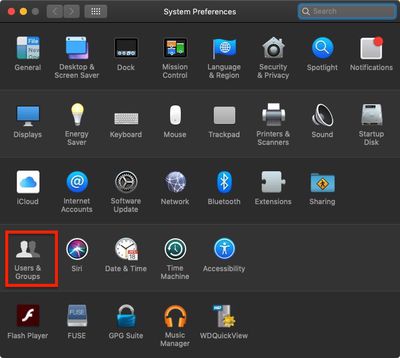
  2. Click Users & Groups.
    how to set up a guest account 2

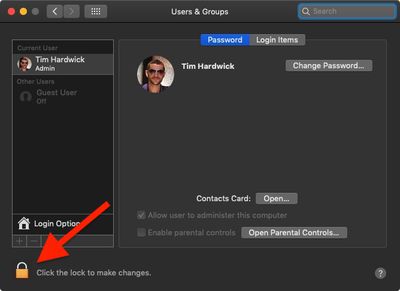
  3. Click the lock in the lower left corner of the window.
    how to set up a guest account 3

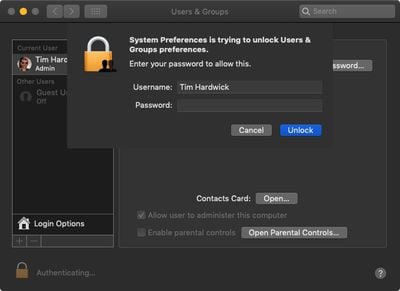
  4. Type in your admin password if prompted.
  5. Click Unlock.
    how to create a user account

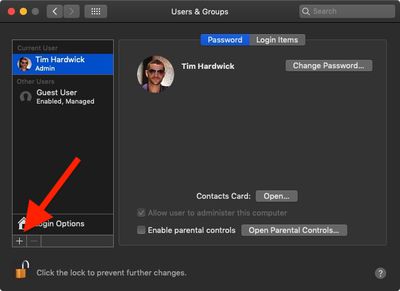
  6. Click the plus (+) at the bottom left of the account column to add a user account.
    how to create a user account with parental controls

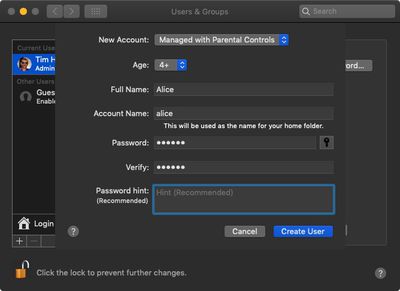
  7. In the New Account dropdown, select Managed with Parental Controls, then fill in the account fields, including a new verified password.
  8. Click Create User.

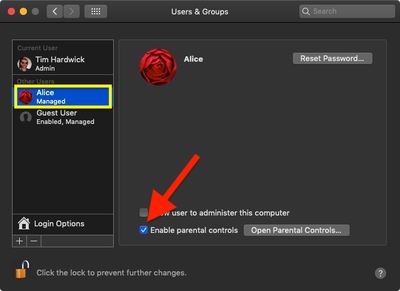
Note that if you select the new user account in the side column, the box next to Enable parental controls is checked.
how to create a user account with parental controls 2
To disable parental controls for this account at any time, simply uncheck the box. For more details on managing the restrictions associated with parental controls, click here.


Popular Stories

iPhone 18 Pro Deep Red Feature

iPhone 18 Pro Launching Later This Year With These 12 New Features

Wednesday March 18, 2026 7:39 am PDT by
While the iPhone 18 Pro and iPhone 18 Pro Max are not expected to launch for another six months or so, there are already plenty of rumors about the devices. It was initially reported that the iPhone 18 Pro models would have fully under-screen Face ID, with only a front camera visible in the top-left corner of the screen. However, the latest rumors indicate that only one Face ID component...
ios 26 4 yellow

Here Are Apple's Release Notes for iOS 26.4

Wednesday March 18, 2026 11:56 am PDT by
Apple provided developers and public beta testers with the release candidate versions of iOS 26.4 and iPadOS 26.4, which means we're going to see a public launch as soon as next week. The RC versions of the software include Apple's official release notes, giving us final details on what's included in the update. Apple Music - Playlist Playground (beta) generates a playlist from your...
Apple Logo Sketch Feature

Apple Has Now Unveiled Eight New Products This Month

Tuesday March 17, 2026 9:25 am PDT by
Apple has unveiled a whopping eight new products so far this March, including an iPhone 17e, iPad Air models with the M4 chip, MacBook Air models with the M5 chip, MacBook Pro models with M5 Pro and M5 Max chips, the all-new MacBook Neo, an updated Studio Display, a higher-end Studio Display XDR, and now the AirPods Max 2 this week. iPhone 17e features the same overall design as the iPhone...
Related Apple News: Travel | Local News | News | Technology | South Africa